Inheritance #
- AudioServer
- CameraServer
- ClassDB
- DisplayServer
- EditorFileSystemDirectory
- EditorInterface
- EditorPaths
- EditorSelection
- EditorUndoRedoManager
- EditorVCSInterface
- Engine
- EngineDebugger
- FramebufferCacheRD
- GDExtensionManager
- Geometry2D
- Geometry3D
- IP
- Input
- InputMap
- JNISingleton
- JSONRPC
- JavaClassWrapper
- JavaScriptBridge
- MainLoop (1)
- Marshalls
- MovieWriter
- NativeMenu
- NavigationMeshGenerator
- NavigationServer2D
- NavigationServer3D
- Node (21)
- OS
- OpenXRExtensionWrapperExtension
- OpenXRInteractionProfileMetadata
- Performance
- PhysicsDirectBodyState2D (1)
- PhysicsDirectBodyState3D (1)
- PhysicsDirectSpaceState2D (1)
- PhysicsDirectSpaceState3D (1)
- PhysicsServer2D (1)
- PhysicsServer2DManager
- PhysicsServer3D (1)
- PhysicsServer3DManager
- PhysicsServer3DRendering
ServerHandler
- ProjectSettings
- RefCounted (121)
- RenderData (2)
- RenderSceneData (2)
- RenderingDevice
- RenderingServer
- ResourceLoader
- ResourceSaver
- ResourceUID
- ScriptLanguage (1)
- ShaderIncludeDB
- TextServerManager
- ThemeDB
- TileData
- Time
- TranslationServer
- TreeItem
- UndoRedo
- UniformSetCacheRD
- WorkerThreadPool
- XRServer
- XRVRS
- AnimationMixer (2)
- AudioStreamPlayer
- CanvasItem (2)
- CanvasLayer (1)
- EditorFileSystem
- EditorPlugin (1)
- EditorResourcePreview
- HTTPRequest
- InstancePlaceholder
- MissingNode
- MultiplayerSpawner
- MultiplayerSynchronizer
- NavigationAgent2D
- NavigationAgent3D
- Node3D (31)
- ResourcePreloader
- ShaderGlobalsOverride
- StatusIndicator
- Timer
- Viewport (2)
- WorldEnvironment
- AudioListener3D
- AudioStreamPlayer3D
- BoneAttachment3D
- Camera3D (1)
- CollisionObject3D (2)
- CollisionPolygon3D
- CollisionShape3D
- GridMap
- ImporterMeshInstance3D
- Joint3D (5)
- LightmapProbe
- Marker3D
- NavigationLink3D
- NavigationObstacle3D
- NavigationRegion3D
- OpenXRCompositionLayer (3)
- OpenXRHand
- Path3D
- PathFollow3D
- RayCast3D
- RemoteTransform3D
- ShapeCast3D
- Skeleton3D
- SkeletonModifier3D (7)
- SpringArm3D
- SpringBoneCollision3D (3)
- VehicleWheel3D
- VisualInstance3D (13)
- XRFaceModifier3D
- XRNode3D (2)
- XROrigin3D
Table of contents
-
var attributes: CameraAttributes -
var compositor: Compositor -
var cull_mask: int = 1048575 -
var current: bool = false -
var doppler_tracking = DOPPLER_TRACKING_DISABLED -
var environment: Environment -
var far: float = 4000.0 -
var fov: float = 75.0 -
var frustum_offset: Vector2 = Vector2(0, 0) -
var h_offset: float = 0.0 -
var keep_aspect = KEEP_HEIGHT -
var near: float = 0.05 -
var projection = PROJECTION_PERSPECTIVE -
var size: float = 1.0 -
var v_offset: float = 0.0 -
func clear_current(enable_next: bool = true) -> void -
const func get_camera_projection() -> Projection -
const func get_camera_rid() -> RID -
const func get_camera_transform() -> Transform3D -
const func get_cull_mask_value(layer_number: int) -> bool -
const func get_frustum() -> Plane[] -
func get_pyramid_shape_rid() -> RID -
const func is_position_behind(world_point: Vector3) -> bool -
const func is_position_in_frustum(world_point: Vector3) -> bool -
func make_current() -> void -
const func project_local_ray_normal(screen_point: Vector2) -> Vector3 -
const func project_position(z_depth: float) -> Vector3 -
const func project_ray_normal(screen_point: Vector2) -> Vector3 -
const func project_ray_origin(screen_point: Vector2) -> Vector3 -
func set_cull_mask_value(value: bool) -> void -
func set_frustum(z_far: float) -> void -
func set_orthogonal(z_far: float) -> void -
func set_perspective(z_far: float) -> void -
const func unproject_position(world_point: Vector3) -> Vector2 -
const PROJECTION_PERSPECTIVE = 0 enum ProjectionType -
const PROJECTION_ORTHOGONAL = 1 enum ProjectionType -
const PROJECTION_FRUSTUM = 2 enum ProjectionType -
const KEEP_WIDTH = 0 enum KeepAspect -
const KEEP_HEIGHT = 1 enum KeepAspect -
const DOPPLER_TRACKING_DISABLED = 0 enum DopplerTracking -
const DOPPLER_TRACKING_IDLE_STEP = 1 enum DopplerTracking -
const DOPPLER_TRACKING_PHYSICS_STEP = 2 enum DopplerTracking -
enum ProjectionType -
enum KeepAspect -
enum DopplerTracking
Camera3D #
is_instantiable, Node3D, Node, core, not_builtin_classes
Camera node, displays from a point of view.
Camera3D is a special node that displays what is visible from its current location. Cameras register themselves in the nearest Viewport node (when ascending the tree). Only one camera can be active per viewport. If no viewport is available ascending the tree, the camera will register in the global viewport. In other words, a camera just provides 3D display capabilities to a Viewport, and, without one, a scene registered in that Viewport (or higher viewports) can't be displayed.
Members #
var attributes: CameraAttributes#
The CameraAttributes to use for this camera.
var compositor: Compositor#
The Compositor to use for this camera.
var cull_mask: int = 1048575#
The culling mask that describes which VisualInstance3D.layers are rendered by this camera. By default, all 20 user-visible layers are rendered.
Note: Since the cull_mask allows for 32 layers to be stored in total, there are an additional 12 layers that are only used internally by the engine and aren't exposed in the editor. Setting cull_mask using a script allows you to toggle those reserved layers, which can be useful for editor plugins.
To adjust cull_mask more easily using a script, use get_cull_mask_value and set_cull_mask_value.
Note: VoxelGI, SDFGI and LightmapGI will always take all layers into account to determine what contributes to global illumination. If this is an issue, set GeometryInstance3D.gi_mode to GeometryInstance3D.GI_MODE_DISABLED for meshes and Light3D.light_bake_mode to Light3D.BAKE_DISABLED for lights to exclude them from global illumination.
var current: bool = false#
If true, the ancestor Viewport is currently using this camera.
If multiple cameras are in the scene, one will always be made current. For example, if two Camera3D nodes are present in the scene and only one is current, setting one camera's current to false will cause the other camera to be made current.
var doppler_tracking = DOPPLER_TRACKING_DISABLED#
If not DOPPLER_TRACKING_DISABLED, this camera will simulate the Doppler effect for objects changed in particular _process methods. See DopplerTracking for possible values.
var environment: Environment#
The Environment to use for this camera.
var far: float = 4000.0#
The distance to the far culling boundary for this camera relative to its local Z axis. Higher values allow the camera to see further away, while decreasing far can improve performance if it results in objects being partially or fully culled.
var fov: float = 75.0#
The camera's field of view angle (in degrees). Only applicable in perspective mode. Since keep_aspect locks one axis, fov sets the other axis' field of view angle.
For reference, the default vertical field of view value (75.0) is equivalent to a horizontal FOV of:
- ~91.31 degrees in a 4:3 viewport
- ~101.67 degrees in a 16:10 viewport
- ~107.51 degrees in a 16:9 viewport
- ~121.63 degrees in a 21:9 viewport
var frustum_offset: Vector2 = Vector2(0, 0)#
The camera's frustum offset. This can be changed from the default to create "tilted frustum" effects such as Y-shearing.
Note: Only effective if projection is PROJECTION_FRUSTUM.
var h_offset: float = 0.0#
The horizontal (X) offset of the camera viewport.
var keep_aspect = KEEP_HEIGHT#
The axis to lock during fov/size adjustments. Can be either KEEP_WIDTH or KEEP_HEIGHT.
var near: float = 0.05#
The distance to the near culling boundary for this camera relative to its local Z axis. Lower values allow the camera to see objects more up close to its origin, at the cost of lower precision across the entire range. Values lower than the default can lead to increased Z-fighting.
var projection = PROJECTION_PERSPECTIVE#
The camera's projection mode. In PROJECTION_PERSPECTIVE mode, objects' Z distance from the camera's local space scales their perceived size.
var size: float = 1.0#
The camera's size in meters measured as the diameter of the width or height, depending on keep_aspect. Only applicable in orthogonal and frustum modes.
var v_offset: float = 0.0#
The vertical (Y) offset of the camera viewport.
Methods #
func clear_current(enable_next: bool = true) -> void#
If this is the current camera, remove it from being current. If enable_next is true, request to make the next camera current, if any.
const func get_camera_projection() -> Projection#
Returns the projection matrix that this camera uses to render to its associated viewport. The camera must be part of the scene tree to function.
const func get_camera_rid() -> RID#
Returns the camera's RID from the RenderingServer.
const func get_camera_transform() -> Transform3D#
Returns the transform of the camera plus the vertical (v_offset) and horizontal (h_offset) offsets; and any other adjustments made to the position and orientation of the camera by subclassed cameras such as XRCamera3D.
const func get_cull_mask_value(layer_number: int) -> bool#
Returns whether or not the specified layer of the cull_mask is enabled, given a layer_number between 1 and 20.
const func get_frustum() -> Plane[]#
Returns the camera's frustum planes in world space units as an array of Planes in the following order: near, far, left, top, right, bottom. Not to be confused with frustum_offset.
func get_pyramid_shape_rid() -> RID#
Returns the RID of a pyramid shape encompassing the camera's view frustum, ignoring the camera's near plane. The tip of the pyramid represents the position of the camera.
const func is_position_behind(world_point: Vector3) -> bool#
Returns true if the given position is behind the camera (the blue part of the linked diagram). See this diagram for an overview of position query methods.
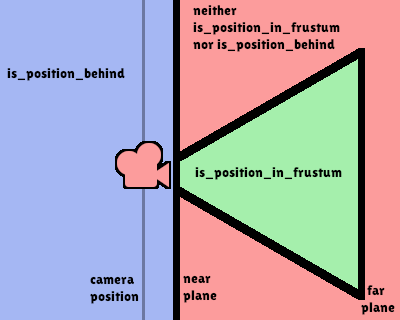
Note: A position which returns false may still be outside the camera's field of view.
const func is_position_in_frustum(world_point: Vector3) -> bool#
Returns true if the given position is inside the camera's frustum (the green part of the linked diagram). See this diagram for an overview of position query methods.
func make_current() -> void#
Makes this camera the current camera for the Viewport (see class description). If the camera node is outside the scene tree, it will attempt to become current once it's added.
const func project_local_ray_normal(screen_point: Vector2) -> Vector3#
Returns a normal vector from the screen point location directed along the camera. Orthogonal cameras are normalized. Perspective cameras account for perspective, screen width/height, etc.
const func project_position(z_depth: float) -> Vector3#
Returns the 3D point in world space that maps to the given 2D coordinate in the Viewport rectangle on a plane that is the given z_depth distance into the scene away from the camera.
const func project_ray_normal(screen_point: Vector2) -> Vector3#
Returns a normal vector in world space, that is the result of projecting a point on the Viewport rectangle by the inverse camera projection. This is useful for casting rays in the form of (origin, normal) for object intersection or picking.
const func project_ray_origin(screen_point: Vector2) -> Vector3#
Returns a 3D position in world space, that is the result of projecting a point on the Viewport rectangle by the inverse camera projection. This is useful for casting rays in the form of (origin, normal) for object intersection or picking.
func set_cull_mask_value(value: bool) -> void#
Based on value, enables or disables the specified layer in the cull_mask, given a layer_number between 1 and 20.
func set_frustum(z_far: float) -> void#
Sets the camera projection to frustum mode (see PROJECTION_FRUSTUM), by specifying a size, an offset, and the z_near and z_far clip planes in world space units. See also frustum_offset.
func set_orthogonal(z_far: float) -> void#
Sets the camera projection to orthogonal mode (see PROJECTION_ORTHOGONAL), by specifying a size, and the z_near and z_far clip planes in world space units. (As a hint, 2D games often use this projection, with values specified in pixels.)
func set_perspective(z_far: float) -> void#
Sets the camera projection to perspective mode (see PROJECTION_PERSPECTIVE), by specifying a fov (field of view) angle in degrees, and the z_near and z_far clip planes in world space units.
const func unproject_position(world_point: Vector3) -> Vector2#
Returns the 2D coordinate in the Viewport rectangle that maps to the given 3D point in world space.
Note: When using this to position GUI elements over a 3D viewport, use is_position_behind to prevent them from appearing if the 3D point is behind the camera:
# This code block is part of a script that inherits from Node3D.
# `control` is a reference to a node inheriting from Control.
control.visible = not get_viewport().get_camera_3d().is_position_behind(global_transform.origin)
control.position = get_viewport().get_camera_3d().unproject_position(global_transform.origin)
Annotations #
Constants #
const PROJECTION_PERSPECTIVE = 0 enum ProjectionType#
Perspective projection. Objects on the screen becomes smaller when they are far away.
const PROJECTION_ORTHOGONAL = 1 enum ProjectionType#
Orthogonal projection, also known as orthographic projection. Objects remain the same size on the screen no matter how far away they are.
const PROJECTION_FRUSTUM = 2 enum ProjectionType#
Frustum projection. This mode allows adjusting frustum_offset to create "tilted frustum" effects.
const KEEP_WIDTH = 0 enum KeepAspect#
Preserves the horizontal aspect ratio; also known as Vert- scaling. This is usually the best option for projects running in portrait mode, as taller aspect ratios will benefit from a wider vertical FOV.
const KEEP_HEIGHT = 1 enum KeepAspect#
Preserves the vertical aspect ratio; also known as Hor+ scaling. This is usually the best option for projects running in landscape mode, as wider aspect ratios will automatically benefit from a wider horizontal FOV.
const DOPPLER_TRACKING_DISABLED = 0 enum DopplerTracking#
Disables Doppler effect simulation (default).
const DOPPLER_TRACKING_IDLE_STEP = 1 enum DopplerTracking#
Simulate Doppler effect by tracking positions of objects that are changed in _process. Changes in the relative velocity of this camera compared to those objects affect how audio is perceived (changing the audio's AudioStreamPlayer3D.pitch_scale).
const DOPPLER_TRACKING_PHYSICS_STEP = 2 enum DopplerTracking#
Simulate Doppler effect by tracking positions of objects that are changed in _physics_process. Changes in the relative velocity of this camera compared to those objects affect how audio is perceived (changing the audio's AudioStreamPlayer3D.pitch_scale).
Constructors #
Enums #
ProjectionType#
enum ProjectionType {
	PROJECTION_PERSPECTIVE = 0,
	PROJECTION_ORTHOGONAL = 1,
	PROJECTION_FRUSTUM = 2,
}KeepAspect#
enum KeepAspect {
	KEEP_WIDTH = 0,
	KEEP_HEIGHT = 1,
}DopplerTracking#
enum DopplerTracking {
	DOPPLER_TRACKING_DISABLED = 0,
	DOPPLER_TRACKING_IDLE_STEP = 1,
	DOPPLER_TRACKING_PHYSICS_STEP = 2,
}