Inheritance #
Table of contents
-
var AudioServer: AudioServer -
var CameraServer: CameraServer -
var ClassDB: ClassDB -
var DisplayServer: DisplayServer -
var EditorInterface: EditorInterface -
var Engine: Engine -
var EngineDebugger: EngineDebugger -
var GDExtensionManager: GDExtensionManager -
var Geometry2D: Geometry2D -
var Geometry3D: Geometry3D -
var IP: IP -
var Input: Input -
var InputMap: InputMap -
var JavaClassWrapper: JavaClassWrapper -
var JavaScriptBridge: JavaScriptBridge -
var Marshalls: Marshalls -
var NativeMenu: NativeMenu -
var NavigationMeshGenerator: NavigationMeshGenerator -
var NavigationServer2D: NavigationServer2D -
var NavigationServer3D: NavigationServer3D -
var OS: OS -
var Performance: Performance -
var PhysicsServer2D: PhysicsServer2D -
var PhysicsServer2DManager: PhysicsServer2DManager -
var PhysicsServer3D: PhysicsServer3D -
var PhysicsServer3DManager: PhysicsServer3DManager -
var ProjectSettings: ProjectSettings -
var RenderingServer: RenderingServer -
var ResourceLoader: ResourceLoader -
var ResourceSaver: ResourceSaver -
var ResourceUID: ResourceUID -
var TextServerManager: TextServerManager -
var ThemeDB: ThemeDB -
var Time: Time -
var TranslationServer: TranslationServer -
var WorkerThreadPool: WorkerThreadPool -
var XRServer: XRServer -
func abs(x: Variant) -> Variant -
func absf(x: float) -> float -
func absi(x: int) -> int -
func acos(x: float) -> float -
func acosh(x: float) -> float -
func angle_difference(to: float) -> float -
func asin(x: float) -> float -
func asinh(x: float) -> float -
func atan(x: float) -> float -
func atan2(x: float) -> float -
func atanh(x: float) -> float -
func bezier_derivative(t: float) -> float -
func bezier_interpolate(t: float) -> float -
func bytes_to_var(bytes: PackedByteArray) -> Variant -
func bytes_to_var_with_objects(bytes: PackedByteArray) -> Variant -
func ceil(x: Variant) -> Variant -
func ceilf(x: float) -> float -
func ceili(x: float) -> int -
func clamp(max: Variant) -> Variant -
func clampf(max: float) -> float -
func clampi(max: int) -> int -
func cos(angle_rad: float) -> float -
func cosh(x: float) -> float -
func cubic_interpolate(weight: float) -> float -
func cubic_interpolate_angle(weight: float) -> float -
func cubic_interpolate_angle_in_time(post_t: float) -> float -
func cubic_interpolate_in_time(post_t: float) -> float -
func db_to_linear(db: float) -> float -
func deg_to_rad(deg: float) -> float -
func ease(curve: float) -> float -
func error_string(error: int) -> String -
func exp(x: float) -> float -
func floor(x: Variant) -> Variant -
func floorf(x: float) -> float -
func floori(x: float) -> int -
func fmod(y: float) -> float -
func fposmod(y: float) -> float -
func hash(variable: Variant) -> int -
func instance_from_id(instance_id: int) -> Object -
func inverse_lerp(weight: float) -> float -
func is_equal_approx(b: float) -> bool -
func is_finite(x: float) -> bool -
func is_inf(x: float) -> bool -
func is_instance_id_valid(id: int) -> bool -
func is_instance_valid(instance: Variant) -> bool -
func is_nan(x: float) -> bool -
func is_same(b: Variant) -> bool -
func is_zero_approx(x: float) -> bool -
func lerp(weight: Variant) -> Variant -
func lerp_angle(weight: float) -> float -
func lerpf(weight: float) -> float -
func linear_to_db(lin: float) -> float -
func log(x: float) -> float -
vararg func max() -> Variant -
func maxf(b: float) -> float -
func maxi(b: int) -> int -
vararg func min() -> Variant -
func minf(b: float) -> float -
func mini(b: int) -> int -
func move_toward(delta: float) -> float -
func nearest_po2(value: int) -> int -
func pingpong(length: float) -> float -
func posmod(y: int) -> int -
func pow(exp: float) -> float -
vararg func print() -> void -
vararg func print_rich() -> void -
vararg func print_verbose() -> void -
vararg func printerr() -> void -
vararg func printraw() -> void -
vararg func prints() -> void -
vararg func printt() -> void -
vararg func push_error() -> void -
vararg func push_warning() -> void -
func rad_to_deg(rad: float) -> float -
func rand_from_seed(seed: int) -> PackedInt64Array -
func randf() -> float -
func randf_range(to: float) -> float -
func randfn(deviation: float) -> float -
func randi() -> int -
func randi_range(to: int) -> int -
func randomize() -> void -
func remap(ostop: float) -> float -
func rid_allocate_id() -> int -
func rid_from_int64(base: int) -> RID -
func rotate_toward(delta: float) -> float -
func round(x: Variant) -> Variant -
func roundf(x: float) -> float -
func roundi(x: float) -> int -
func seed(base: int) -> void -
func sign(x: Variant) -> Variant -
func signf(x: float) -> float -
func signi(x: int) -> int -
func sin(angle_rad: float) -> float -
func sinh(x: float) -> float -
func smoothstep(x: float) -> float -
func snapped(step: Variant) -> Variant -
func snappedf(step: float) -> float -
func snappedi(step: int) -> int -
func sqrt(x: float) -> float -
func step_decimals(x: float) -> int -
vararg func str() -> String -
func str_to_var(string: String) -> Variant -
func tan(angle_rad: float) -> float -
func tanh(x: float) -> float -
func type_convert(type: int) -> Variant -
func type_string(type: int) -> String -
func typeof(variable: Variant) -> int -
func var_to_bytes(variable: Variant) -> PackedByteArray -
func var_to_bytes_with_objects(variable: Variant) -> PackedByteArray -
func var_to_str(variable: Variant) -> String -
func weakref(obj: Variant) -> Variant -
func wrap(max: Variant) -> Variant -
func wrapf(max: float) -> float -
func wrapi(max: int) -> int -
const SIDE_LEFT = 0 enum Side -
const SIDE_TOP = 1 enum Side -
const SIDE_RIGHT = 2 enum Side -
const SIDE_BOTTOM = 3 enum Side -
const CORNER_TOP_LEFT = 0 enum Corner -
const CORNER_TOP_RIGHT = 1 enum Corner -
const CORNER_BOTTOM_RIGHT = 2 enum Corner -
const CORNER_BOTTOM_LEFT = 3 enum Corner -
const VERTICAL = 1 enum Orientation -
const HORIZONTAL = 0 enum Orientation -
const CLOCKWISE = 0 enum ClockDirection -
const COUNTERCLOCKWISE = 1 enum ClockDirection -
const HORIZONTAL_ALIGNMENT_LEFT = 0 enum HorizontalAlignment -
const HORIZONTAL_ALIGNMENT_CENTER = 1 enum HorizontalAlignment -
const HORIZONTAL_ALIGNMENT_RIGHT = 2 enum HorizontalAlignment -
const HORIZONTAL_ALIGNMENT_FILL = 3 enum HorizontalAlignment -
const VERTICAL_ALIGNMENT_TOP = 0 enum VerticalAlignment -
const VERTICAL_ALIGNMENT_CENTER = 1 enum VerticalAlignment -
const VERTICAL_ALIGNMENT_BOTTOM = 2 enum VerticalAlignment -
const VERTICAL_ALIGNMENT_FILL = 3 enum VerticalAlignment -
const INLINE_ALIGNMENT_TOP_TO = 0 enum InlineAlignment -
const INLINE_ALIGNMENT_CENTER_TO = 1 enum InlineAlignment -
const INLINE_ALIGNMENT_BASELINE_TO = 3 enum InlineAlignment -
const INLINE_ALIGNMENT_BOTTOM_TO = 2 enum InlineAlignment -
const INLINE_ALIGNMENT_TO_TOP = 0 enum InlineAlignment -
const INLINE_ALIGNMENT_TO_CENTER = 4 enum InlineAlignment -
const INLINE_ALIGNMENT_TO_BASELINE = 8 enum InlineAlignment -
const INLINE_ALIGNMENT_TO_BOTTOM = 12 enum InlineAlignment -
const INLINE_ALIGNMENT_TOP = 0 enum InlineAlignment -
const INLINE_ALIGNMENT_CENTER = 5 enum InlineAlignment -
const INLINE_ALIGNMENT_BOTTOM = 14 enum InlineAlignment -
const INLINE_ALIGNMENT_IMAGE_MASK = 3 enum InlineAlignment -
const INLINE_ALIGNMENT_TEXT_MASK = 12 enum InlineAlignment -
const EULER_ORDER_XYZ = 0 enum EulerOrder -
const EULER_ORDER_XZY = 1 enum EulerOrder -
const EULER_ORDER_YXZ = 2 enum EulerOrder -
const EULER_ORDER_YZX = 3 enum EulerOrder -
const EULER_ORDER_ZXY = 4 enum EulerOrder -
const EULER_ORDER_ZYX = 5 enum EulerOrder -
const KEY_NONE = 0 enum Key -
const KEY_SPECIAL = 4194304 enum Key -
const KEY_ESCAPE = 4194305 enum Key -
const KEY_TAB = 4194306 enum Key -
const KEY_BACKTAB = 4194307 enum Key -
const KEY_BACKSPACE = 4194308 enum Key -
const KEY_ENTER = 4194309 enum Key -
const KEY_KP_ENTER = 4194310 enum Key -
const KEY_INSERT = 4194311 enum Key -
const KEY_DELETE = 4194312 enum Key -
const KEY_PAUSE = 4194313 enum Key -
const KEY_PRINT = 4194314 enum Key -
const KEY_SYSREQ = 4194315 enum Key -
const KEY_CLEAR = 4194316 enum Key -
const KEY_HOME = 4194317 enum Key -
const KEY_END = 4194318 enum Key -
const KEY_LEFT = 4194319 enum Key -
const KEY_UP = 4194320 enum Key -
const KEY_RIGHT = 4194321 enum Key -
const KEY_DOWN = 4194322 enum Key -
const KEY_PAGEUP = 4194323 enum Key -
const KEY_PAGEDOWN = 4194324 enum Key -
const KEY_SHIFT = 4194325 enum Key -
const KEY_CTRL = 4194326 enum Key -
const KEY_META = 4194327 enum Key -
const KEY_ALT = 4194328 enum Key -
const KEY_CAPSLOCK = 4194329 enum Key -
const KEY_NUMLOCK = 4194330 enum Key -
const KEY_SCROLLLOCK = 4194331 enum Key -
const KEY_F1 = 4194332 enum Key -
const KEY_F2 = 4194333 enum Key -
const KEY_F3 = 4194334 enum Key -
const KEY_F4 = 4194335 enum Key -
const KEY_F5 = 4194336 enum Key -
const KEY_F6 = 4194337 enum Key -
const KEY_F7 = 4194338 enum Key -
const KEY_F8 = 4194339 enum Key -
const KEY_F9 = 4194340 enum Key -
const KEY_F10 = 4194341 enum Key -
const KEY_F11 = 4194342 enum Key -
const KEY_F12 = 4194343 enum Key -
const KEY_F13 = 4194344 enum Key -
const KEY_F14 = 4194345 enum Key -
const KEY_F15 = 4194346 enum Key -
const KEY_F16 = 4194347 enum Key -
const KEY_F17 = 4194348 enum Key -
const KEY_F18 = 4194349 enum Key -
const KEY_F19 = 4194350 enum Key -
const KEY_F20 = 4194351 enum Key -
const KEY_F21 = 4194352 enum Key -
const KEY_F22 = 4194353 enum Key -
const KEY_F23 = 4194354 enum Key -
const KEY_F24 = 4194355 enum Key -
const KEY_F25 = 4194356 enum Key -
const KEY_F26 = 4194357 enum Key -
const KEY_F27 = 4194358 enum Key -
const KEY_F28 = 4194359 enum Key -
const KEY_F29 = 4194360 enum Key -
const KEY_F30 = 4194361 enum Key -
const KEY_F31 = 4194362 enum Key -
const KEY_F32 = 4194363 enum Key -
const KEY_F33 = 4194364 enum Key -
const KEY_F34 = 4194365 enum Key -
const KEY_F35 = 4194366 enum Key -
const KEY_KP_MULTIPLY = 4194433 enum Key -
const KEY_KP_DIVIDE = 4194434 enum Key -
const KEY_KP_SUBTRACT = 4194435 enum Key -
const KEY_KP_PERIOD = 4194436 enum Key -
const KEY_KP_ADD = 4194437 enum Key -
const KEY_KP_0 = 4194438 enum Key -
const KEY_KP_1 = 4194439 enum Key -
const KEY_KP_2 = 4194440 enum Key -
const KEY_KP_3 = 4194441 enum Key -
const KEY_KP_4 = 4194442 enum Key -
const KEY_KP_5 = 4194443 enum Key -
const KEY_KP_6 = 4194444 enum Key -
const KEY_KP_7 = 4194445 enum Key -
const KEY_KP_8 = 4194446 enum Key -
const KEY_KP_9 = 4194447 enum Key -
const KEY_MENU = 4194370 enum Key -
const KEY_HYPER = 4194371 enum Key -
const KEY_HELP = 4194373 enum Key -
const KEY_BACK = 4194376 enum Key -
const KEY_FORWARD = 4194377 enum Key -
const KEY_STOP = 4194378 enum Key -
const KEY_REFRESH = 4194379 enum Key -
const KEY_VOLUMEDOWN = 4194380 enum Key -
const KEY_VOLUMEMUTE = 4194381 enum Key -
const KEY_VOLUMEUP = 4194382 enum Key -
const KEY_MEDIAPLAY = 4194388 enum Key -
const KEY_MEDIASTOP = 4194389 enum Key -
const KEY_MEDIAPREVIOUS = 4194390 enum Key -
const KEY_MEDIANEXT = 4194391 enum Key -
const KEY_MEDIARECORD = 4194392 enum Key -
const KEY_HOMEPAGE = 4194393 enum Key -
const KEY_FAVORITES = 4194394 enum Key -
const KEY_SEARCH = 4194395 enum Key -
const KEY_STANDBY = 4194396 enum Key -
const KEY_OPENURL = 4194397 enum Key -
const KEY_LAUNCHMAIL = 4194398 enum Key -
const KEY_LAUNCHMEDIA = 4194399 enum Key -
const KEY_LAUNCH0 = 4194400 enum Key -
const KEY_LAUNCH1 = 4194401 enum Key -
const KEY_LAUNCH2 = 4194402 enum Key -
const KEY_LAUNCH3 = 4194403 enum Key -
const KEY_LAUNCH4 = 4194404 enum Key -
const KEY_LAUNCH5 = 4194405 enum Key -
const KEY_LAUNCH6 = 4194406 enum Key -
const KEY_LAUNCH7 = 4194407 enum Key -
const KEY_LAUNCH8 = 4194408 enum Key -
const KEY_LAUNCH9 = 4194409 enum Key -
const KEY_LAUNCHA = 4194410 enum Key -
const KEY_LAUNCHB = 4194411 enum Key -
const KEY_LAUNCHC = 4194412 enum Key -
const KEY_LAUNCHD = 4194413 enum Key -
const KEY_LAUNCHE = 4194414 enum Key -
const KEY_LAUNCHF = 4194415 enum Key -
const KEY_GLOBE = 4194416 enum Key -
const KEY_KEYBOARD = 4194417 enum Key -
const KEY_JIS_EISU = 4194418 enum Key -
const KEY_JIS_KANA = 4194419 enum Key -
const KEY_UNKNOWN = 8388607 enum Key -
const KEY_SPACE = 32 enum Key -
const KEY_EXCLAM = 33 enum Key -
const KEY_QUOTEDBL = 34 enum Key -
const KEY_NUMBERSIGN = 35 enum Key -
const KEY_DOLLAR = 36 enum Key -
const KEY_PERCENT = 37 enum Key -
const KEY_AMPERSAND = 38 enum Key -
const KEY_APOSTROPHE = 39 enum Key -
const KEY_PARENLEFT = 40 enum Key -
const KEY_PARENRIGHT = 41 enum Key -
const KEY_ASTERISK = 42 enum Key -
const KEY_PLUS = 43 enum Key -
const KEY_COMMA = 44 enum Key -
const KEY_MINUS = 45 enum Key -
const KEY_PERIOD = 46 enum Key -
const KEY_SLASH = 47 enum Key -
const KEY_0 = 48 enum Key -
const KEY_1 = 49 enum Key -
const KEY_2 = 50 enum Key -
const KEY_3 = 51 enum Key -
const KEY_4 = 52 enum Key -
const KEY_5 = 53 enum Key -
const KEY_6 = 54 enum Key -
const KEY_7 = 55 enum Key -
const KEY_8 = 56 enum Key -
const KEY_9 = 57 enum Key -
const KEY_COLON = 58 enum Key -
const KEY_SEMICOLON = 59 enum Key -
const KEY_LESS = 60 enum Key -
const KEY_EQUAL = 61 enum Key -
const KEY_GREATER = 62 enum Key -
const KEY_QUESTION = 63 enum Key -
const KEY_AT = 64 enum Key -
const KEY_A = 65 enum Key -
const KEY_B = 66 enum Key -
const KEY_C = 67 enum Key -
const KEY_D = 68 enum Key -
const KEY_E = 69 enum Key -
const KEY_F = 70 enum Key -
const KEY_G = 71 enum Key -
const KEY_H = 72 enum Key -
const KEY_I = 73 enum Key -
const KEY_J = 74 enum Key -
const KEY_K = 75 enum Key -
const KEY_L = 76 enum Key -
const KEY_M = 77 enum Key -
const KEY_N = 78 enum Key -
const KEY_O = 79 enum Key -
const KEY_P = 80 enum Key -
const KEY_Q = 81 enum Key -
const KEY_R = 82 enum Key -
const KEY_S = 83 enum Key -
const KEY_T = 84 enum Key -
const KEY_U = 85 enum Key -
const KEY_V = 86 enum Key -
const KEY_W = 87 enum Key -
const KEY_X = 88 enum Key -
const KEY_Y = 89 enum Key -
const KEY_Z = 90 enum Key -
const KEY_BRACKETLEFT = 91 enum Key -
const KEY_BACKSLASH = 92 enum Key -
const KEY_BRACKETRIGHT = 93 enum Key -
const KEY_ASCIICIRCUM = 94 enum Key -
const KEY_UNDERSCORE = 95 enum Key -
const KEY_QUOTELEFT = 96 enum Key -
const KEY_BRACELEFT = 123 enum Key -
const KEY_BAR = 124 enum Key -
const KEY_BRACERIGHT = 125 enum Key -
const KEY_ASCIITILDE = 126 enum Key -
const KEY_YEN = 165 enum Key -
const KEY_SECTION = 167 enum Key -
const KEY_CODE_MASK = 8388607 enum KeyModifierMaskBitfield -
const KEY_MODIFIER_MASK = 2130706432 enum KeyModifierMaskBitfield -
const KEY_MASK_CMD_OR_CTRL = 16777216 enum KeyModifierMaskBitfield -
const KEY_MASK_SHIFT = 33554432 enum KeyModifierMaskBitfield -
const KEY_MASK_ALT = 67108864 enum KeyModifierMaskBitfield -
const KEY_MASK_META = 134217728 enum KeyModifierMaskBitfield -
const KEY_MASK_CTRL = 268435456 enum KeyModifierMaskBitfield -
const KEY_MASK_KPAD = 536870912 enum KeyModifierMaskBitfield -
const KEY_MASK_GROUP_SWITCH = 1073741824 enum KeyModifierMaskBitfield -
const KEY_LOCATION_UNSPECIFIED = 0 enum KeyLocation -
const KEY_LOCATION_LEFT = 1 enum KeyLocation -
const KEY_LOCATION_RIGHT = 2 enum KeyLocation -
const MOUSE_BUTTON_NONE = 0 enum MouseButton -
const MOUSE_BUTTON_LEFT = 1 enum MouseButton -
const MOUSE_BUTTON_RIGHT = 2 enum MouseButton -
const MOUSE_BUTTON_MIDDLE = 3 enum MouseButton -
const MOUSE_BUTTON_WHEEL_UP = 4 enum MouseButton -
const MOUSE_BUTTON_WHEEL_DOWN = 5 enum MouseButton -
const MOUSE_BUTTON_WHEEL_LEFT = 6 enum MouseButton -
const MOUSE_BUTTON_WHEEL_RIGHT = 7 enum MouseButton -
const MOUSE_BUTTON_XBUTTON1 = 8 enum MouseButton -
const MOUSE_BUTTON_XBUTTON2 = 9 enum MouseButton -
const MOUSE_BUTTON_MASK_LEFT = 1 enum MouseButtonMaskBitfield -
const MOUSE_BUTTON_MASK_RIGHT = 2 enum MouseButtonMaskBitfield -
const MOUSE_BUTTON_MASK_MIDDLE = 4 enum MouseButtonMaskBitfield -
const MOUSE_BUTTON_MASK_MB_XBUTTON1 = 128 enum MouseButtonMaskBitfield -
const MOUSE_BUTTON_MASK_MB_XBUTTON2 = 256 enum MouseButtonMaskBitfield -
const JOY_BUTTON_INVALID = -1 enum JoyButton -
const JOY_BUTTON_A = 0 enum JoyButton -
const JOY_BUTTON_B = 1 enum JoyButton -
const JOY_BUTTON_X = 2 enum JoyButton -
const JOY_BUTTON_Y = 3 enum JoyButton -
const JOY_BUTTON_BACK = 4 enum JoyButton -
const JOY_BUTTON_GUIDE = 5 enum JoyButton -
const JOY_BUTTON_START = 6 enum JoyButton -
const JOY_BUTTON_LEFT_STICK = 7 enum JoyButton -
const JOY_BUTTON_RIGHT_STICK = 8 enum JoyButton -
const JOY_BUTTON_LEFT_SHOULDER = 9 enum JoyButton -
const JOY_BUTTON_RIGHT_SHOULDER = 10 enum JoyButton -
const JOY_BUTTON_DPAD_UP = 11 enum JoyButton -
const JOY_BUTTON_DPAD_DOWN = 12 enum JoyButton -
const JOY_BUTTON_DPAD_LEFT = 13 enum JoyButton -
const JOY_BUTTON_DPAD_RIGHT = 14 enum JoyButton -
const JOY_BUTTON_MISC1 = 15 enum JoyButton -
const JOY_BUTTON_PADDLE1 = 16 enum JoyButton -
const JOY_BUTTON_PADDLE2 = 17 enum JoyButton -
const JOY_BUTTON_PADDLE3 = 18 enum JoyButton -
const JOY_BUTTON_PADDLE4 = 19 enum JoyButton -
const JOY_BUTTON_TOUCHPAD = 20 enum JoyButton -
const JOY_BUTTON_SDL_MAX = 21 enum JoyButton -
const JOY_BUTTON_MAX = 128 enum JoyButton -
const JOY_AXIS_INVALID = -1 enum JoyAxis -
const JOY_AXIS_LEFT_X = 0 enum JoyAxis -
const JOY_AXIS_LEFT_Y = 1 enum JoyAxis -
const JOY_AXIS_RIGHT_X = 2 enum JoyAxis -
const JOY_AXIS_RIGHT_Y = 3 enum JoyAxis -
const JOY_AXIS_TRIGGER_LEFT = 4 enum JoyAxis -
const JOY_AXIS_TRIGGER_RIGHT = 5 enum JoyAxis -
const JOY_AXIS_SDL_MAX = 6 enum JoyAxis -
const JOY_AXIS_MAX = 10 enum JoyAxis -
const MIDI_MESSAGE_NONE = 0 enum MIDIMessage -
const MIDI_MESSAGE_NOTE_OFF = 8 enum MIDIMessage -
const MIDI_MESSAGE_NOTE_ON = 9 enum MIDIMessage -
const MIDI_MESSAGE_AFTERTOUCH = 10 enum MIDIMessage -
const MIDI_MESSAGE_CONTROL_CHANGE = 11 enum MIDIMessage -
const MIDI_MESSAGE_PROGRAM_CHANGE = 12 enum MIDIMessage -
const MIDI_MESSAGE_CHANNEL_PRESSURE = 13 enum MIDIMessage -
const MIDI_MESSAGE_PITCH_BEND = 14 enum MIDIMessage -
const MIDI_MESSAGE_SYSTEM_EXCLUSIVE = 240 enum MIDIMessage -
const MIDI_MESSAGE_QUARTER_FRAME = 241 enum MIDIMessage -
const MIDI_MESSAGE_SONG_POSITION_POINTER = 242 enum MIDIMessage -
const MIDI_MESSAGE_SONG_SELECT = 243 enum MIDIMessage -
const MIDI_MESSAGE_TUNE_REQUEST = 246 enum MIDIMessage -
const MIDI_MESSAGE_TIMING_CLOCK = 248 enum MIDIMessage -
const MIDI_MESSAGE_START = 250 enum MIDIMessage -
const MIDI_MESSAGE_CONTINUE = 251 enum MIDIMessage -
const MIDI_MESSAGE_STOP = 252 enum MIDIMessage -
const MIDI_MESSAGE_ACTIVE_SENSING = 254 enum MIDIMessage -
const MIDI_MESSAGE_SYSTEM_RESET = 255 enum MIDIMessage -
const OK = 0 enum Error -
const FAILED = 1 enum Error -
const ERR_UNAVAILABLE = 2 enum Error -
const ERR_UNCONFIGURED = 3 enum Error -
const ERR_UNAUTHORIZED = 4 enum Error -
const ERR_PARAMETER_RANGE_ERROR = 5 enum Error -
const ERR_OUT_OF_MEMORY = 6 enum Error -
const ERR_FILE_NOT_FOUND = 7 enum Error -
const ERR_FILE_BAD_DRIVE = 8 enum Error -
const ERR_FILE_BAD_PATH = 9 enum Error -
const ERR_FILE_NO_PERMISSION = 10 enum Error -
const ERR_FILE_ALREADY_IN_USE = 11 enum Error -
const ERR_FILE_CANT_OPEN = 12 enum Error -
const ERR_FILE_CANT_WRITE = 13 enum Error -
const ERR_FILE_CANT_READ = 14 enum Error -
const ERR_FILE_UNRECOGNIZED = 15 enum Error -
const ERR_FILE_CORRUPT = 16 enum Error -
const ERR_FILE_MISSING_DEPENDENCIES = 17 enum Error -
const ERR_FILE_EOF = 18 enum Error -
const ERR_CANT_OPEN = 19 enum Error -
const ERR_CANT_CREATE = 20 enum Error -
const ERR_QUERY_FAILED = 21 enum Error -
const ERR_ALREADY_IN_USE = 22 enum Error -
const ERR_LOCKED = 23 enum Error -
const ERR_TIMEOUT = 24 enum Error -
const ERR_CANT_CONNECT = 25 enum Error -
const ERR_CANT_RESOLVE = 26 enum Error -
const ERR_CONNECTION_ERROR = 27 enum Error -
const ERR_CANT_ACQUIRE_RESOURCE = 28 enum Error -
const ERR_CANT_FORK = 29 enum Error -
const ERR_INVALID_DATA = 30 enum Error -
const ERR_INVALID_PARAMETER = 31 enum Error -
const ERR_ALREADY_EXISTS = 32 enum Error -
const ERR_DOES_NOT_EXIST = 33 enum Error -
const ERR_DATABASE_CANT_READ = 34 enum Error -
const ERR_DATABASE_CANT_WRITE = 35 enum Error -
const ERR_COMPILATION_FAILED = 36 enum Error -
const ERR_METHOD_NOT_FOUND = 37 enum Error -
const ERR_LINK_FAILED = 38 enum Error -
const ERR_SCRIPT_FAILED = 39 enum Error -
const ERR_CYCLIC_LINK = 40 enum Error -
const ERR_INVALID_DECLARATION = 41 enum Error -
const ERR_DUPLICATE_SYMBOL = 42 enum Error -
const ERR_PARSE_ERROR = 43 enum Error -
const ERR_BUSY = 44 enum Error -
const ERR_SKIP = 45 enum Error -
const ERR_HELP = 46 enum Error -
const ERR_BUG = 47 enum Error -
const ERR_PRINTER_ON_FIRE = 48 enum Error -
const PROPERTY_HINT_NONE = 0 enum PropertyHint -
const PROPERTY_HINT_RANGE = 1 enum PropertyHint -
const PROPERTY_HINT_ENUM = 2 enum PropertyHint -
const PROPERTY_HINT_ENUM_SUGGESTION = 3 enum PropertyHint -
const PROPERTY_HINT_EXP_EASING = 4 enum PropertyHint -
const PROPERTY_HINT_LINK = 5 enum PropertyHint -
const PROPERTY_HINT_FLAGS = 6 enum PropertyHint -
const PROPERTY_HINT_LAYERS_2D_RENDER = 7 enum PropertyHint -
const PROPERTY_HINT_LAYERS_2D_PHYSICS = 8 enum PropertyHint -
const PROPERTY_HINT_LAYERS_2D_NAVIGATION = 9 enum PropertyHint -
const PROPERTY_HINT_LAYERS_3D_RENDER = 10 enum PropertyHint -
const PROPERTY_HINT_LAYERS_3D_PHYSICS = 11 enum PropertyHint -
const PROPERTY_HINT_LAYERS_3D_NAVIGATION = 12 enum PropertyHint -
const PROPERTY_HINT_LAYERS_AVOIDANCE = 37 enum PropertyHint -
const PROPERTY_HINT_FILE = 13 enum PropertyHint -
const PROPERTY_HINT_DIR = 14 enum PropertyHint -
const PROPERTY_HINT_GLOBAL_FILE = 15 enum PropertyHint -
const PROPERTY_HINT_GLOBAL_DIR = 16 enum PropertyHint -
const PROPERTY_HINT_RESOURCE_TYPE = 17 enum PropertyHint -
const PROPERTY_HINT_MULTILINE_TEXT = 18 enum PropertyHint -
const PROPERTY_HINT_EXPRESSION = 19 enum PropertyHint -
const PROPERTY_HINT_PLACEHOLDER_TEXT = 20 enum PropertyHint -
const PROPERTY_HINT_COLOR_NO_ALPHA = 21 enum PropertyHint -
const PROPERTY_HINT_OBJECT_ID = 22 enum PropertyHint -
const PROPERTY_HINT_TYPE_STRING = 23 enum PropertyHint -
const PROPERTY_HINT_NODE_PATH_TO_EDITED_NODE = 24 enum PropertyHintDeprecated -
const PROPERTY_HINT_OBJECT_TOO_BIG = 25 enum PropertyHint -
const PROPERTY_HINT_NODE_PATH_VALID_TYPES = 26 enum PropertyHint -
const PROPERTY_HINT_SAVE_FILE = 27 enum PropertyHint -
const PROPERTY_HINT_GLOBAL_SAVE_FILE = 28 enum PropertyHint -
const PROPERTY_HINT_INT_IS_OBJECTID = 29 enum PropertyHintDeprecated -
const PROPERTY_HINT_INT_IS_POINTER = 30 enum PropertyHint -
const PROPERTY_HINT_ARRAY_TYPE = 31 enum PropertyHint -
const PROPERTY_HINT_DICTIONARY_TYPE = 38 enum PropertyHint -
const PROPERTY_HINT_LOCALE_ID = 32 enum PropertyHint -
const PROPERTY_HINT_LOCALIZABLE_STRING = 33 enum PropertyHint -
const PROPERTY_HINT_NODE_TYPE = 34 enum PropertyHint -
const PROPERTY_HINT_HIDE_QUATERNION_EDIT = 35 enum PropertyHint -
const PROPERTY_HINT_PASSWORD = 36 enum PropertyHint -
const PROPERTY_HINT_TOOL_BUTTON = 39 enum PropertyHint -
const PROPERTY_HINT_ONESHOT = 40 enum PropertyHint -
const PROPERTY_HINT_MAX = 42 enum PropertyHint -
const PROPERTY_USAGE_NONE = 0 enum PropertyUsageFlagsBitfield -
const PROPERTY_USAGE_STORAGE = 2 enum PropertyUsageFlagsBitfield -
const PROPERTY_USAGE_EDITOR = 4 enum PropertyUsageFlagsBitfield -
const PROPERTY_USAGE_INTERNAL = 8 enum PropertyUsageFlagsBitfield -
const PROPERTY_USAGE_CHECKABLE = 16 enum PropertyUsageFlagsBitfield -
const PROPERTY_USAGE_CHECKED = 32 enum PropertyUsageFlagsBitfield -
const PROPERTY_USAGE_GROUP = 64 enum PropertyUsageFlagsBitfield -
const PROPERTY_USAGE_CATEGORY = 128 enum PropertyUsageFlagsBitfield -
const PROPERTY_USAGE_SUBGROUP = 256 enum PropertyUsageFlagsBitfield -
const PROPERTY_USAGE_CLASS_IS_BITFIELD = 512 enum PropertyUsageFlagsBitfield -
const PROPERTY_USAGE_NO_INSTANCE_STATE = 1024 enum PropertyUsageFlagsBitfield -
const PROPERTY_USAGE_RESTART_IF_CHANGED = 2048 enum PropertyUsageFlagsBitfield -
const PROPERTY_USAGE_SCRIPT_VARIABLE = 4096 enum PropertyUsageFlagsBitfield -
const PROPERTY_USAGE_STORE_IF_NULL = 8192 enum PropertyUsageFlagsBitfield -
const PROPERTY_USAGE_UPDATE_ALL_IF_MODIFIED = 16384 enum PropertyUsageFlagsBitfield -
const PROPERTY_USAGE_SCRIPT_DEFAULT_VALUE = 32768 enum PropertyUsageFlagsBitfieldDeprecated -
const PROPERTY_USAGE_CLASS_IS_ENUM = 65536 enum PropertyUsageFlagsBitfield -
const PROPERTY_USAGE_NIL_IS_VARIANT = 131072 enum PropertyUsageFlagsBitfield -
const PROPERTY_USAGE_ARRAY = 262144 enum PropertyUsageFlagsBitfield -
const PROPERTY_USAGE_ALWAYS_DUPLICATE = 524288 enum PropertyUsageFlagsBitfield -
const PROPERTY_USAGE_NEVER_DUPLICATE = 1048576 enum PropertyUsageFlagsBitfield -
const PROPERTY_USAGE_HIGH_END_GFX = 2097152 enum PropertyUsageFlagsBitfield -
const PROPERTY_USAGE_NODE_PATH_FROM_SCENE_ROOT = 4194304 enum PropertyUsageFlagsBitfield -
const PROPERTY_USAGE_RESOURCE_NOT_PERSISTENT = 8388608 enum PropertyUsageFlagsBitfield -
const PROPERTY_USAGE_KEYING_INCREMENTS = 16777216 enum PropertyUsageFlagsBitfield -
const PROPERTY_USAGE_DEFERRED_SET_RESOURCE = 33554432 enum PropertyUsageFlagsBitfieldDeprecated -
const PROPERTY_USAGE_EDITOR_INSTANTIATE_OBJECT = 67108864 enum PropertyUsageFlagsBitfield -
const PROPERTY_USAGE_EDITOR_BASIC_SETTING = 134217728 enum PropertyUsageFlagsBitfield -
const PROPERTY_USAGE_READ_ONLY = 268435456 enum PropertyUsageFlagsBitfield -
const PROPERTY_USAGE_SECRET = 536870912 enum PropertyUsageFlagsBitfield -
const PROPERTY_USAGE_DEFAULT = 6 enum PropertyUsageFlagsBitfield -
const PROPERTY_USAGE_NO_EDITOR = 2 enum PropertyUsageFlagsBitfield -
const METHOD_FLAG_NORMAL = 1 enum MethodFlagsBitfield -
const METHOD_FLAG_EDITOR = 2 enum MethodFlagsBitfield -
const METHOD_FLAG_CONST = 4 enum MethodFlagsBitfield -
const METHOD_FLAG_VIRTUAL = 8 enum MethodFlagsBitfield -
const METHOD_FLAG_VARARG = 16 enum MethodFlagsBitfield -
const METHOD_FLAG_STATIC = 32 enum MethodFlagsBitfield -
const METHOD_FLAG_OBJECT_CORE = 64 enum MethodFlagsBitfield -
const METHOD_FLAG_VIRTUAL_REQUIRED = 128 enum MethodFlagsBitfield -
const METHOD_FLAGS_DEFAULT = 1 enum MethodFlagsBitfield -
const TYPE_NIL = 0 enum Variant.Type -
const TYPE_BOOL = 1 enum Variant.Type -
const TYPE_INT = 2 enum Variant.Type -
const TYPE_FLOAT = 3 enum Variant.Type -
const TYPE_STRING = 4 enum Variant.Type -
const TYPE_VECTOR2 = 5 enum Variant.Type -
const TYPE_VECTOR2I = 6 enum Variant.Type -
const TYPE_RECT2 = 7 enum Variant.Type -
const TYPE_RECT2I = 8 enum Variant.Type -
const TYPE_VECTOR3 = 9 enum Variant.Type -
const TYPE_VECTOR3I = 10 enum Variant.Type -
const TYPE_TRANSFORM2D = 11 enum Variant.Type -
const TYPE_VECTOR4 = 12 enum Variant.Type -
const TYPE_VECTOR4I = 13 enum Variant.Type -
const TYPE_PLANE = 14 enum Variant.Type -
const TYPE_QUATERNION = 15 enum Variant.Type -
const TYPE_AABB = 16 enum Variant.Type -
const TYPE_BASIS = 17 enum Variant.Type -
const TYPE_TRANSFORM3D = 18 enum Variant.Type -
const TYPE_PROJECTION = 19 enum Variant.Type -
const TYPE_COLOR = 20 enum Variant.Type -
const TYPE_STRING_NAME = 21 enum Variant.Type -
const TYPE_NODE_PATH = 22 enum Variant.Type -
const TYPE_RID = 23 enum Variant.Type -
const TYPE_OBJECT = 24 enum Variant.Type -
const TYPE_CALLABLE = 25 enum Variant.Type -
const TYPE_SIGNAL = 26 enum Variant.Type -
const TYPE_DICTIONARY = 27 enum Variant.Type -
const TYPE_ARRAY = 28 enum Variant.Type -
const TYPE_PACKED_BYTE_ARRAY = 29 enum Variant.Type -
const TYPE_PACKED_INT32_ARRAY = 30 enum Variant.Type -
const TYPE_PACKED_INT64_ARRAY = 31 enum Variant.Type -
const TYPE_PACKED_FLOAT32_ARRAY = 32 enum Variant.Type -
const TYPE_PACKED_FLOAT64_ARRAY = 33 enum Variant.Type -
const TYPE_PACKED_STRING_ARRAY = 34 enum Variant.Type -
const TYPE_PACKED_VECTOR2_ARRAY = 35 enum Variant.Type -
const TYPE_PACKED_VECTOR3_ARRAY = 36 enum Variant.Type -
const TYPE_PACKED_COLOR_ARRAY = 37 enum Variant.Type -
const TYPE_PACKED_VECTOR4_ARRAY = 38 enum Variant.Type -
const TYPE_MAX = 39 enum Variant.Type -
const OP_EQUAL = 0 enum Variant.Operator -
const OP_NOT_EQUAL = 1 enum Variant.Operator -
const OP_LESS = 2 enum Variant.Operator -
const OP_LESS_EQUAL = 3 enum Variant.Operator -
const OP_GREATER = 4 enum Variant.Operator -
const OP_GREATER_EQUAL = 5 enum Variant.Operator -
const OP_ADD = 6 enum Variant.Operator -
const OP_SUBTRACT = 7 enum Variant.Operator -
const OP_MULTIPLY = 8 enum Variant.Operator -
const OP_DIVIDE = 9 enum Variant.Operator -
const OP_NEGATE = 10 enum Variant.Operator -
const OP_POSITIVE = 11 enum Variant.Operator -
const OP_MODULE = 12 enum Variant.Operator -
const OP_POWER = 13 enum Variant.Operator -
const OP_SHIFT_LEFT = 14 enum Variant.Operator -
const OP_SHIFT_RIGHT = 15 enum Variant.Operator -
const OP_BIT_AND = 16 enum Variant.Operator -
const OP_BIT_OR = 17 enum Variant.Operator -
const OP_BIT_XOR = 18 enum Variant.Operator -
const OP_BIT_NEGATE = 19 enum Variant.Operator -
const OP_AND = 20 enum Variant.Operator -
const OP_OR = 21 enum Variant.Operator -
const OP_XOR = 22 enum Variant.Operator -
const OP_NOT = 23 enum Variant.Operator -
const OP_IN = 24 enum Variant.Operator -
const OP_MAX = 25 enum Variant.Operator -
enum Side -
enum Corner -
enum Orientation -
enum ClockDirection -
enum HorizontalAlignment -
enum VerticalAlignment -
enum InlineAlignment -
enum EulerOrder -
enum Key -
enum KeyModifierMask -
enum KeyLocation -
enum MouseButton -
enum MouseButtonMask -
enum JoyButton -
enum JoyAxis -
enum MIDIMessage -
enum Error -
enum PropertyHint -
enum PropertyUsageFlags -
enum MethodFlags -
enum Variant.Type -
enum Variant.Operator
@GlobalScope #
Global scope constants and functions.
A list of global scope enumerated constants and built-in functions. This is all that resides in the globals, constants regarding error codes, keycodes, property hints, etc.
Singletons are also documented here, since they can be accessed from anywhere.
For the entries that can only be accessed from scripts written in GDScript, see [@GDScript].
Members #
var AudioServer: AudioServer#
The AudioServer singleton.
var CameraServer: CameraServer#
The CameraServer singleton.
var ClassDB: ClassDB#
The ClassDB singleton.
var DisplayServer: DisplayServer#
The DisplayServer singleton.
var EditorInterface: EditorInterface#
The EditorInterface singleton.
Note: Only available in editor builds.
var Engine: Engine#
The Engine singleton.
var EngineDebugger: EngineDebugger#
The EngineDebugger singleton.
var GDExtensionManager: GDExtensionManager#
The GDExtensionManager singleton.
var Geometry2D: Geometry2D#
The Geometry2D singleton.
var Geometry3D: Geometry3D#
The Geometry3D singleton.
var IP: IP#
The IP singleton.
var Input: Input#
The Input singleton.
var InputMap: InputMap#
The InputMap singleton.
var JavaClassWrapper: JavaClassWrapper#
The JavaClassWrapper singleton.
Note: Only implemented on Android.
var JavaScriptBridge: JavaScriptBridge#
The JavaScriptBridge singleton.
Note: Only implemented on the Web platform.
var Marshalls: Marshalls#
The Marshalls singleton.
var NativeMenu: NativeMenu#
The NativeMenu singleton.
Note: Only implemented on macOS.
var NavigationMeshGenerator: NavigationMeshGenerator#
The NavigationMeshGenerator singleton.
var NavigationServer2D: NavigationServer2D#
The NavigationServer2D singleton.
var NavigationServer3D: NavigationServer3D#
The NavigationServer3D singleton.
var OS: OS#
The OS singleton.
var Performance: Performance#
The Performance singleton.
var PhysicsServer2D: PhysicsServer2D#
The PhysicsServer2D singleton.
var PhysicsServer2DManager: PhysicsServer2DManager#
The PhysicsServer2DManager singleton.
var PhysicsServer3D: PhysicsServer3D#
The PhysicsServer3D singleton.
var PhysicsServer3DManager: PhysicsServer3DManager#
The PhysicsServer3DManager singleton.
var ProjectSettings: ProjectSettings#
The ProjectSettings singleton.
var RenderingServer: RenderingServer#
The RenderingServer singleton.
var ResourceLoader: ResourceLoader#
The ResourceLoader singleton.
var ResourceSaver: ResourceSaver#
The ResourceSaver singleton.
var ResourceUID: ResourceUID#
The ResourceUID singleton.
var TextServerManager: TextServerManager#
The TextServerManager singleton.
var ThemeDB: ThemeDB#
The ThemeDB singleton.
var Time: Time#
The Time singleton.
var TranslationServer: TranslationServer#
The TranslationServer singleton.
var WorkerThreadPool: WorkerThreadPool#
The WorkerThreadPool singleton.
var XRServer: XRServer#
The XRServer singleton.
Methods #
func abs(x: Variant) -> Variant#
Returns the absolute value of a Variant parameter x (i.e. non-negative value). Supported types: int, float, Vector2, Vector2i, Vector3, Vector3i, Vector4, Vector4i.
var a = abs(-1)
# a is 1

var b = abs(-1.2)
# b is 1.2

var c = abs(Vector2(-3.5, -4))
# c is (3.5, 4)

var d = abs(Vector2i(-5, -6))
# d is (5, 6)

var e = abs(Vector3(-7, 8.5, -3.8))
# e is (7, 8.5, 3.8)

var f = abs(Vector3i(-7, -8, -9))
# f is (7, 8, 9)
Note: For better type safety, use absf, absi, Vector2.abs, Vector2i.abs, Vector3.abs, Vector3i.abs, Vector4.abs, or Vector4i.abs.
func absf(x: float) -> float#
Returns the absolute value of float parameter x (i.e. positive value).
# a is 1.2
var a = absf(-1.2)
func absi(x: int) -> int#
Returns the absolute value of int parameter x (i.e. positive value).
# a is 1
var a = absi(-1)
func acos(x: float) -> float#
Returns the arc cosine of x in radians. Use to get the angle of cosine x. x will be clamped between -1.0 and 1.0 (inclusive), in order to prevent acos from returning @GDScript.NAN.
# c is 0.523599 or 30 degrees if converted with rad_to_deg(c)
var c = acos(0.866025)
func acosh(x: float) -> float#
Returns the hyperbolic arc (also called inverse) cosine of x, returning a value in radians. Use it to get the angle from an angle's cosine in hyperbolic space if x is larger or equal to 1. For values of x lower than 1, it will return 0, in order to prevent acosh from returning @GDScript.NAN.
var a = acosh(2) # Returns 1.31695789692482
cosh(a) # Returns 2

var b = acosh(-1) # Returns 0
func angle_difference(to: float) -> float#
Returns the difference between the two angles (in radians), in the range of [-PI, +PI]. When from and to are opposite, returns -PI if from is smaller than to, or PI otherwise.
func asin(x: float) -> float#
Returns the arc sine of x in radians. Use to get the angle of sine x. x will be clamped between -1.0 and 1.0 (inclusive), in order to prevent asin from returning @GDScript.NAN.
# s is 0.523599 or 30 degrees if converted with rad_to_deg(s)
var s = asin(0.5)
func asinh(x: float) -> float#
Returns the hyperbolic arc (also called inverse) sine of x, returning a value in radians. Use it to get the angle from an angle's sine in hyperbolic space.
var a = asinh(0.9) # Returns 0.8088669356527824
sinh(a) # Returns 0.9
func atan(x: float) -> float#
Returns the arc tangent of x in radians. Use it to get the angle from an angle's tangent in trigonometry.
The method cannot know in which quadrant the angle should fall. See atan2 if you have both y and [code skip-lint]x.
var a = atan(0.5) # a is 0.463648If x is between -PI / 2 and PI / 2 (inclusive), atan(tan(x)) is equal to x.
func atan2(x: float) -> float#
Returns the arc tangent of y/x in radians. Use to get the angle of tangent y/x. To compute the value, the method takes into account the sign of both arguments in order to determine the quadrant.
Important note: The Y coordinate comes first, by convention.
var a = atan2(0, -1) # a is 3.141593func atanh(x: float) -> float#
Returns the hyperbolic arc (also called inverse) tangent of x, returning a value in radians. Use it to get the angle from an angle's tangent in hyperbolic space if x is between -1 and 1 (non-inclusive).
In mathematics, the inverse hyperbolic tangent is only defined for -1 < x < 1 in the real set, so values equal or lower to -1 for x return negative @GDScript.INF and values equal or higher than 1 return positive @GDScript.INF in order to prevent atanh from returning @GDScript.NAN.
var a = atanh(0.9) # Returns 1.47221948958322
tanh(a) # Returns 0.9

var b = atanh(-2) # Returns -inf
tanh(b) # Returns -1
func bezier_derivative(t: float) -> float#
Returns the derivative at the given t on a one-dimensional Bézier curve defined by the given control_1, control_2, and end points.
func bezier_interpolate(t: float) -> float#
Returns the point at the given t on a one-dimensional Bézier curve defined by the given control_1, control_2, and end points.
func bytes_to_var(bytes: PackedByteArray) -> Variant#
Decodes a byte array back to a Variant value, without decoding objects.
Note: If you need object deserialization, see bytes_to_var_with_objects.
func bytes_to_var_with_objects(bytes: PackedByteArray) -> Variant#
Decodes a byte array back to a Variant value. Decoding objects is allowed.
Warning: Deserialized object can contain code which gets executed. Do not use this option if the serialized object comes from untrusted sources to avoid potential security threats (remote code execution).
func ceil(x: Variant) -> Variant#
Rounds x upward (towards positive infinity), returning the smallest whole number that is not less than x. Supported types: int, float, Vector2, Vector2i, Vector3, Vector3i, Vector4, Vector4i.
var i = ceil(1.45) # i is 2.0
i = ceil(1.001)    # i is 2.0
See also floor, round, and snapped.
Note: For better type safety, use ceilf, ceili, Vector2.ceil, Vector3.ceil, or Vector4.ceil.
func ceilf(x: float) -> float#
Rounds x upward (towards positive infinity), returning the smallest whole number that is not less than x.
func ceili(x: float) -> int#
Rounds x upward (towards positive infinity), returning the smallest whole number that is not less than x.
func clamp(max: Variant) -> Variant#
Clamps the value, returning a Variant not less than min and not more than max. Any values that can be compared with the less than and greater than operators will work.
var a = clamp(-10, -1, 5)
# a is -1

var b = clamp(8.1, 0.9, 5.5)
# b is 5.5
Note: For better type safety, use clampf, clampi, Vector2.clamp, Vector2i.clamp, Vector3.clamp, Vector3i.clamp, Vector4.clamp, Vector4i.clamp, or Color.clamp (not currently supported by this method).
Note: When using this on vectors it will not perform component-wise clamping, and will pick min if value < min or max if value > max. To perform component-wise clamping use the methods listed above.
func clampf(max: float) -> float#
Clamps the value, returning a float not less than min and not more than max.
var speed = 42.1
var a = clampf(speed, 1.0, 20.5) # a is 20.5

speed = -10.0
var b = clampf(speed, -1.0, 1.0) # b is -1.0
func clampi(max: int) -> int#
Clamps the value, returning an int not less than min and not more than max.
var speed = 42
var a = clampi(speed, 1, 20) # a is 20

speed = -10
var b = clampi(speed, -1, 1) # b is -1
func cos(angle_rad: float) -> float#
Returns the cosine of angle angle_rad in radians.
cos(PI * 2)         # Returns 1.0
cos(PI)             # Returns -1.0
cos(deg_to_rad(90)) # Returns 0.0
func cosh(x: float) -> float#
Returns the hyperbolic cosine of x in radians.
print(cosh(1)) # Prints 1.543081func cubic_interpolate(weight: float) -> float#
Cubic interpolates between two values by the factor defined in weight with pre and post values.
func cubic_interpolate_angle(weight: float) -> float#
Cubic interpolates between two rotation values with shortest path by the factor defined in weight with pre and post values. See also lerp_angle.
func cubic_interpolate_angle_in_time(post_t: float) -> float#
Cubic interpolates between two rotation values with shortest path by the factor defined in weight with pre and post values. See also lerp_angle.
It can perform smoother interpolation than cubic_interpolate by the time values.
func cubic_interpolate_in_time(post_t: float) -> float#
Cubic interpolates between two values by the factor defined in weight with pre and post values.
It can perform smoother interpolation than cubic_interpolate by the time values.
func db_to_linear(db: float) -> float#
Converts from decibels to linear energy (audio).
func deg_to_rad(deg: float) -> float#
Converts an angle expressed in degrees to radians.
var r = deg_to_rad(180) # r is 3.141593func ease(curve: float) -> float#
Returns an "eased" value of x based on an easing function defined with curve. This easing function is based on an exponent. The curve can be any floating-point number, with specific values leading to the following behaviors:
[codeblock lang=text]
- Lower than -1.0 (exclusive): Ease in-out
- -1.0: Linear
- Between -1.0 and 0.0 (exclusive): Ease out-in
- 0.0: Constant
- Between 0.0 to 1.0 (exclusive): Ease out
- 1.0: Linear
- Greater than 1.0 (exclusive): Ease in
ease() curve values cheatsheet
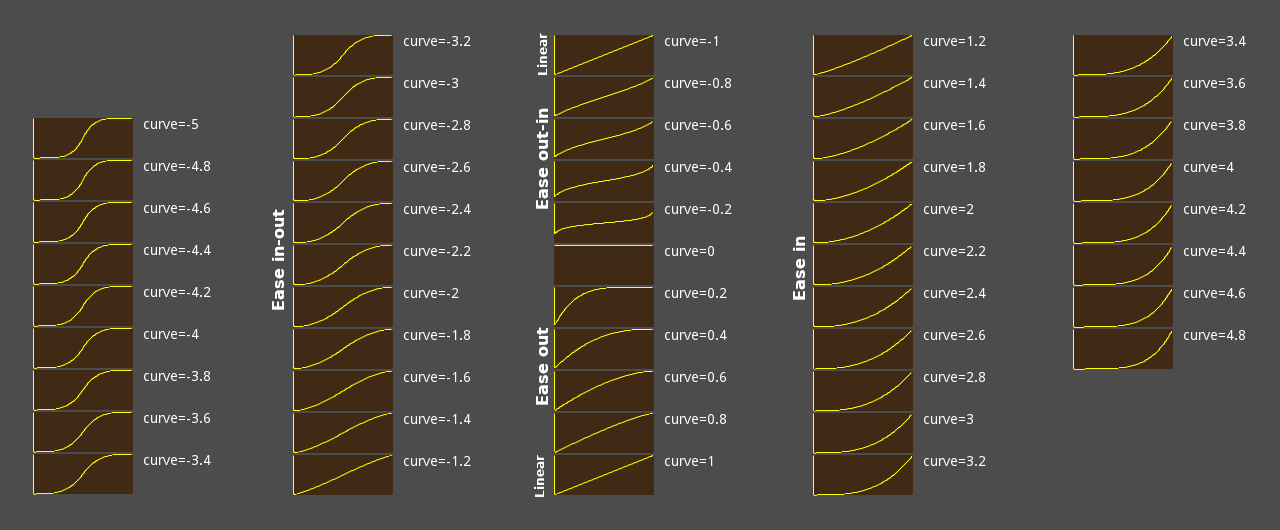
See also smoothstep. If you need to perform more advanced transitions, use Tween.interpolate_value.
func error_string(error: int) -> String#
Returns a human-readable name for the given Error code.
print(OK)                              # Prints 0
print(error_string(OK))                # Prints "OK"
print(error_string(ERR_BUSY))          # Prints "Busy"
print(error_string(ERR_OUT_OF_MEMORY)) # Prints "Out of memory"
func exp(x: float) -> float#
The natural exponential function. It raises the mathematical constant e to the power of x and returns it.
e has an approximate value of 2.71828, and can be obtained with exp(1).
For exponents to other bases use the method pow.
var a = exp(2) # Approximately 7.39func floor(x: Variant) -> Variant#
Rounds x downward (towards negative infinity), returning the largest whole number that is not more than x. Supported types: int, float, Vector2, Vector2i, Vector3, Vector3i, Vector4, Vector4i.
var a = floor(2.99) # a is 2.0
a = floor(-2.99)    # a is -3.0
See also ceil, round, and snapped.
Note: For better type safety, use floorf, floori, Vector2.floor, Vector3.floor, or Vector4.floor.
func floorf(x: float) -> float#
Rounds x downward (towards negative infinity), returning the largest whole number that is not more than x.
func floori(x: float) -> int#
Rounds x downward (towards negative infinity), returning the largest whole number that is not more than x.
A type-safe version of floor, returning an int.
Note: This function is not the same as int(x), which rounds towards 0.
func fmod(y: float) -> float#
Returns the floating-point remainder of x divided by y, keeping the sign of x.
var remainder = fmod(7, 5.5) # remainder is 1.5For the integer remainder operation, use the % operator.
func fposmod(y: float) -> float#
Returns the floating-point modulus of x divided by y, wrapping equally in positive and negative.
print(" (x)  (fmod(x, 1.5))   (fposmod(x, 1.5))")
for i in 7:
    var x = i * 0.5 - 1.5
    print("%4.1f           %4.1f  | %4.1f" % [x, fmod(x, 1.5), fposmod(x, 1.5)])
Prints:
[codeblock lang=text]
(x) (fmod(x, 1.5)) (fposmod(x, 1.5))
-1.5 -0.0 | 0.0
-1.0 -1.0 | 0.5
-0.5 -0.5 | 1.0
0.0 0.0 | 0.0
0.5 0.5 | 0.5
1.0 1.0 | 1.0
1.5 0.0 | 0.0
func hash(variable: Variant) -> int#
Returns the integer hash of the passed variable.
GDScript
print(hash("a")) # Prints 177670C#
GD.Print(GD.Hash("a")); // Prints 177670func instance_from_id(instance_id: int) -> Object#
Returns the Object that corresponds to instance_id. All Objects have a unique instance ID. See also Object.get_instance_id.
GDScript
var drink = "water"

func _ready():
    var id = get_instance_id()
    var instance = instance_from_id(id)
    print(instance.foo) # Prints "water"
C#
public partial class MyNode : Node
{
    public string Drink { get; set; } = "water";

    public override void _Ready()
    {
        ulong id = GetInstanceId();
        var instance = (MyNode)InstanceFromId(Id);
        GD.Print(instance.Drink); // Prints "water"
    }
}
func inverse_lerp(weight: float) -> float#
Returns an interpolation or extrapolation factor considering the range specified in from and to, and the interpolated value specified in weight. The returned value will be between 0.0 and 1.0 if weight is between from and to (inclusive). If weight is located outside this range, then an extrapolation factor will be returned (return value lower than 0.0 or greater than 1.0). Use clamp on the result of inverse_lerp if this is not desired.
# The interpolation ratio in the `lerp()` call below is 0.75.
var middle = lerp(20, 30, 0.75)
# middle is now 27.5.

# Now, we pretend to have forgotten the original ratio and want to get it back.
var ratio = inverse_lerp(20, 30, 27.5)
# ratio is now 0.75.
See also lerp, which performs the reverse of this operation, and remap to map a continuous series of values to another.
func is_equal_approx(b: float) -> bool#
Returns true if a and b are approximately equal to each other.
Here, "approximately equal" means that a and b are within a small internal epsilon of each other, which scales with the magnitude of the numbers.
Infinity values of the same sign are considered equal.
func is_finite(x: float) -> bool#
Returns whether x is a finite value, i.e. it is not @GDScript.NAN, positive infinity, or negative infinity.
func is_inf(x: float) -> bool#
Returns true if x is either positive infinity or negative infinity.
func is_instance_id_valid(id: int) -> bool#
Returns true if the Object that corresponds to id is a valid object (e.g. has not been deleted from memory). All Objects have a unique instance ID.
func is_instance_valid(instance: Variant) -> bool#
Returns true if instance is a valid Object (e.g. has not been deleted from memory).
func is_nan(x: float) -> bool#
Returns true if x is a NaN ("Not a Number" or invalid) value.
func is_same(b: Variant) -> bool#
Returns true, for value types, if a and b share the same value. Returns true, for reference types, if the references of a and b are the same.
# Vector2 is a value type
var vec2_a = Vector2(0, 0)
var vec2_b = Vector2(0, 0)
var vec2_c = Vector2(1, 1)
is_same(vec2_a, vec2_a)  # true
is_same(vec2_a, vec2_b)  # true
is_same(vec2_a, vec2_c)  # false

# Array is a reference type
var arr_a = []
var arr_b = []
is_same(arr_a, arr_a)  # true
is_same(arr_a, arr_b)  # false
These are Variant value types: null, bool, int, float, String, StringName, Vector2, Vector2i, Vector3, Vector3i, Vector4, Vector4i, Rect2, Rect2i, Transform2D, Transform3D, Plane, Quaternion, AABB, Basis, Projection, Color, NodePath, RID, Callable and Signal.
These are Variant reference types: Object, Dictionary, Array, PackedByteArray, PackedInt32Array, PackedInt64Array, PackedFloat32Array, PackedFloat64Array, PackedStringArray, PackedVector2Array, PackedVector3Array, PackedVector4Array, and PackedColorArray.
func is_zero_approx(x: float) -> bool#
Returns true if x is zero or almost zero. The comparison is done using a tolerance calculation with a small internal epsilon.
This function is faster than using is_equal_approx with one value as zero.
func lerp(weight: Variant) -> Variant#
Linearly interpolates between two values by the factor defined in weight. To perform interpolation, weight should be between 0.0 and 1.0 (inclusive). However, values outside this range are allowed and can be used to perform extrapolation. If this is not desired, use clampf to limit weight.
Both from and to must be the same type. Supported types: int, float, Vector2, Vector3, Vector4, Color, Quaternion, Basis, Transform2D, Transform3D.
lerp(0, 4, 0.75) # Returns 3.0See also inverse_lerp which performs the reverse of this operation. To perform eased interpolation with lerp, combine it with ease or smoothstep. See also remap to map a continuous series of values to another.
Note: For better type safety, use lerpf, Vector2.lerp, Vector3.lerp, Vector4.lerp, Color.lerp, Quaternion.slerp, Basis.slerp, Transform2D.interpolate_with, or Transform3D.interpolate_with.
func lerp_angle(weight: float) -> float#
Linearly interpolates between two angles (in radians) by a weight value between 0.0 and 1.0.
Similar to lerp, but interpolates correctly when the angles wrap around @GDScript.TAU. To perform eased interpolation with lerp_angle, combine it with ease or smoothstep.
extends Sprite
var elapsed = 0.0
func _process(delta):
    var min_angle = deg_to_rad(0.0)
    var max_angle = deg_to_rad(90.0)
    rotation = lerp_angle(min_angle, max_angle, elapsed)
    elapsed += delta
Note: This function lerps through the shortest path between from and to. However, when these two angles are approximately PI + k * TAU apart for any integer k, it's not obvious which way they lerp due to floating-point precision errors. For example, lerp_angle(0, PI, weight) lerps counter-clockwise, while lerp_angle(0, PI + 5 * TAU, weight) lerps clockwise.
func lerpf(weight: float) -> float#
Linearly interpolates between two values by the factor defined in weight. To perform interpolation, weight should be between 0.0 and 1.0 (inclusive). However, values outside this range are allowed and can be used to perform extrapolation. If this is not desired, use clampf on the result of this function.
lerpf(0, 4, 0.75) # Returns 3.0See also inverse_lerp which performs the reverse of this operation. To perform eased interpolation with lerp, combine it with ease or smoothstep.
func linear_to_db(lin: float) -> float#
Converts from linear energy to decibels (audio). Since volume is not normally linear, this can be used to implement volume sliders that behave as expected.
Example: Change the Master bus's volume through a Slider node, which ranges from 0.0 to 1.0:
AudioServer.set_bus_volume_db(AudioServer.get_bus_index("Master"), linear_to_db($Slider.value))func log(x: float) -> float#
Returns the natural logarithm of x (base e, with e being approximately 2.71828). This is the amount of time needed to reach a certain level of continuous growth.
Note: This is not the same as the "log" function on most calculators, which uses a base 10 logarithm. To use base 10 logarithm, use log(x) / log(10).
log(10) # Returns 2.302585Note: The logarithm of 0 returns -inf, while negative values return -nan.
vararg func max() -> Variant#
Returns the maximum of the given numeric values. This function can take any number of arguments.
max(1, 7, 3, -6, 5) # Returns 7Note: When using this on vectors it will not perform component-wise maximum, and will pick the largest value when compared using x < y. To perform component-wise maximum, use Vector2.max, Vector2i.max, Vector3.max, Vector3i.max, Vector4.max, and Vector4i.max.
func maxf(b: float) -> float#
Returns the maximum of two float values.
maxf(3.6, 24)   # Returns 24.0
maxf(-3.99, -4) # Returns -3.99
func maxi(b: int) -> int#
Returns the maximum of two int values.
maxi(1, 2)   # Returns 2
maxi(-3, -4) # Returns -3
vararg func min() -> Variant#
Returns the minimum of the given numeric values. This function can take any number of arguments.
min(1, 7, 3, -6, 5) # Returns -6Note: When using this on vectors it will not perform component-wise minimum, and will pick the smallest value when compared using x < y. To perform component-wise minimum, use Vector2.min, Vector2i.min, Vector3.min, Vector3i.min, Vector4.min, and Vector4i.min.
func minf(b: float) -> float#
Returns the minimum of two float values.
minf(3.6, 24)   # Returns 3.6
minf(-3.99, -4) # Returns -4.0
func mini(b: int) -> int#
Returns the minimum of two int values.
mini(1, 2)   # Returns 1
mini(-3, -4) # Returns -4
func move_toward(delta: float) -> float#
Moves from toward to by the delta amount. Will not go past to.
Use a negative delta value to move away.
move_toward(5, 10, 4)    # Returns 9
move_toward(10, 5, 4)    # Returns 6
move_toward(5, 10, 9)    # Returns 10
move_toward(10, 5, -1.5) # Returns 11.5
func nearest_po2(value: int) -> int#
Returns the smallest integer power of 2 that is greater than or equal to value.
nearest_po2(3) # Returns 4
nearest_po2(4) # Returns 4
nearest_po2(5) # Returns 8

nearest_po2(0)  # Returns 0 (this may not be expected)
nearest_po2(-1) # Returns 0 (this may not be expected)
Warning: Due to its implementation, this method returns 0 rather than 1 for values less than or equal to 0, with an exception for value being the smallest negative 64-bit integer (-9223372036854775808) in which case the value is returned unchanged.
func pingpong(length: float) -> float#
Wraps value between 0 and the length. If the limit is reached, the next value the function returns is decreased to the 0 side or increased to the length side (like a triangle wave). If length is less than zero, it becomes positive.
pingpong(-3.0, 3.0) # Returns 3.0
pingpong(-2.0, 3.0) # Returns 2.0
pingpong(-1.0, 3.0) # Returns 1.0
pingpong(0.0, 3.0)  # Returns 0.0
pingpong(1.0, 3.0)  # Returns 1.0
pingpong(2.0, 3.0)  # Returns 2.0
pingpong(3.0, 3.0)  # Returns 3.0
pingpong(4.0, 3.0)  # Returns 2.0
pingpong(5.0, 3.0)  # Returns 1.0
pingpong(6.0, 3.0)  # Returns 0.0
func posmod(y: int) -> int#
Returns the integer modulus of x divided by y that wraps equally in positive and negative.
print("#(i)  (i % 3)   (posmod(i, 3))")
for i in range(-3, 4):
    print("%2d       %2d  | %2d" % [i, i % 3, posmod(i, 3)])
Prints:
[codeblock lang=text]
(i) (i % 3) (posmod(i, 3))
-3 0 | 0
-2 -2 | 1
-1 -1 | 2
0 0 | 0
1 1 | 1
2 2 | 2
3 0 | 0
func pow(exp: float) -> float#
Returns the result of base raised to the power of exp.
In GDScript, this is the equivalent of the ** operator.
pow(2, 5)   # Returns 32.0
pow(4, 1.5) # Returns 8.0
vararg func print() -> void#
Converts one or more arguments of any type to string in the best way possible and prints them to the console.
GDScript
var a = [1, 2, 3]
print("a", "b", a) # Prints "ab[1, 2, 3]"
C#
Godot.Collections.Array a = [1, 2, 3];
GD.Print("a", "b", a); // Prints "ab[1, 2, 3]"
Note: Consider using push_error and push_warning to print error and warning messages instead of print or print_rich. This distinguishes them from print messages used for debugging purposes, while also displaying a stack trace when an error or warning is printed. See also Engine.print_to_stdout and ProjectSettings.application/run/disable_stdout.
vararg func print_rich() -> void#
Converts one or more arguments of any type to string in the best way possible and prints them to the console.
The following BBCode tags are supported: b, i, u, s, indent, code, url, center, right, color, bgcolor, fgcolor.
URL tags only support URLs wrapped by a URL tag, not URLs with a different title.
When printing to standard output, the supported subset of BBCode is converted to ANSI escape codes for the terminal emulator to display. Support for ANSI escape codes varies across terminal emulators, especially for italic and strikethrough. In standard output, code is represented with faint text but without any font change. Unsupported tags are left as-is in standard output.
Note: Consider using push_error and push_warning to print error and warning messages instead of print or print_rich. This distinguishes them from print messages used for debugging purposes, while also displaying a stack trace when an error or warning is printed.
Note: On Windows, only Windows 10 and later correctly displays ANSI escape codes in standard output.
Note: Output displayed in the editor supports clickable [code skip-lint]text tags. The [code skip-lint]url tag's address value is handled by OS.shell_open when clicked.
vararg func print_verbose() -> void#
If verbose mode is enabled (OS.is_stdout_verbose returning true), converts one or more arguments of any type to string in the best way possible and prints them to the console.
vararg func printerr() -> void#
Prints one or more arguments to strings in the best way possible to standard error line.
GDScript
printerr("prints to stderr")C#
GD.PrintErr("prints to stderr");vararg func printraw() -> void#
Prints one or more arguments to strings in the best way possible to the OS terminal. Unlike print, no newline is automatically added at the end.
Note: The OS terminal is not the same as the editor's Output dock. The output sent to the OS terminal can be seen when running Godot from a terminal. On Windows, this requires using the console.exe executable.
GDScript
# Prints "ABC" to terminal.
printraw("A")
printraw("B")
printraw("C")
C#
// Prints "ABC" to terminal.
GD.PrintRaw("A");
GD.PrintRaw("B");
GD.PrintRaw("C");
vararg func prints() -> void#
Prints one or more arguments to the console with a space between each argument.
GDScript
prints("A", "B", "C") # Prints "A B C"C#
GD.PrintS("A", "B", "C"); // Prints "A B C"vararg func printt() -> void#
Prints one or more arguments to the console with a tab between each argument.
GDScript
printt("A", "B", "C") # Prints "A B C"C#
GD.PrintT("A", "B", "C"); // Prints "A B C"vararg func push_error() -> void#
Pushes an error message to Godot's built-in debugger and to the OS terminal.
GDScript
push_error("test error") # Prints "test error" to debugger and terminal as an error.C#
GD.PushError("test error"); // Prints "test error" to debugger and terminal as an error.Note: This function does not pause project execution. To print an error message and pause project execution in debug builds, use assert(false, "test error") instead.
vararg func push_warning() -> void#
Pushes a warning message to Godot's built-in debugger and to the OS terminal.
GDScript
push_warning("test warning") # Prints "test warning" to debugger and terminal as a warning.C#
GD.PushWarning("test warning"); // Prints "test warning" to debugger and terminal as a warning.func rad_to_deg(rad: float) -> float#
Converts an angle expressed in radians to degrees.
rad_to_deg(0.523599) # Returns 30
rad_to_deg(PI)       # Returns 180
rad_to_deg(PI * 2)   # Returns 360
func rand_from_seed(seed: int) -> PackedInt64Array#
Given a seed, returns a PackedInt64Array of size 2, where its first element is the randomized int value, and the second element is the same as seed. Passing the same seed consistently returns the same array.
Note: "Seed" here refers to the internal state of the pseudo random number generator, currently implemented as a 64 bit integer.
var a = rand_from_seed(4)

print(a[0]) # Prints 2879024997
print(a[1]) # Prints 4
func randf() -> float#
Returns a random floating-point value between 0.0 and 1.0 (inclusive).
GDScript
randf() # Returns e.g. 0.375671C#
GD.Randf(); // Returns e.g. 0.375671func randf_range(to: float) -> float#
Returns a random floating-point value between from and to (inclusive).
GDScript
randf_range(0, 20.5) # Returns e.g. 7.45315
randf_range(-10, 10) # Returns e.g. -3.844535
C#
GD.RandRange(0.0, 20.5);   // Returns e.g. 7.45315
GD.RandRange(-10.0, 10.0); // Returns e.g. -3.844535
func randfn(deviation: float) -> float#
Returns a normally-distributed, pseudo-random floating-point value from the specified mean and a standard deviation. This is also known as a Gaussian distribution.
Note: This method uses the Box-Muller transform algorithm.
func randi() -> int#
Returns a random unsigned 32-bit integer. Use remainder to obtain a random value in the interval [0, N - 1] (where N is smaller than 2^32).
GDScript
randi()           # Returns random integer between 0 and 2^32 - 1
randi() % 20      # Returns random integer between 0 and 19
randi() % 100     # Returns random integer between 0 and 99
randi() % 100 + 1 # Returns random integer between 1 and 100
C#
GD.Randi();           // Returns random integer between 0 and 2^32 - 1
GD.Randi() % 20;      // Returns random integer between 0 and 19
GD.Randi() % 100;     // Returns random integer between 0 and 99
GD.Randi() % 100 + 1; // Returns random integer between 1 and 100
func randi_range(to: int) -> int#
Returns a random signed 32-bit integer between from and to (inclusive). If to is lesser than from, they are swapped.
GDScript
randi_range(0, 1)      # Returns either 0 or 1
randi_range(-10, 1000) # Returns random integer between -10 and 1000
C#
GD.RandRange(0, 1);      // Returns either 0 or 1
GD.RandRange(-10, 1000); // Returns random integer between -10 and 1000
func randomize() -> void#
Randomizes the seed (or the internal state) of the random number generator. The current implementation uses a number based on the device's time.
Note: This function is called automatically when the project is run. If you need to fix the seed to have consistent, reproducible results, use seed to initialize the random number generator.
func remap(ostop: float) -> float#
Maps a value from range [istart, istop] to [ostart, ostop]. See also lerp and inverse_lerp. If value is outside [istart, istop], then the resulting value will also be outside [ostart, ostop]. If this is not desired, use clamp on the result of this function.
remap(75, 0, 100, -1, 1) # Returns 0.5For complex use cases where multiple ranges are needed, consider using Curve or Gradient instead.
Note: If istart == istop, the return value is undefined (most likely NaN, INF, or -INF).
func rid_allocate_id() -> int#
Allocates a unique ID which can be used by the implementation to construct an RID. This is used mainly from native extensions to implement servers.
func rid_from_int64(base: int) -> RID#
Creates an RID from a base. This is used mainly from native extensions to build servers.
func rotate_toward(delta: float) -> float#
Rotates from toward to by the delta amount. Will not go past to.
Similar to move_toward, but interpolates correctly when the angles wrap around @GDScript.TAU.
If delta is negative, this function will rotate away from to, toward the opposite angle, and will not go past the opposite angle.
func round(x: Variant) -> Variant#
Rounds x to the nearest whole number, with halfway cases rounded away from 0. Supported types: int, float, Vector2, Vector2i, Vector3, Vector3i, Vector4, Vector4i.
round(2.4) # Returns 2
round(2.5) # Returns 3
round(2.6) # Returns 3
See also floor, ceil, and snapped.
Note: For better type safety, use roundf, roundi, Vector2.round, Vector3.round, or Vector4.round.
func roundf(x: float) -> float#
Rounds x to the nearest whole number, with halfway cases rounded away from 0.
func roundi(x: float) -> int#
Rounds x to the nearest whole number, with halfway cases rounded away from 0.
func seed(base: int) -> void#
Sets the seed for the random number generator to base. Setting the seed manually can ensure consistent, repeatable results for most random functions.
GDScript
var my_seed = "Godot Rocks".hash()
seed(my_seed)
var a = randf() + randi()
seed(my_seed)
var b = randf() + randi()
# a and b are now identical
C#
ulong mySeed = (ulong)GD.Hash("Godot Rocks");
GD.Seed(mySeed);
var a = GD.Randf() + GD.Randi();
GD.Seed(mySeed);
var b = GD.Randf() + GD.Randi();
// a and b are now identical
func sign(x: Variant) -> Variant#
Returns the same type of Variant as x, with -1 for negative values, 1 for positive values, and 0 for zeros. For nan values it returns 0.
Supported types: int, float, Vector2, Vector2i, Vector3, Vector3i, Vector4, Vector4i.
sign(-6.0) # Returns -1
sign(0.0)  # Returns 0
sign(6.0)  # Returns 1
sign(NAN)  # Returns 0

sign(Vector3(-6.0, 0.0, 6.0)) # Returns (-1, 0, 1)
Note: For better type safety, use signf, signi, Vector2.sign, Vector2i.sign, Vector3.sign, Vector3i.sign, Vector4.sign, or Vector4i.sign.
func signf(x: float) -> float#
Returns -1.0 if x is negative, 1.0 if x is positive, and 0.0 if x is zero. For nan values of x it returns 0.0.
signf(-6.5) # Returns -1.0
signf(0.0)  # Returns 0.0
signf(6.5)  # Returns 1.0
signf(NAN)  # Returns 0.0
func signi(x: int) -> int#
Returns -1 if x is negative, 1 if x is positive, and 0 if x is zero.
signi(-6) # Returns -1
signi(0)  # Returns 0
signi(6)  # Returns 1
func sin(angle_rad: float) -> float#
Returns the sine of angle angle_rad in radians.
sin(0.523599)       # Returns 0.5
sin(deg_to_rad(90)) # Returns 1.0
func sinh(x: float) -> float#
Returns the hyperbolic sine of x.
var a = log(2.0) # Returns 0.693147
sinh(a) # Returns 0.75
func smoothstep(x: float) -> float#
Returns a smooth cubic Hermite interpolation between 0 and 1.
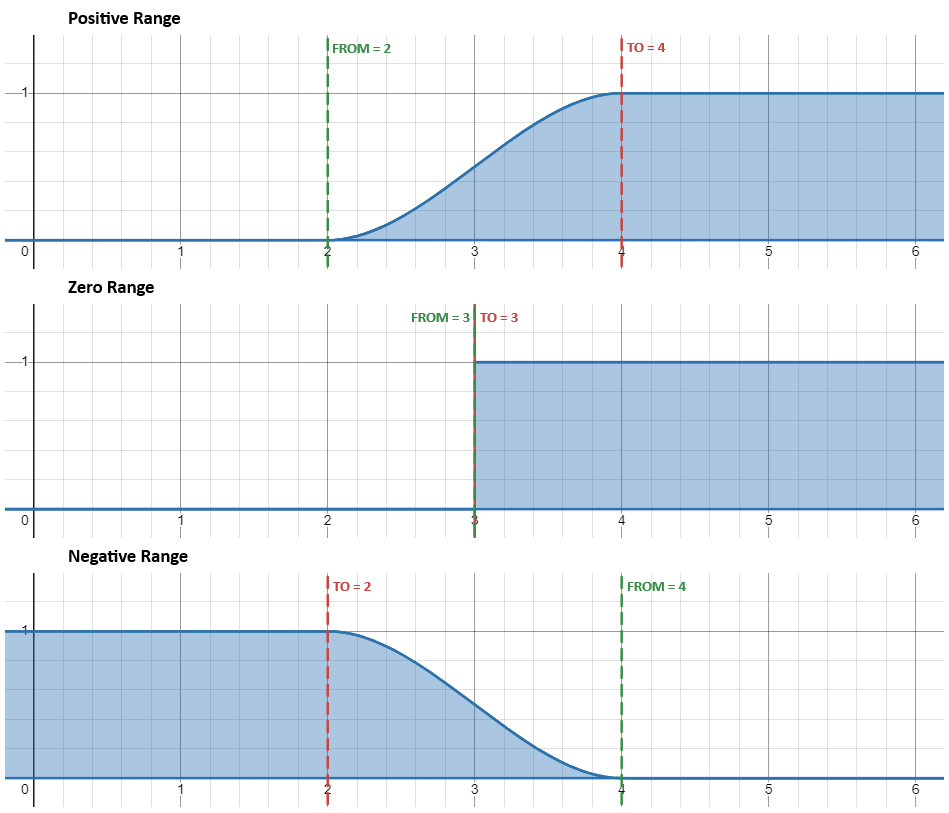
For positive ranges (when from <= to) the return value is 0 when x <= from, and 1 when x >= to. If x lies between from and to, the return value follows an S-shaped curve that smoothly transitions from 0 to 1.
For negative ranges (when from > to) the function is mirrored and returns 1 when x <= to and 0 when x >= from.
This S-shaped curve is the cubic Hermite interpolator, given by f(y) = 3*y^2 - 2*y^3 where y = (x-from) / (to-from).
smoothstep(0, 2, -5.0) # Returns 0.0
smoothstep(0, 2, 0.5) # Returns 0.15625
smoothstep(0, 2, 1.0) # Returns 0.5
smoothstep(0, 2, 2.0) # Returns 1.0
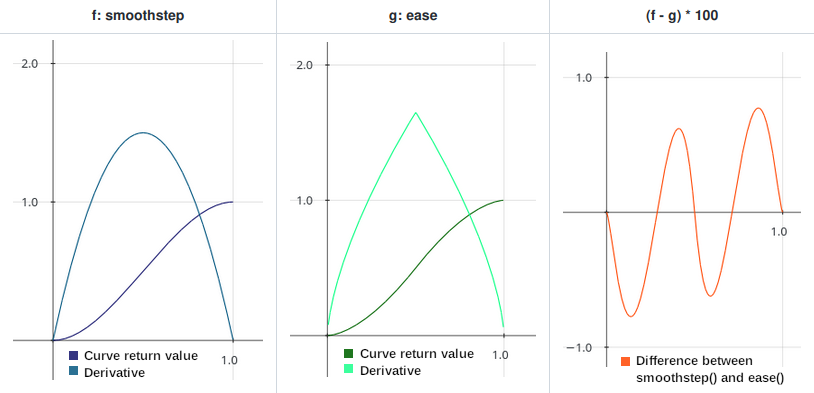
Compared to ease with a curve value of -1.6521, smoothstep returns the smoothest possible curve with no sudden changes in the derivative. If you need to perform more advanced transitions, use Tween or AnimationPlayer.
Comparison between smoothstep() and ease(x, -1.6521) return values
Smoothstep() return values with positive, zero, and negative ranges
func snapped(step: Variant) -> Variant#
Returns the multiple of step that is the closest to x. This can also be used to round a floating-point number to an arbitrary number of decimals.
The returned value is the same type of Variant as step. Supported types: int, float, Vector2, Vector2i, Vector3, Vector3i, Vector4, Vector4i.
snapped(100, 32)  # Returns 96
snapped(3.14159, 0.01)  # Returns 3.14

snapped(Vector2(34, 70), Vector2(8, 8))  # Returns (32, 72)
See also ceil, floor, and round.
Note: For better type safety, use snappedf, snappedi, Vector2.snapped, Vector2i.snapped, Vector3.snapped, Vector3i.snapped, Vector4.snapped, or Vector4i.snapped.
func snappedf(step: float) -> float#
Returns the multiple of step that is the closest to x. This can also be used to round a floating-point number to an arbitrary number of decimals.
A type-safe version of snapped, returning a float.
snappedf(32.0, 2.5)  # Returns 32.5
snappedf(3.14159, 0.01)  # Returns 3.14
func snappedi(step: int) -> int#
Returns the multiple of step that is the closest to x.
A type-safe version of snapped, returning an int.
snappedi(53, 16)  # Returns 48
snappedi(4096, 100)  # Returns 4100
func sqrt(x: float) -> float#
Returns the square root of x, where x is a non-negative number.
sqrt(9)     # Returns 3
sqrt(10.24) # Returns 3.2
sqrt(-1)    # Returns NaN
Note: Negative values of x return NaN ("Not a Number"). in C#, if you need negative inputs, use System.Numerics.Complex.
func step_decimals(x: float) -> int#
Returns the position of the first non-zero digit, after the decimal point. Note that the maximum return value is 10, which is a design decision in the implementation.
var n = step_decimals(5)       # n is 0
n = step_decimals(1.0005)      # n is 4
n = step_decimals(0.000000005) # n is 9
vararg func str() -> String#
Converts one or more arguments of any Variant type to a String in the best way possible.
var a = [10, 20, 30]
var b = str(a)
print(len(a)) # Prints 3 (the number of elements in the array).
print(len(b)) # Prints 12 (the length of the string "[10, 20, 30]").
func str_to_var(string: String) -> Variant#
Converts a formatted string that was returned by var_to_str to the original Variant.
GDScript
var data = '{ "a": 1, "b": 2 }' # data is a String
var dict = str_to_var(data)     # dict is a Dictionary
print(dict["a"])                # Prints 1
C#
string data = "{ \"a\": 1, \"b\": 2 }";           // data is a string
var dict = GD.StrToVar(data).AsGodotDictionary(); // dict is a Dictionary
GD.Print(dict["a"]);                              // Prints 1
func tan(angle_rad: float) -> float#
Returns the tangent of angle angle_rad in radians.
tan(deg_to_rad(45)) # Returns 1func tanh(x: float) -> float#
Returns the hyperbolic tangent of x.
var a = log(2.0) # Returns 0.693147
tanh(a)          # Returns 0.6
func type_convert(type: int) -> Variant#
Converts the given variant to the given type, using the Variant.Type values. This method is generous with how it handles types, it can automatically convert between array types, convert numeric Strings to int, and converting most things to String.
If the type conversion cannot be done, this method will return the default value for that type, for example converting Rect2 to Vector2 will always return Vector2.ZERO. This method will never show error messages as long as type is a valid Variant type.
The returned value is a Variant, but the data inside and its type will be the same as the requested type.
type_convert("Hi!", TYPE_INT) # Returns 0
type_convert("123", TYPE_INT) # Returns 123
type_convert(123.4, TYPE_INT) # Returns 123
type_convert(5, TYPE_VECTOR2) # Returns (0, 0)
type_convert("Hi!", TYPE_NIL) # Returns null
func type_string(type: int) -> String#
Returns a human-readable name of the given type, using the Variant.Type values.
print(TYPE_INT) # Prints 2
print(type_string(TYPE_INT)) # Prints "int"
print(type_string(TYPE_STRING)) # Prints "String"
See also typeof.
func typeof(variable: Variant) -> int#
Returns the internal type of the given variable, using the Variant.Type values.
var json = JSON.new()
json.parse('["a", "b", "c"]')
var result = json.get_data()
if result is Array:
    print(result[0]) # Prints "a"
else:
    print("Unexpected result!")
See also type_string.
func var_to_bytes(variable: Variant) -> PackedByteArray#
Encodes a Variant value to a byte array, without encoding objects. Deserialization can be done with bytes_to_var.
Note: If you need object serialization, see var_to_bytes_with_objects.
Note: Encoding Callable is not supported and will result in an empty value, regardless of the data.
func var_to_bytes_with_objects(variable: Variant) -> PackedByteArray#
Encodes a Variant value to a byte array. Encoding objects is allowed (and can potentially include executable code). Deserialization can be done with bytes_to_var_with_objects.
Note: Encoding Callable is not supported and will result in an empty value, regardless of the data.
func var_to_str(variable: Variant) -> String#
Converts a Variant variable to a formatted String that can then be parsed using str_to_var.
GDScript
var a = { "a": 1, "b": 2 }
print(var_to_str(a))
C#
var a = new Godot.Collections.Dictionary { ["a"] = 1, ["b"] = 2 };
GD.Print(GD.VarToStr(a));
Prints:
[codeblock lang=text]
{
"a": 1,
"b": 2
}
Note: Converting Signal or Callable is not supported and will result in an empty value for these types, regardless of their data.
func weakref(obj: Variant) -> Variant#
Returns a WeakRef instance holding a weak reference to obj. Returns an empty WeakRef instance if obj is null. Prints an error and returns null if obj is neither Object-derived nor null.
A weak reference to an object is not enough to keep the object alive: when the only remaining references to a referent are weak references, garbage collection is free to destroy the referent and reuse its memory for something else. However, until the object is actually destroyed the weak reference may return the object even if there are no strong references to it.
func wrap(max: Variant) -> Variant#
Wraps the Variant value between min and max. Can be used for creating loop-alike behavior or infinite surfaces.
Variant types int and float are supported. If any of the arguments is float this function returns a float, otherwise it returns an int.
var a = wrap(4, 5, 10)
# a is 9 (int)

var a = wrap(7, 5, 10)
# a is 7 (int)

var a = wrap(10.5, 5, 10)
# a is 5.5 (float)
func wrapf(max: float) -> float#
Wraps the float value between min and max. Can be used for creating loop-alike behavior or infinite surfaces.
# Infinite loop between 5.0 and 9.9
value = wrapf(value + 0.1, 5.0, 10.0)
# Infinite rotation (in radians)
angle = wrapf(angle + 0.1, 0.0, TAU)# Infinite rotation (in radians)
angle = wrapf(angle + 0.1, -PI, PI)Note: If min is 0, this is equivalent to fposmod, so prefer using that instead.
wrapf is more flexible than using the fposmod approach by giving the user control over the minimum value.
func wrapi(max: int) -> int#
Wraps the integer value between min and max. Can be used for creating loop-alike behavior or infinite surfaces.
# Infinite loop between 5 and 9
frame = wrapi(frame + 1, 5, 10)
# result is -2
var result = wrapi(-6, -5, -1)Annotations #
Constants #
const SIDE_LEFT = 0 enum Side#
Left side, usually used for Control or StyleBox-derived classes.
const SIDE_TOP = 1 enum Side#
Top side, usually used for Control or StyleBox-derived classes.
const SIDE_RIGHT = 2 enum Side#
Right side, usually used for Control or StyleBox-derived classes.
const SIDE_BOTTOM = 3 enum Side#
Bottom side, usually used for Control or StyleBox-derived classes.
const CORNER_TOP_LEFT = 0 enum Corner#
Top-left corner.
const CORNER_TOP_RIGHT = 1 enum Corner#
Top-right corner.
const CORNER_BOTTOM_RIGHT = 2 enum Corner#
Bottom-right corner.
const CORNER_BOTTOM_LEFT = 3 enum Corner#
Bottom-left corner.
const VERTICAL = 1 enum Orientation#
General vertical alignment, usually used for Separator, ScrollBar, Slider, etc.
const HORIZONTAL = 0 enum Orientation#
General horizontal alignment, usually used for Separator, ScrollBar, Slider, etc.
const CLOCKWISE = 0 enum ClockDirection#
Clockwise rotation. Used by some methods (e.g. Image.rotate_90).
const COUNTERCLOCKWISE = 1 enum ClockDirection#
Counter-clockwise rotation. Used by some methods (e.g. Image.rotate_90).
const HORIZONTAL_ALIGNMENT_LEFT = 0 enum HorizontalAlignment#
Horizontal left alignment, usually for text-derived classes.
const HORIZONTAL_ALIGNMENT_CENTER = 1 enum HorizontalAlignment#
Horizontal center alignment, usually for text-derived classes.
const HORIZONTAL_ALIGNMENT_RIGHT = 2 enum HorizontalAlignment#
Horizontal right alignment, usually for text-derived classes.
const HORIZONTAL_ALIGNMENT_FILL = 3 enum HorizontalAlignment#
Expand row to fit width, usually for text-derived classes.
const VERTICAL_ALIGNMENT_TOP = 0 enum VerticalAlignment#
Vertical top alignment, usually for text-derived classes.
const VERTICAL_ALIGNMENT_CENTER = 1 enum VerticalAlignment#
Vertical center alignment, usually for text-derived classes.
const VERTICAL_ALIGNMENT_BOTTOM = 2 enum VerticalAlignment#
Vertical bottom alignment, usually for text-derived classes.
const VERTICAL_ALIGNMENT_FILL = 3 enum VerticalAlignment#
Expand rows to fit height, usually for text-derived classes.
const INLINE_ALIGNMENT_TOP_TO = 0 enum InlineAlignment#
Aligns the top of the inline object (e.g. image, table) to the position of the text specified by INLINE_ALIGNMENT_TO_* constant.
const INLINE_ALIGNMENT_CENTER_TO = 1 enum InlineAlignment#
Aligns the center of the inline object (e.g. image, table) to the position of the text specified by INLINE_ALIGNMENT_TO_* constant.
const INLINE_ALIGNMENT_BASELINE_TO = 3 enum InlineAlignment#
Aligns the baseline (user defined) of the inline object (e.g. image, table) to the position of the text specified by INLINE_ALIGNMENT_TO_* constant.
const INLINE_ALIGNMENT_BOTTOM_TO = 2 enum InlineAlignment#
Aligns the bottom of the inline object (e.g. image, table) to the position of the text specified by INLINE_ALIGNMENT_TO_* constant.
const INLINE_ALIGNMENT_TO_TOP = 0 enum InlineAlignment#
Aligns the position of the inline object (e.g. image, table) specified by INLINE_ALIGNMENT_*_TO constant to the top of the text.
const INLINE_ALIGNMENT_TO_CENTER = 4 enum InlineAlignment#
Aligns the position of the inline object (e.g. image, table) specified by INLINE_ALIGNMENT_*_TO constant to the center of the text.
const INLINE_ALIGNMENT_TO_BASELINE = 8 enum InlineAlignment#
Aligns the position of the inline object (e.g. image, table) specified by INLINE_ALIGNMENT_*_TO constant to the baseline of the text.
const INLINE_ALIGNMENT_TO_BOTTOM = 12 enum InlineAlignment#
Aligns inline object (e.g. image, table) to the bottom of the text.
const INLINE_ALIGNMENT_TOP = 0 enum InlineAlignment#
Aligns top of the inline object (e.g. image, table) to the top of the text. Equivalent to INLINE_ALIGNMENT_TOP_TO | INLINE_ALIGNMENT_TO_TOP.
const INLINE_ALIGNMENT_CENTER = 5 enum InlineAlignment#
Aligns center of the inline object (e.g. image, table) to the center of the text. Equivalent to INLINE_ALIGNMENT_CENTER_TO | INLINE_ALIGNMENT_TO_CENTER.
const INLINE_ALIGNMENT_BOTTOM = 14 enum InlineAlignment#
Aligns bottom of the inline object (e.g. image, table) to the bottom of the text. Equivalent to INLINE_ALIGNMENT_BOTTOM_TO | INLINE_ALIGNMENT_TO_BOTTOM.
const INLINE_ALIGNMENT_IMAGE_MASK = 3 enum InlineAlignment#
A bit mask for INLINE_ALIGNMENT_*_TO alignment constants.
const INLINE_ALIGNMENT_TEXT_MASK = 12 enum InlineAlignment#
A bit mask for INLINE_ALIGNMENT_TO_* alignment constants.
const EULER_ORDER_XYZ = 0 enum EulerOrder#
Specifies that Euler angles should be in XYZ order. When composing, the order is X, Y, Z. When decomposing, the order is reversed, first Z, then Y, and X last.
const EULER_ORDER_XZY = 1 enum EulerOrder#
Specifies that Euler angles should be in XZY order. When composing, the order is X, Z, Y. When decomposing, the order is reversed, first Y, then Z, and X last.
const EULER_ORDER_YXZ = 2 enum EulerOrder#
Specifies that Euler angles should be in YXZ order. When composing, the order is Y, X, Z. When decomposing, the order is reversed, first Z, then X, and Y last.
const EULER_ORDER_YZX = 3 enum EulerOrder#
Specifies that Euler angles should be in YZX order. When composing, the order is Y, Z, X. When decomposing, the order is reversed, first X, then Z, and Y last.
const EULER_ORDER_ZXY = 4 enum EulerOrder#
Specifies that Euler angles should be in ZXY order. When composing, the order is Z, X, Y. When decomposing, the order is reversed, first Y, then X, and Z last.
const EULER_ORDER_ZYX = 5 enum EulerOrder#
Specifies that Euler angles should be in ZYX order. When composing, the order is Z, Y, X. When decomposing, the order is reversed, first X, then Y, and Z last.
const KEY_NONE = 0 enum Key#
Enum value which doesn't correspond to any key. This is used to initialize Key properties with a generic state.
const KEY_SPECIAL = 4194304 enum Key#
Keycodes with this bit applied are non-printable.
const KEY_ESCAPE = 4194305 enum Key#
Escape key.
const KEY_TAB = 4194306 enum Key#
Tab key.
const KEY_BACKTAB = 4194307 enum Key#
Shift + Tab key.
const KEY_BACKSPACE = 4194308 enum Key#
Backspace key.
const KEY_ENTER = 4194309 enum Key#
Return key (on the main keyboard).
const KEY_KP_ENTER = 4194310 enum Key#
Enter key on the numeric keypad.
const KEY_INSERT = 4194311 enum Key#
Insert key.
const KEY_DELETE = 4194312 enum Key#
Delete key.
const KEY_PAUSE = 4194313 enum Key#
Pause key.
const KEY_PRINT = 4194314 enum Key#
Print Screen key.
const KEY_SYSREQ = 4194315 enum Key#
System Request key.
const KEY_CLEAR = 4194316 enum Key#
Clear key.
const KEY_HOME = 4194317 enum Key#
Home key.
const KEY_END = 4194318 enum Key#
End key.
const KEY_LEFT = 4194319 enum Key#
Left arrow key.
const KEY_UP = 4194320 enum Key#
Up arrow key.
const KEY_RIGHT = 4194321 enum Key#
Right arrow key.
const KEY_DOWN = 4194322 enum Key#
Down arrow key.
const KEY_PAGEUP = 4194323 enum Key#
Page Up key.
const KEY_PAGEDOWN = 4194324 enum Key#
Page Down key.
const KEY_SHIFT = 4194325 enum Key#
Shift key.
const KEY_CTRL = 4194326 enum Key#
Control key.
const KEY_META = 4194327 enum Key#
Meta key.
const KEY_ALT = 4194328 enum Key#
Alt key.
const KEY_CAPSLOCK = 4194329 enum Key#
Caps Lock key.
const KEY_NUMLOCK = 4194330 enum Key#
Num Lock key.
const KEY_SCROLLLOCK = 4194331 enum Key#
Scroll Lock key.
const KEY_F1 = 4194332 enum Key#
F1 key.
const KEY_F2 = 4194333 enum Key#
F2 key.
const KEY_F3 = 4194334 enum Key#
F3 key.
const KEY_F4 = 4194335 enum Key#
F4 key.
const KEY_F5 = 4194336 enum Key#
F5 key.
const KEY_F6 = 4194337 enum Key#
F6 key.
const KEY_F7 = 4194338 enum Key#
F7 key.
const KEY_F8 = 4194339 enum Key#
F8 key.
const KEY_F9 = 4194340 enum Key#
F9 key.
const KEY_F10 = 4194341 enum Key#
F10 key.
const KEY_F11 = 4194342 enum Key#
F11 key.
const KEY_F12 = 4194343 enum Key#
F12 key.
const KEY_F13 = 4194344 enum Key#
F13 key.
const KEY_F14 = 4194345 enum Key#
F14 key.
const KEY_F15 = 4194346 enum Key#
F15 key.
const KEY_F16 = 4194347 enum Key#
F16 key.
const KEY_F17 = 4194348 enum Key#
F17 key.
const KEY_F18 = 4194349 enum Key#
F18 key.
const KEY_F19 = 4194350 enum Key#
F19 key.
const KEY_F20 = 4194351 enum Key#
F20 key.
const KEY_F21 = 4194352 enum Key#
F21 key.
const KEY_F22 = 4194353 enum Key#
F22 key.
const KEY_F23 = 4194354 enum Key#
F23 key.
const KEY_F24 = 4194355 enum Key#
F24 key.
const KEY_F25 = 4194356 enum Key#
F25 key. Only supported on macOS and Linux due to a Windows limitation.
const KEY_F26 = 4194357 enum Key#
F26 key. Only supported on macOS and Linux due to a Windows limitation.
const KEY_F27 = 4194358 enum Key#
F27 key. Only supported on macOS and Linux due to a Windows limitation.
const KEY_F28 = 4194359 enum Key#
F28 key. Only supported on macOS and Linux due to a Windows limitation.
const KEY_F29 = 4194360 enum Key#
F29 key. Only supported on macOS and Linux due to a Windows limitation.
const KEY_F30 = 4194361 enum Key#
F30 key. Only supported on macOS and Linux due to a Windows limitation.
const KEY_F31 = 4194362 enum Key#
F31 key. Only supported on macOS and Linux due to a Windows limitation.
const KEY_F32 = 4194363 enum Key#
F32 key. Only supported on macOS and Linux due to a Windows limitation.
const KEY_F33 = 4194364 enum Key#
F33 key. Only supported on macOS and Linux due to a Windows limitation.
const KEY_F34 = 4194365 enum Key#
F34 key. Only supported on macOS and Linux due to a Windows limitation.
const KEY_F35 = 4194366 enum Key#
F35 key. Only supported on macOS and Linux due to a Windows limitation.
const KEY_KP_MULTIPLY = 4194433 enum Key#
Multiply (*) key on the numeric keypad.
const KEY_KP_DIVIDE = 4194434 enum Key#
Divide (/) key on the numeric keypad.
const KEY_KP_SUBTRACT = 4194435 enum Key#
Subtract (-) key on the numeric keypad.
const KEY_KP_PERIOD = 4194436 enum Key#
Period (.) key on the numeric keypad.
const KEY_KP_ADD = 4194437 enum Key#
Add (+) key on the numeric keypad.
const KEY_KP_0 = 4194438 enum Key#
Number 0 on the numeric keypad.
const KEY_KP_1 = 4194439 enum Key#
Number 1 on the numeric keypad.
const KEY_KP_2 = 4194440 enum Key#
Number 2 on the numeric keypad.
const KEY_KP_3 = 4194441 enum Key#
Number 3 on the numeric keypad.
const KEY_KP_4 = 4194442 enum Key#
Number 4 on the numeric keypad.
const KEY_KP_5 = 4194443 enum Key#
Number 5 on the numeric keypad.
const KEY_KP_6 = 4194444 enum Key#
Number 6 on the numeric keypad.
const KEY_KP_7 = 4194445 enum Key#
Number 7 on the numeric keypad.
const KEY_KP_8 = 4194446 enum Key#
Number 8 on the numeric keypad.
const KEY_KP_9 = 4194447 enum Key#
Number 9 on the numeric keypad.
const KEY_MENU = 4194370 enum Key#
Context menu key.
const KEY_HYPER = 4194371 enum Key#
Hyper key. (On Linux/X11 only).
const KEY_HELP = 4194373 enum Key#
Help key.
const KEY_BACK = 4194376 enum Key#
Back key.
const KEY_FORWARD = 4194377 enum Key#
Forward key.
const KEY_STOP = 4194378 enum Key#
Media stop key.
const KEY_REFRESH = 4194379 enum Key#
Refresh key.
const KEY_VOLUMEDOWN = 4194380 enum Key#
Volume down key.
const KEY_VOLUMEMUTE = 4194381 enum Key#
Mute volume key.
const KEY_VOLUMEUP = 4194382 enum Key#
Volume up key.
const KEY_MEDIAPLAY = 4194388 enum Key#
Media play key.
const KEY_MEDIASTOP = 4194389 enum Key#
Media stop key.
const KEY_MEDIAPREVIOUS = 4194390 enum Key#
Previous song key.
const KEY_MEDIANEXT = 4194391 enum Key#
Next song key.
const KEY_MEDIARECORD = 4194392 enum Key#
Media record key.
const KEY_HOMEPAGE = 4194393 enum Key#
Home page key.
const KEY_FAVORITES = 4194394 enum Key#
Favorites key.
const KEY_SEARCH = 4194395 enum Key#
Search key.
const KEY_STANDBY = 4194396 enum Key#
Standby key.
const KEY_OPENURL = 4194397 enum Key#
Open URL / Launch Browser key.
const KEY_LAUNCHMAIL = 4194398 enum Key#
Launch Mail key.
const KEY_LAUNCHMEDIA = 4194399 enum Key#
Launch Media key.
const KEY_LAUNCH0 = 4194400 enum Key#
Launch Shortcut 0 key.
const KEY_LAUNCH1 = 4194401 enum Key#
Launch Shortcut 1 key.
const KEY_LAUNCH2 = 4194402 enum Key#
Launch Shortcut 2 key.
const KEY_LAUNCH3 = 4194403 enum Key#
Launch Shortcut 3 key.
const KEY_LAUNCH4 = 4194404 enum Key#
Launch Shortcut 4 key.
const KEY_LAUNCH5 = 4194405 enum Key#
Launch Shortcut 5 key.
const KEY_LAUNCH6 = 4194406 enum Key#
Launch Shortcut 6 key.
const KEY_LAUNCH7 = 4194407 enum Key#
Launch Shortcut 7 key.
const KEY_LAUNCH8 = 4194408 enum Key#
Launch Shortcut 8 key.
const KEY_LAUNCH9 = 4194409 enum Key#
Launch Shortcut 9 key.
const KEY_LAUNCHA = 4194410 enum Key#
Launch Shortcut A key.
const KEY_LAUNCHB = 4194411 enum Key#
Launch Shortcut B key.
const KEY_LAUNCHC = 4194412 enum Key#
Launch Shortcut C key.
const KEY_LAUNCHD = 4194413 enum Key#
Launch Shortcut D key.
const KEY_LAUNCHE = 4194414 enum Key#
Launch Shortcut E key.
const KEY_LAUNCHF = 4194415 enum Key#
Launch Shortcut F key.
const KEY_GLOBE = 4194416 enum Key#
"Globe" key on Mac / iPad keyboard.
const KEY_KEYBOARD = 4194417 enum Key#
"On-screen keyboard" key on iPad keyboard.
const KEY_JIS_EISU = 4194418 enum Key#
英数 key on Mac keyboard.
const KEY_JIS_KANA = 4194419 enum Key#
かな key on Mac keyboard.
const KEY_UNKNOWN = 8388607 enum Key#
Unknown key.
const KEY_SPACE = 32 enum Key#
Space key.
const KEY_EXCLAM = 33 enum Key#
Exclamation mark (!) key.
const KEY_QUOTEDBL = 34 enum Key#
Double quotation mark (") key.
const KEY_NUMBERSIGN = 35 enum Key#
Number sign or hash (#) key.
const KEY_DOLLAR = 36 enum Key#
Dollar sign ($) key.
const KEY_PERCENT = 37 enum Key#
Percent sign (%) key.
const KEY_AMPERSAND = 38 enum Key#
Ampersand (&) key.
const KEY_APOSTROPHE = 39 enum Key#
Apostrophe (') key.
const KEY_PARENLEFT = 40 enum Key#
Left parenthesis (() key.
const KEY_PARENRIGHT = 41 enum Key#
Right parenthesis ()) key.
const KEY_ASTERISK = 42 enum Key#
Asterisk (*) key.
const KEY_PLUS = 43 enum Key#
Plus (+) key.
const KEY_COMMA = 44 enum Key#
Comma (,) key.
const KEY_MINUS = 45 enum Key#
Minus (-) key.
const KEY_PERIOD = 46 enum Key#
Period (.) key.
const KEY_SLASH = 47 enum Key#
Slash (/) key.
const KEY_0 = 48 enum Key#
Number 0 key.
const KEY_1 = 49 enum Key#
Number 1 key.
const KEY_2 = 50 enum Key#
Number 2 key.
const KEY_3 = 51 enum Key#
Number 3 key.
const KEY_4 = 52 enum Key#
Number 4 key.
const KEY_5 = 53 enum Key#
Number 5 key.
const KEY_6 = 54 enum Key#
Number 6 key.
const KEY_7 = 55 enum Key#
Number 7 key.
const KEY_8 = 56 enum Key#
Number 8 key.
const KEY_9 = 57 enum Key#
Number 9 key.
const KEY_COLON = 58 enum Key#
Colon (:) key.
const KEY_SEMICOLON = 59 enum Key#
Semicolon (;) key.
const KEY_LESS = 60 enum Key#
Less-than sign (<) key.
const KEY_EQUAL = 61 enum Key#
Equal sign (=) key.
const KEY_GREATER = 62 enum Key#
Greater-than sign (>) key.
const KEY_QUESTION = 63 enum Key#
Question mark (?) key.
const KEY_AT = 64 enum Key#
At sign (@) key.
const KEY_A = 65 enum Key#
A key.
const KEY_B = 66 enum Key#
B key.
const KEY_C = 67 enum Key#
C key.
const KEY_D = 68 enum Key#
D key.
const KEY_E = 69 enum Key#
E key.
const KEY_F = 70 enum Key#
F key.
const KEY_G = 71 enum Key#
G key.
const KEY_H = 72 enum Key#
H key.
const KEY_I = 73 enum Key#
I key.
const KEY_J = 74 enum Key#
J key.
const KEY_K = 75 enum Key#
K key.
const KEY_L = 76 enum Key#
L key.
const KEY_M = 77 enum Key#
M key.
const KEY_N = 78 enum Key#
N key.
const KEY_O = 79 enum Key#
O key.
const KEY_P = 80 enum Key#
P key.
const KEY_Q = 81 enum Key#
Q key.
const KEY_R = 82 enum Key#
R key.
const KEY_S = 83 enum Key#
S key.
const KEY_T = 84 enum Key#
T key.
const KEY_U = 85 enum Key#
U key.
const KEY_V = 86 enum Key#
V key.
const KEY_W = 87 enum Key#
W key.
const KEY_X = 88 enum Key#
X key.
const KEY_Y = 89 enum Key#
Y key.
const KEY_Z = 90 enum Key#
Z key.
const KEY_BRACKETLEFT = 91 enum Key#
Left bracket (lb) key.
const KEY_BACKSLASH = 92 enum Key#
Backslash (\) key.
const KEY_BRACKETRIGHT = 93 enum Key#
Right bracket (rb) key.
const KEY_ASCIICIRCUM = 94 enum Key#
Caret (^) key.
const KEY_UNDERSCORE = 95 enum Key#
Underscore (_) key.
const KEY_QUOTELEFT = 96 enum Key#
Backtick (`) key.
const KEY_BRACELEFT = 123 enum Key#
Left brace ({) key.
const KEY_BAR = 124 enum Key#
Vertical bar or pipe (|) key.
const KEY_BRACERIGHT = 125 enum Key#
Right brace (}) key.
const KEY_ASCIITILDE = 126 enum Key#
Tilde (~) key.
const KEY_YEN = 165 enum Key#
Yen symbol (¥) key.
const KEY_SECTION = 167 enum Key#
Section sign (§) key.
const KEY_CODE_MASK = 8388607 enum KeyModifierMaskBitfield#
Key Code mask.
const KEY_MODIFIER_MASK = 2130706432 enum KeyModifierMaskBitfield#
Modifier key mask.
const KEY_MASK_CMD_OR_CTRL = 16777216 enum KeyModifierMaskBitfield#
Automatically remapped to KEY_META on macOS and KEY_CTRL on other platforms, this mask is never set in the actual events, and should be used for key mapping only.
const KEY_MASK_SHIFT = 33554432 enum KeyModifierMaskBitfield#
Shift key mask.
const KEY_MASK_ALT = 67108864 enum KeyModifierMaskBitfield#
Alt or Option (on macOS) key mask.
const KEY_MASK_META = 134217728 enum KeyModifierMaskBitfield#
Command (on macOS) or Meta/Windows key mask.
const KEY_MASK_CTRL = 268435456 enum KeyModifierMaskBitfield#
Control key mask.
const KEY_MASK_KPAD = 536870912 enum KeyModifierMaskBitfield#
Keypad key mask.
const KEY_MASK_GROUP_SWITCH = 1073741824 enum KeyModifierMaskBitfield#
Group Switch key mask.
const KEY_LOCATION_UNSPECIFIED = 0 enum KeyLocation#
Used for keys which only appear once, or when a comparison doesn't need to differentiate the LEFT and RIGHT versions.
For example, when using InputEvent.is_match, an event which has KEY_LOCATION_UNSPECIFIED will match any KeyLocation on the passed event.
const KEY_LOCATION_LEFT = 1 enum KeyLocation#
A key which is to the left of its twin.
const KEY_LOCATION_RIGHT = 2 enum KeyLocation#
A key which is to the right of its twin.
const MOUSE_BUTTON_NONE = 0 enum MouseButton#
Enum value which doesn't correspond to any mouse button. This is used to initialize MouseButton properties with a generic state.
const MOUSE_BUTTON_LEFT = 1 enum MouseButton#
Primary mouse button, usually assigned to the left button.
const MOUSE_BUTTON_RIGHT = 2 enum MouseButton#
Secondary mouse button, usually assigned to the right button.
const MOUSE_BUTTON_MIDDLE = 3 enum MouseButton#
Middle mouse button.
const MOUSE_BUTTON_WHEEL_UP = 4 enum MouseButton#
Mouse wheel scrolling up.
const MOUSE_BUTTON_WHEEL_DOWN = 5 enum MouseButton#
Mouse wheel scrolling down.
const MOUSE_BUTTON_WHEEL_LEFT = 6 enum MouseButton#
Mouse wheel left button (only present on some mice).
const MOUSE_BUTTON_WHEEL_RIGHT = 7 enum MouseButton#
Mouse wheel right button (only present on some mice).
const MOUSE_BUTTON_XBUTTON1 = 8 enum MouseButton#
Extra mouse button 1. This is sometimes present, usually to the sides of the mouse.
const MOUSE_BUTTON_XBUTTON2 = 9 enum MouseButton#
Extra mouse button 2. This is sometimes present, usually to the sides of the mouse.
const MOUSE_BUTTON_MASK_LEFT = 1 enum MouseButtonMaskBitfield#
Primary mouse button mask, usually for the left button.
const MOUSE_BUTTON_MASK_RIGHT = 2 enum MouseButtonMaskBitfield#
Secondary mouse button mask, usually for the right button.
const MOUSE_BUTTON_MASK_MIDDLE = 4 enum MouseButtonMaskBitfield#
Middle mouse button mask.
const MOUSE_BUTTON_MASK_MB_XBUTTON1 = 128 enum MouseButtonMaskBitfield#
Extra mouse button 1 mask.
const MOUSE_BUTTON_MASK_MB_XBUTTON2 = 256 enum MouseButtonMaskBitfield#
Extra mouse button 2 mask.
const JOY_BUTTON_INVALID = -1 enum JoyButton#
An invalid game controller button.
const JOY_BUTTON_A = 0 enum JoyButton#
Game controller SDL button A. Corresponds to the bottom action button: Sony Cross, Xbox A, Nintendo B.
const JOY_BUTTON_B = 1 enum JoyButton#
Game controller SDL button B. Corresponds to the right action button: Sony Circle, Xbox B, Nintendo A.
const JOY_BUTTON_X = 2 enum JoyButton#
Game controller SDL button X. Corresponds to the left action button: Sony Square, Xbox X, Nintendo Y.
const JOY_BUTTON_Y = 3 enum JoyButton#
Game controller SDL button Y. Corresponds to the top action button: Sony Triangle, Xbox Y, Nintendo X.
const JOY_BUTTON_BACK = 4 enum JoyButton#
Game controller SDL back button. Corresponds to the Sony Select, Xbox Back, Nintendo - button.
const JOY_BUTTON_GUIDE = 5 enum JoyButton#
Game controller SDL guide button. Corresponds to the Sony PS, Xbox Home button.
const JOY_BUTTON_START = 6 enum JoyButton#
Game controller SDL start button. Corresponds to the Sony Options, Xbox Menu, Nintendo + button.
const JOY_BUTTON_LEFT_STICK = 7 enum JoyButton#
Game controller SDL left stick button. Corresponds to the Sony L3, Xbox L/LS button.
const JOY_BUTTON_RIGHT_STICK = 8 enum JoyButton#
Game controller SDL right stick button. Corresponds to the Sony R3, Xbox R/RS button.
const JOY_BUTTON_LEFT_SHOULDER = 9 enum JoyButton#
Game controller SDL left shoulder button. Corresponds to the Sony L1, Xbox LB button.
const JOY_BUTTON_RIGHT_SHOULDER = 10 enum JoyButton#
Game controller SDL right shoulder button. Corresponds to the Sony R1, Xbox RB button.
const JOY_BUTTON_DPAD_UP = 11 enum JoyButton#
Game controller D-pad up button.
const JOY_BUTTON_DPAD_DOWN = 12 enum JoyButton#
Game controller D-pad down button.
const JOY_BUTTON_DPAD_LEFT = 13 enum JoyButton#
Game controller D-pad left button.
const JOY_BUTTON_DPAD_RIGHT = 14 enum JoyButton#
Game controller D-pad right button.
const JOY_BUTTON_MISC1 = 15 enum JoyButton#
Game controller SDL miscellaneous button. Corresponds to Xbox share button, PS5 microphone button, Nintendo Switch capture button.
const JOY_BUTTON_PADDLE1 = 16 enum JoyButton#
Game controller SDL paddle 1 button.
const JOY_BUTTON_PADDLE2 = 17 enum JoyButton#
Game controller SDL paddle 2 button.
const JOY_BUTTON_PADDLE3 = 18 enum JoyButton#
Game controller SDL paddle 3 button.
const JOY_BUTTON_PADDLE4 = 19 enum JoyButton#
Game controller SDL paddle 4 button.
const JOY_BUTTON_TOUCHPAD = 20 enum JoyButton#
Game controller SDL touchpad button.
const JOY_BUTTON_SDL_MAX = 21 enum JoyButton#
The number of SDL game controller buttons.
const JOY_BUTTON_MAX = 128 enum JoyButton#
The maximum number of game controller buttons supported by the engine. The actual limit may be lower on specific platforms:
- Android: Up to 36 buttons.
- Linux: Up to 80 buttons.
- Windows and macOS: Up to 128 buttons.
const JOY_AXIS_INVALID = -1 enum JoyAxis#
An invalid game controller axis.
const JOY_AXIS_LEFT_X = 0 enum JoyAxis#
Game controller left joystick x-axis.
const JOY_AXIS_LEFT_Y = 1 enum JoyAxis#
Game controller left joystick y-axis.
const JOY_AXIS_RIGHT_X = 2 enum JoyAxis#
Game controller right joystick x-axis.
const JOY_AXIS_RIGHT_Y = 3 enum JoyAxis#
Game controller right joystick y-axis.
const JOY_AXIS_TRIGGER_LEFT = 4 enum JoyAxis#
Game controller left trigger axis.
const JOY_AXIS_TRIGGER_RIGHT = 5 enum JoyAxis#
Game controller right trigger axis.
const JOY_AXIS_SDL_MAX = 6 enum JoyAxis#
The number of SDL game controller axes.
const JOY_AXIS_MAX = 10 enum JoyAxis#
The maximum number of game controller axes: OpenVR supports up to 5 Joysticks making a total of 10 axes.
const MIDI_MESSAGE_NONE = 0 enum MIDIMessage#
Does not correspond to any MIDI message. This is the default value of InputEventMIDI.message.
const MIDI_MESSAGE_NOTE_OFF = 8 enum MIDIMessage#
MIDI message sent when a note is released.
Note: Not all MIDI devices send this message; some may send MIDI_MESSAGE_NOTE_ON with InputEventMIDI.velocity set to 0.
const MIDI_MESSAGE_NOTE_ON = 9 enum MIDIMessage#
MIDI message sent when a note is pressed.
const MIDI_MESSAGE_AFTERTOUCH = 10 enum MIDIMessage#
MIDI message sent to indicate a change in pressure while a note is being pressed down, also called aftertouch.
const MIDI_MESSAGE_CONTROL_CHANGE = 11 enum MIDIMessage#
MIDI message sent when a controller value changes. In a MIDI device, a controller is any input that doesn't play notes. These may include sliders for volume, balance, and panning, as well as switches and pedals. See the General MIDI specification for a small list.
const MIDI_MESSAGE_PROGRAM_CHANGE = 12 enum MIDIMessage#
MIDI message sent when the MIDI device changes its current instrument (also called program or preset).
const MIDI_MESSAGE_CHANNEL_PRESSURE = 13 enum MIDIMessage#
MIDI message sent to indicate a change in pressure for the whole channel. Some MIDI devices may send this instead of MIDI_MESSAGE_AFTERTOUCH.
const MIDI_MESSAGE_PITCH_BEND = 14 enum MIDIMessage#
MIDI message sent when the value of the pitch bender changes, usually a wheel on the MIDI device.
const MIDI_MESSAGE_SYSTEM_EXCLUSIVE = 240 enum MIDIMessage#
MIDI system exclusive (SysEx) message. This type of message is not standardized and it's highly dependent on the MIDI device sending it.
Note: Getting this message's data from InputEventMIDI is not implemented.
const MIDI_MESSAGE_QUARTER_FRAME = 241 enum MIDIMessage#
MIDI message sent every quarter frame to keep connected MIDI devices synchronized. Related to MIDI_MESSAGE_TIMING_CLOCK.
Note: Getting this message's data from InputEventMIDI is not implemented.
const MIDI_MESSAGE_SONG_POSITION_POINTER = 242 enum MIDIMessage#
MIDI message sent to jump onto a new position in the current sequence or song.
Note: Getting this message's data from InputEventMIDI is not implemented.
const MIDI_MESSAGE_SONG_SELECT = 243 enum MIDIMessage#
MIDI message sent to select a sequence or song to play.
Note: Getting this message's data from InputEventMIDI is not implemented.
const MIDI_MESSAGE_TUNE_REQUEST = 246 enum MIDIMessage#
MIDI message sent to request a tuning calibration. Used on analog synthesizers. Most modern MIDI devices do not need this message.
const MIDI_MESSAGE_TIMING_CLOCK = 248 enum MIDIMessage#
MIDI message sent 24 times after MIDI_MESSAGE_QUARTER_FRAME, to keep connected MIDI devices synchronized.
const MIDI_MESSAGE_START = 250 enum MIDIMessage#
MIDI message sent to start the current sequence or song from the beginning.
const MIDI_MESSAGE_CONTINUE = 251 enum MIDIMessage#
MIDI message sent to resume from the point the current sequence or song was paused.
const MIDI_MESSAGE_STOP = 252 enum MIDIMessage#
MIDI message sent to pause the current sequence or song.
const MIDI_MESSAGE_ACTIVE_SENSING = 254 enum MIDIMessage#
MIDI message sent repeatedly while the MIDI device is idle, to tell the receiver that the connection is alive. Most MIDI devices do not send this message.
const MIDI_MESSAGE_SYSTEM_RESET = 255 enum MIDIMessage#
MIDI message sent to reset a MIDI device to its default state, as if it was just turned on. It should not be sent when the MIDI device is being turned on.
const OK = 0 enum Error#
Methods that return Error return OK when no error occurred.
Since OK has value 0, and all other error constants are positive integers, it can also be used in boolean checks.
var error = method_that_returns_error()
if error != OK:
    printerr("Failure!")

# Or, alternatively:
if error:
    printerr("Still failing!")
Note: Many functions do not return an error code, but will print error messages to standard output.
const FAILED = 1 enum Error#
Generic error.
const ERR_UNAVAILABLE = 2 enum Error#
Unavailable error.
const ERR_UNCONFIGURED = 3 enum Error#
Unconfigured error.
const ERR_UNAUTHORIZED = 4 enum Error#
Unauthorized error.
const ERR_PARAMETER_RANGE_ERROR = 5 enum Error#
Parameter range error.
const ERR_OUT_OF_MEMORY = 6 enum Error#
Out of memory (OOM) error.
const ERR_FILE_NOT_FOUND = 7 enum Error#
File: Not found error.
const ERR_FILE_BAD_DRIVE = 8 enum Error#
File: Bad drive error.
const ERR_FILE_BAD_PATH = 9 enum Error#
File: Bad path error.
const ERR_FILE_NO_PERMISSION = 10 enum Error#
File: No permission error.
const ERR_FILE_ALREADY_IN_USE = 11 enum Error#
File: Already in use error.
const ERR_FILE_CANT_OPEN = 12 enum Error#
File: Can't open error.
const ERR_FILE_CANT_WRITE = 13 enum Error#
File: Can't write error.
const ERR_FILE_CANT_READ = 14 enum Error#
File: Can't read error.
const ERR_FILE_UNRECOGNIZED = 15 enum Error#
File: Unrecognized error.
const ERR_FILE_CORRUPT = 16 enum Error#
File: Corrupt error.
const ERR_FILE_MISSING_DEPENDENCIES = 17 enum Error#
File: Missing dependencies error.
const ERR_FILE_EOF = 18 enum Error#
File: End of file (EOF) error.
const ERR_CANT_OPEN = 19 enum Error#
Can't open error.
const ERR_CANT_CREATE = 20 enum Error#
Can't create error.
const ERR_QUERY_FAILED = 21 enum Error#
Query failed error.
const ERR_ALREADY_IN_USE = 22 enum Error#
Already in use error.
const ERR_LOCKED = 23 enum Error#
Locked error.
const ERR_TIMEOUT = 24 enum Error#
Timeout error.
const ERR_CANT_CONNECT = 25 enum Error#
Can't connect error.
const ERR_CANT_RESOLVE = 26 enum Error#
Can't resolve error.
const ERR_CONNECTION_ERROR = 27 enum Error#
Connection error.
const ERR_CANT_ACQUIRE_RESOURCE = 28 enum Error#
Can't acquire resource error.
const ERR_CANT_FORK = 29 enum Error#
Can't fork process error.
const ERR_INVALID_DATA = 30 enum Error#
Invalid data error.
const ERR_INVALID_PARAMETER = 31 enum Error#
Invalid parameter error.
const ERR_ALREADY_EXISTS = 32 enum Error#
Already exists error.
const ERR_DOES_NOT_EXIST = 33 enum Error#
Does not exist error.
const ERR_DATABASE_CANT_READ = 34 enum Error#
Database: Read error.
const ERR_DATABASE_CANT_WRITE = 35 enum Error#
Database: Write error.
const ERR_COMPILATION_FAILED = 36 enum Error#
Compilation failed error.
const ERR_METHOD_NOT_FOUND = 37 enum Error#
Method not found error.
const ERR_LINK_FAILED = 38 enum Error#
Linking failed error.
const ERR_SCRIPT_FAILED = 39 enum Error#
Script failed error.
const ERR_CYCLIC_LINK = 40 enum Error#
Cycling link (import cycle) error.
const ERR_INVALID_DECLARATION = 41 enum Error#
Invalid declaration error.
const ERR_DUPLICATE_SYMBOL = 42 enum Error#
Duplicate symbol error.
const ERR_PARSE_ERROR = 43 enum Error#
Parse error.
const ERR_BUSY = 44 enum Error#
Busy error.
const ERR_SKIP = 45 enum Error#
Skip error.
const ERR_HELP = 46 enum Error#
Help error. Used internally when passing --version or --help as executable options.
const ERR_BUG = 47 enum Error#
Bug error, caused by an implementation issue in the method.
Note: If a built-in method returns this code, please open an issue on the GitHub Issue Tracker.
const ERR_PRINTER_ON_FIRE = 48 enum Error#
Printer on fire error (This is an easter egg, no built-in methods return this error code).
const PROPERTY_HINT_NONE = 0 enum PropertyHint#
The property has no hint for the editor.
const PROPERTY_HINT_RANGE = 1 enum PropertyHint#
Hints that an int or float property should be within a range specified via the hint string "min,max" or "min,max,step". The hint string can optionally include "or_greater" and/or "or_less" to allow manual input going respectively above the max or below the min values.
Example: "-360,360,1,or_greater,or_less".
Additionally, other keywords can be included: "exp" for exponential range editing, "radians_as_degrees" for editing radian angles in degrees (the range values are also in degrees), "degrees" to hint at an angle and "hide_slider" to hide the slider.
const PROPERTY_HINT_ENUM = 2 enum PropertyHint#
Hints that an int or String property is an enumerated value to pick in a list specified via a hint string.
The hint string is a comma separated list of names such as "Hello,Something,Else". Whitespaces are not removed from either end of a name. For integer properties, the first name in the list has value 0, the next 1, and so on. Explicit values can also be specified by appending :integer to the name, e.g. "Zero,One,Three:3,Four,Six:6".
const PROPERTY_HINT_ENUM_SUGGESTION = 3 enum PropertyHint#
Hints that a String property can be an enumerated value to pick in a list specified via a hint string such as "Hello,Something,Else".
Unlike PROPERTY_HINT_ENUM, a property with this hint still accepts arbitrary values and can be empty. The list of values serves to suggest possible values.
const PROPERTY_HINT_EXP_EASING = 4 enum PropertyHint#
Hints that a float property should be edited via an exponential easing function. The hint string can include "attenuation" to flip the curve horizontally and/or "positive_only" to exclude in/out easing and limit values to be greater than or equal to zero.
const PROPERTY_HINT_LINK = 5 enum PropertyHint#
Hints that a vector property should allow its components to be linked. For example, this allows Vector2.x and Vector2.y to be edited together.
const PROPERTY_HINT_FLAGS = 6 enum PropertyHint#
Hints that an int property is a bitmask with named bit flags.
The hint string is a comma separated list of names such as "Bit0,Bit1,Bit2,Bit3". Whitespaces are not removed from either end of a name. The first name in the list has value 1, the next 2, then 4, 8, 16 and so on. Explicit values can also be specified by appending :integer to the name, e.g. "A:4,B:8,C:16". You can also combine several flags ("A:4,B:8,AB:12,C:16").
Note: A flag value must be at least 1 and at most 2 ** 32 - 1.
Note: Unlike PROPERTY_HINT_ENUM, the previous explicit value is not taken into account. For the hint "A:16,B,C", A is 16, B is 2, C is 4.
const PROPERTY_HINT_LAYERS_2D_RENDER = 7 enum PropertyHint#
Hints that an int property is a bitmask using the optionally named 2D render layers.
const PROPERTY_HINT_LAYERS_2D_PHYSICS = 8 enum PropertyHint#
Hints that an int property is a bitmask using the optionally named 2D physics layers.
const PROPERTY_HINT_LAYERS_2D_NAVIGATION = 9 enum PropertyHint#
Hints that an int property is a bitmask using the optionally named 2D navigation layers.
const PROPERTY_HINT_LAYERS_3D_RENDER = 10 enum PropertyHint#
Hints that an int property is a bitmask using the optionally named 3D render layers.
const PROPERTY_HINT_LAYERS_3D_PHYSICS = 11 enum PropertyHint#
Hints that an int property is a bitmask using the optionally named 3D physics layers.
const PROPERTY_HINT_LAYERS_3D_NAVIGATION = 12 enum PropertyHint#
Hints that an int property is a bitmask using the optionally named 3D navigation layers.
const PROPERTY_HINT_LAYERS_AVOIDANCE = 37 enum PropertyHint#
Hints that an integer property is a bitmask using the optionally named avoidance layers.
const PROPERTY_HINT_FILE = 13 enum PropertyHint#
Hints that a String property is a path to a file. Editing it will show a file dialog for picking the path. The hint string can be a set of filters with wildcards like "*.png,*.jpg".
const PROPERTY_HINT_DIR = 14 enum PropertyHint#
Hints that a String property is a path to a directory. Editing it will show a file dialog for picking the path.
const PROPERTY_HINT_GLOBAL_FILE = 15 enum PropertyHint#
Hints that a String property is an absolute path to a file outside the project folder. Editing it will show a file dialog for picking the path. The hint string can be a set of filters with wildcards, like "*.png,*.jpg".
const PROPERTY_HINT_GLOBAL_DIR = 16 enum PropertyHint#
Hints that a String property is an absolute path to a directory outside the project folder. Editing it will show a file dialog for picking the path.
const PROPERTY_HINT_RESOURCE_TYPE = 17 enum PropertyHint#
Hints that a property is an instance of a Resource-derived type, optionally specified via the hint string (e.g. "Texture2D"). Editing it will show a popup menu of valid resource types to instantiate.
const PROPERTY_HINT_MULTILINE_TEXT = 18 enum PropertyHint#
Hints that a String property is text with line breaks. Editing it will show a text input field where line breaks can be typed.
const PROPERTY_HINT_EXPRESSION = 19 enum PropertyHint#
Hints that a String property is an Expression.
const PROPERTY_HINT_PLACEHOLDER_TEXT = 20 enum PropertyHint#
Hints that a String property should show a placeholder text on its input field, if empty. The hint string is the placeholder text to use.
const PROPERTY_HINT_COLOR_NO_ALPHA = 21 enum PropertyHint#
Hints that a Color property should be edited without affecting its transparency (Color.a is not editable).
const PROPERTY_HINT_OBJECT_ID = 22 enum PropertyHint#
Hints that the property's value is an object encoded as object ID, with its type specified in the hint string. Used by the debugger.
const PROPERTY_HINT_TYPE_STRING = 23 enum PropertyHint#
If a property is String, hints that the property represents a particular type (class). This allows to select a type from the create dialog. The property will store the selected type as a string.
If a property is Array, hints the editor how to show elements. The hint_string must encode nested types using ":" and "/".
GDScript
# Array of elem_type.
hint_string = "%d:" % [elem_type]
hint_string = "%d/%d:%s" % [elem_type, elem_hint, elem_hint_string]
# Two-dimensional array of elem_type (array of arrays of elem_type).
hint_string = "%d:%d:" % [TYPE_ARRAY, elem_type]
hint_string = "%d:%d/%d:%s" % [TYPE_ARRAY, elem_type, elem_hint, elem_hint_string]
# Three-dimensional array of elem_type (array of arrays of arrays of elem_type).
hint_string = "%d:%d:%d:" % [TYPE_ARRAY, TYPE_ARRAY, elem_type]
hint_string = "%d:%d:%d/%d:%s" % [TYPE_ARRAY, TYPE_ARRAY, elem_type, elem_hint, elem_hint_string]
C#
// Array of elemType.
hintString = $"{elemType:D}:";
hintString = $"{elemType:}/{elemHint:D}:{elemHintString}";
// Two-dimensional array of elemType (array of arrays of elemType).
hintString = $"{Variant.Type.Array:D}:{elemType:D}:";
hintString = $"{Variant.Type.Array:D}:{elemType:D}/{elemHint:D}:{elemHintString}";
// Three-dimensional array of elemType (array of arrays of arrays of elemType).
hintString = $"{Variant.Type.Array:D}:{Variant.Type.Array:D}:{elemType:D}:";
hintString = $"{Variant.Type.Array:D}:{Variant.Type.Array:D}:{elemType:D}/{elemHint:D}:{elemHintString}";
Examples:
GDScript
hint_string = "%d:" % [TYPE_INT] # Array of integers.
hint_string = "%d/%d:1,10,1" % [TYPE_INT, PROPERTY_HINT_RANGE] # Array of integers (in range from 1 to 10).
hint_string = "%d/%d:Zero,One,Two" % [TYPE_INT, PROPERTY_HINT_ENUM] # Array of integers (an enum).
hint_string = "%d/%d:Zero,One,Three:3,Six:6" % [TYPE_INT, PROPERTY_HINT_ENUM] # Array of integers (an enum).
hint_string = "%d/%d:*.png" % [TYPE_STRING, PROPERTY_HINT_FILE] # Array of strings (file paths).
hint_string = "%d/%d:Texture2D" % [TYPE_OBJECT, PROPERTY_HINT_RESOURCE_TYPE] # Array of textures.

hint_string = "%d:%d:" % [TYPE_ARRAY, TYPE_FLOAT] # Two-dimensional array of floats.
hint_string = "%d:%d/%d:" % [TYPE_ARRAY, TYPE_STRING, PROPERTY_HINT_MULTILINE_TEXT] # Two-dimensional array of multiline strings.
hint_string = "%d:%d/%d:-1,1,0.1" % [TYPE_ARRAY, TYPE_FLOAT, PROPERTY_HINT_RANGE] # Two-dimensional array of floats (in range from -1 to 1).
hint_string = "%d:%d/%d:Texture2D" % [TYPE_ARRAY, TYPE_OBJECT, PROPERTY_HINT_RESOURCE_TYPE] # Two-dimensional array of textures.
C#
hintString = $"{Variant.Type.Int:D}/{PropertyHint.Range:D}:1,10,1"; // Array of integers (in range from 1 to 10).
hintString = $"{Variant.Type.Int:D}/{PropertyHint.Enum:D}:Zero,One,Two"; // Array of integers (an enum).
hintString = $"{Variant.Type.Int:D}/{PropertyHint.Enum:D}:Zero,One,Three:3,Six:6"; // Array of integers (an enum).
hintString = $"{Variant.Type.String:D}/{PropertyHint.File:D}:*.png"; // Array of strings (file paths).
hintString = $"{Variant.Type.Object:D}/{PropertyHint.ResourceType:D}:Texture2D"; // Array of textures.

hintString = $"{Variant.Type.Array:D}:{Variant.Type.Float:D}:"; // Two-dimensional array of floats.
hintString = $"{Variant.Type.Array:D}:{Variant.Type.String:D}/{PropertyHint.MultilineText:D}:"; // Two-dimensional array of multiline strings.
hintString = $"{Variant.Type.Array:D}:{Variant.Type.Float:D}/{PropertyHint.Range:D}:-1,1,0.1"; // Two-dimensional array of floats (in range from -1 to 1).
hintString = $"{Variant.Type.Array:D}:{Variant.Type.Object:D}/{PropertyHint.ResourceType:D}:Texture2D"; // Two-dimensional array of textures.
Note: The trailing colon is required for properly detecting built-in types.
const PROPERTY_HINT_NODE_PATH_TO_EDITED_NODE = 24 enum PropertyHintDeprecated#
const PROPERTY_HINT_OBJECT_TOO_BIG = 25 enum PropertyHint#
Hints that an object is too big to be sent via the debugger.
const PROPERTY_HINT_NODE_PATH_VALID_TYPES = 26 enum PropertyHint#
Hints that the hint string specifies valid node types for property of type NodePath.
const PROPERTY_HINT_SAVE_FILE = 27 enum PropertyHint#
Hints that a String property is a path to a file. Editing it will show a file dialog for picking the path for the file to be saved at. The dialog has access to the project's directory. The hint string can be a set of filters with wildcards like "*.png,*.jpg". See also FileDialog.filters.
const PROPERTY_HINT_GLOBAL_SAVE_FILE = 28 enum PropertyHint#
Hints that a String property is a path to a file. Editing it will show a file dialog for picking the path for the file to be saved at. The dialog has access to the entire filesystem. The hint string can be a set of filters with wildcards like "*.png,*.jpg". See also FileDialog.filters.
const PROPERTY_HINT_INT_IS_OBJECTID = 29 enum PropertyHintDeprecated#
const PROPERTY_HINT_INT_IS_POINTER = 30 enum PropertyHint#
Hints that an int property is a pointer. Used by GDExtension.
const PROPERTY_HINT_ARRAY_TYPE = 31 enum PropertyHint#
Hints that a property is an Array with the stored type specified in the hint string.
const PROPERTY_HINT_DICTIONARY_TYPE = 38 enum PropertyHint#
Hints that a property is a Dictionary with the stored types specified in the hint string.
const PROPERTY_HINT_LOCALE_ID = 32 enum PropertyHint#
Hints that a string property is a locale code. Editing it will show a locale dialog for picking language and country.
const PROPERTY_HINT_LOCALIZABLE_STRING = 33 enum PropertyHint#
Hints that a dictionary property is string translation map. Dictionary keys are locale codes and, values are translated strings.
const PROPERTY_HINT_NODE_TYPE = 34 enum PropertyHint#
Hints that a property is an instance of a Node-derived type, optionally specified via the hint string (e.g. "Node2D"). Editing it will show a dialog for picking a node from the scene.
const PROPERTY_HINT_HIDE_QUATERNION_EDIT = 35 enum PropertyHint#
Hints that a quaternion property should disable the temporary euler editor.
const PROPERTY_HINT_PASSWORD = 36 enum PropertyHint#
Hints that a string property is a password, and every character is replaced with the secret character.
const PROPERTY_HINT_TOOL_BUTTON = 39 enum PropertyHint#
Hints that a Callable property should be displayed as a clickable button. When the button is pressed, the callable is called. The hint string specifies the button text and optionally an icon from the "EditorIcons" theme type.
[codeblock lang=text]
"Click me!" - A button with the text "Click me!" and the default "Callable" icon.
"Click me!,ColorRect" - A button with the text "Click me!" and the "ColorRect" icon.
Note: A Callable cannot be properly serialized and stored in a file, so it is recommended to use PROPERTY_USAGE_EDITOR instead of PROPERTY_USAGE_DEFAULT.
const PROPERTY_HINT_ONESHOT = 40 enum PropertyHint#
Hints that a property will be changed on its own after setting, such as AudioStreamPlayer.playing or GPUParticles3D.emitting.
const PROPERTY_HINT_MAX = 42 enum PropertyHint#
Represents the size of the PropertyHint enum.
const PROPERTY_USAGE_NONE = 0 enum PropertyUsageFlagsBitfield#
The property is not stored, and does not display in the editor. This is the default for non-exported properties.
const PROPERTY_USAGE_STORAGE = 2 enum PropertyUsageFlagsBitfield#
The property is serialized and saved in the scene file (default for exported properties).
const PROPERTY_USAGE_EDITOR = 4 enum PropertyUsageFlagsBitfield#
The property is shown in the EditorInspector (default for exported properties).
const PROPERTY_USAGE_INTERNAL = 8 enum PropertyUsageFlagsBitfield#
The property is excluded from the class reference.
const PROPERTY_USAGE_CHECKABLE = 16 enum PropertyUsageFlagsBitfield#
The property can be checked in the EditorInspector.
const PROPERTY_USAGE_CHECKED = 32 enum PropertyUsageFlagsBitfield#
The property is checked in the EditorInspector.
const PROPERTY_USAGE_GROUP = 64 enum PropertyUsageFlagsBitfield#
Used to group properties together in the editor. See EditorInspector.
const PROPERTY_USAGE_CATEGORY = 128 enum PropertyUsageFlagsBitfield#
Used to categorize properties together in the editor.
const PROPERTY_USAGE_SUBGROUP = 256 enum PropertyUsageFlagsBitfield#
Used to group properties together in the editor in a subgroup (under a group). See EditorInspector.
const PROPERTY_USAGE_CLASS_IS_BITFIELD = 512 enum PropertyUsageFlagsBitfield#
The property is a bitfield, i.e. it contains multiple flags represented as bits.
const PROPERTY_USAGE_NO_INSTANCE_STATE = 1024 enum PropertyUsageFlagsBitfield#
The property does not save its state in PackedScene.
const PROPERTY_USAGE_RESTART_IF_CHANGED = 2048 enum PropertyUsageFlagsBitfield#
Editing the property prompts the user for restarting the editor.
const PROPERTY_USAGE_SCRIPT_VARIABLE = 4096 enum PropertyUsageFlagsBitfield#
The property is a script variable. PROPERTY_USAGE_SCRIPT_VARIABLE can be used to distinguish between exported script variables from built-in variables (which don't have this usage flag). By default, PROPERTY_USAGE_SCRIPT_VARIABLE is not applied to variables that are created by overriding Object._get_property_list in a script.
const PROPERTY_USAGE_STORE_IF_NULL = 8192 enum PropertyUsageFlagsBitfield#
The property value of type Object will be stored even if its value is null.
const PROPERTY_USAGE_UPDATE_ALL_IF_MODIFIED = 16384 enum PropertyUsageFlagsBitfield#
If this property is modified, all inspector fields will be refreshed.
const PROPERTY_USAGE_SCRIPT_DEFAULT_VALUE = 32768 enum PropertyUsageFlagsBitfieldDeprecated#
const PROPERTY_USAGE_CLASS_IS_ENUM = 65536 enum PropertyUsageFlagsBitfield#
The property is a variable of enum type, i.e. it only takes named integer constants from its associated enumeration.
const PROPERTY_USAGE_NIL_IS_VARIANT = 131072 enum PropertyUsageFlagsBitfield#
If property has nil as default value, its type will be Variant.
const PROPERTY_USAGE_ARRAY = 262144 enum PropertyUsageFlagsBitfield#
The property is an array.
const PROPERTY_USAGE_ALWAYS_DUPLICATE = 524288 enum PropertyUsageFlagsBitfield#
When duplicating a resource with Resource.duplicate, and this flag is set on a property of that resource, the property should always be duplicated, regardless of the subresources bool parameter.
const PROPERTY_USAGE_NEVER_DUPLICATE = 1048576 enum PropertyUsageFlagsBitfield#
When duplicating a resource with Resource.duplicate, and this flag is set on a property of that resource, the property should never be duplicated, regardless of the subresources bool parameter.
const PROPERTY_USAGE_HIGH_END_GFX = 2097152 enum PropertyUsageFlagsBitfield#
The property is only shown in the editor if modern renderers are supported (the Compatibility rendering method is excluded).
const PROPERTY_USAGE_NODE_PATH_FROM_SCENE_ROOT = 4194304 enum PropertyUsageFlagsBitfield#
The NodePath property will always be relative to the scene's root. Mostly useful for local resources.
const PROPERTY_USAGE_RESOURCE_NOT_PERSISTENT = 8388608 enum PropertyUsageFlagsBitfield#
Use when a resource is created on the fly, i.e. the getter will always return a different instance. ResourceSaver needs this information to properly save such resources.
const PROPERTY_USAGE_KEYING_INCREMENTS = 16777216 enum PropertyUsageFlagsBitfield#
Inserting an animation key frame of this property will automatically increment the value, allowing to easily keyframe multiple values in a row.
const PROPERTY_USAGE_DEFERRED_SET_RESOURCE = 33554432 enum PropertyUsageFlagsBitfieldDeprecated#
const PROPERTY_USAGE_EDITOR_INSTANTIATE_OBJECT = 67108864 enum PropertyUsageFlagsBitfield#
When this property is a Resource and base object is a Node, a resource instance will be automatically created whenever the node is created in the editor.
const PROPERTY_USAGE_EDITOR_BASIC_SETTING = 134217728 enum PropertyUsageFlagsBitfield#
The property is considered a basic setting and will appear even when advanced mode is disabled. Used for project settings.
const PROPERTY_USAGE_READ_ONLY = 268435456 enum PropertyUsageFlagsBitfield#
The property is read-only in the EditorInspector.
const PROPERTY_USAGE_SECRET = 536870912 enum PropertyUsageFlagsBitfield#
An export preset property with this flag contains confidential information and is stored separately from the rest of the export preset configuration.
const PROPERTY_USAGE_DEFAULT = 6 enum PropertyUsageFlagsBitfield#
Default usage (storage and editor).
const PROPERTY_USAGE_NO_EDITOR = 2 enum PropertyUsageFlagsBitfield#
Default usage but without showing the property in the editor (storage).
const METHOD_FLAG_NORMAL = 1 enum MethodFlagsBitfield#
Flag for a normal method.
const METHOD_FLAG_EDITOR = 2 enum MethodFlagsBitfield#
Flag for an editor method.
const METHOD_FLAG_CONST = 4 enum MethodFlagsBitfield#
Flag for a constant method.
const METHOD_FLAG_VIRTUAL = 8 enum MethodFlagsBitfield#
Flag for a virtual method.
const METHOD_FLAG_VARARG = 16 enum MethodFlagsBitfield#
Flag for a method with a variable number of arguments.
const METHOD_FLAG_STATIC = 32 enum MethodFlagsBitfield#
Flag for a static method.
const METHOD_FLAG_OBJECT_CORE = 64 enum MethodFlagsBitfield#
Used internally. Allows to not dump core virtual methods (such as Object._notification) to the JSON API.
const METHOD_FLAG_VIRTUAL_REQUIRED = 128 enum MethodFlagsBitfield#
Flag for a virtual method that is required.
const METHOD_FLAGS_DEFAULT = 1 enum MethodFlagsBitfield#
Default method flags (normal).
const TYPE_NIL = 0 enum Variant.Type#
Variable is null.
const TYPE_BOOL = 1 enum Variant.Type#
Variable is of type bool.
const TYPE_INT = 2 enum Variant.Type#
Variable is of type int.
const TYPE_FLOAT = 3 enum Variant.Type#
Variable is of type float.
const TYPE_STRING = 4 enum Variant.Type#
Variable is of type String.
const TYPE_VECTOR2 = 5 enum Variant.Type#
Variable is of type Vector2.
const TYPE_VECTOR2I = 6 enum Variant.Type#
Variable is of type Vector2i.
const TYPE_RECT2 = 7 enum Variant.Type#
Variable is of type Rect2.
const TYPE_RECT2I = 8 enum Variant.Type#
Variable is of type Rect2i.
const TYPE_VECTOR3 = 9 enum Variant.Type#
Variable is of type Vector3.
const TYPE_VECTOR3I = 10 enum Variant.Type#
Variable is of type Vector3i.
const TYPE_TRANSFORM2D = 11 enum Variant.Type#
Variable is of type Transform2D.
const TYPE_VECTOR4 = 12 enum Variant.Type#
Variable is of type Vector4.
const TYPE_VECTOR4I = 13 enum Variant.Type#
Variable is of type Vector4i.
const TYPE_PLANE = 14 enum Variant.Type#
Variable is of type Plane.
const TYPE_QUATERNION = 15 enum Variant.Type#
Variable is of type Quaternion.
const TYPE_AABB = 16 enum Variant.Type#
Variable is of type AABB.
const TYPE_BASIS = 17 enum Variant.Type#
Variable is of type Basis.
const TYPE_TRANSFORM3D = 18 enum Variant.Type#
Variable is of type Transform3D.
const TYPE_PROJECTION = 19 enum Variant.Type#
Variable is of type Projection.
const TYPE_COLOR = 20 enum Variant.Type#
Variable is of type Color.
const TYPE_STRING_NAME = 21 enum Variant.Type#
Variable is of type StringName.
const TYPE_NODE_PATH = 22 enum Variant.Type#
Variable is of type NodePath.
const TYPE_RID = 23 enum Variant.Type#
Variable is of type RID.
const TYPE_OBJECT = 24 enum Variant.Type#
Variable is of type Object.
const TYPE_CALLABLE = 25 enum Variant.Type#
Variable is of type Callable.
const TYPE_SIGNAL = 26 enum Variant.Type#
Variable is of type Signal.
const TYPE_DICTIONARY = 27 enum Variant.Type#
Variable is of type Dictionary.
const TYPE_ARRAY = 28 enum Variant.Type#
Variable is of type Array.
const TYPE_PACKED_BYTE_ARRAY = 29 enum Variant.Type#
Variable is of type PackedByteArray.
const TYPE_PACKED_INT32_ARRAY = 30 enum Variant.Type#
Variable is of type PackedInt32Array.
const TYPE_PACKED_INT64_ARRAY = 31 enum Variant.Type#
Variable is of type PackedInt64Array.
const TYPE_PACKED_FLOAT32_ARRAY = 32 enum Variant.Type#
Variable is of type PackedFloat32Array.
const TYPE_PACKED_FLOAT64_ARRAY = 33 enum Variant.Type#
Variable is of type PackedFloat64Array.
const TYPE_PACKED_STRING_ARRAY = 34 enum Variant.Type#
Variable is of type PackedStringArray.
const TYPE_PACKED_VECTOR2_ARRAY = 35 enum Variant.Type#
Variable is of type PackedVector2Array.
const TYPE_PACKED_VECTOR3_ARRAY = 36 enum Variant.Type#
Variable is of type PackedVector3Array.
const TYPE_PACKED_COLOR_ARRAY = 37 enum Variant.Type#
Variable is of type PackedColorArray.
const TYPE_PACKED_VECTOR4_ARRAY = 38 enum Variant.Type#
Variable is of type PackedVector4Array.
const TYPE_MAX = 39 enum Variant.Type#
Represents the size of the Variant.Type enum.
const OP_EQUAL = 0 enum Variant.Operator#
Equality operator (==).
const OP_NOT_EQUAL = 1 enum Variant.Operator#
Inequality operator (!=).
const OP_LESS = 2 enum Variant.Operator#
Less than operator (<).
const OP_LESS_EQUAL = 3 enum Variant.Operator#
Less than or equal operator (<=).
const OP_GREATER = 4 enum Variant.Operator#
Greater than operator (>).
const OP_GREATER_EQUAL = 5 enum Variant.Operator#
Greater than or equal operator (>=).
const OP_ADD = 6 enum Variant.Operator#
Addition operator (+).
const OP_SUBTRACT = 7 enum Variant.Operator#
Subtraction operator (-).
const OP_MULTIPLY = 8 enum Variant.Operator#
Multiplication operator (*).
const OP_DIVIDE = 9 enum Variant.Operator#
Division operator (/).
const OP_NEGATE = 10 enum Variant.Operator#
Unary negation operator (-).
const OP_POSITIVE = 11 enum Variant.Operator#
Unary plus operator (+).
const OP_MODULE = 12 enum Variant.Operator#
Remainder/modulo operator (%).
const OP_POWER = 13 enum Variant.Operator#
Power operator (**).
const OP_SHIFT_LEFT = 14 enum Variant.Operator#
Left shift operator (<<).
const OP_SHIFT_RIGHT = 15 enum Variant.Operator#
Right shift operator (>>).
const OP_BIT_AND = 16 enum Variant.Operator#
Bitwise AND operator (&).
const OP_BIT_OR = 17 enum Variant.Operator#
Bitwise OR operator (|).
const OP_BIT_XOR = 18 enum Variant.Operator#
Bitwise XOR operator (^).
const OP_BIT_NEGATE = 19 enum Variant.Operator#
Bitwise NOT operator (~).
const OP_AND = 20 enum Variant.Operator#
Logical AND operator (and or &&).
const OP_OR = 21 enum Variant.Operator#
Logical OR operator (or or ||).
const OP_XOR = 22 enum Variant.Operator#
Logical XOR operator (not implemented in GDScript).
const OP_NOT = 23 enum Variant.Operator#
Logical NOT operator (not or !).
const OP_IN = 24 enum Variant.Operator#
Logical IN operator (in).
const OP_MAX = 25 enum Variant.Operator#
Represents the size of the Variant.Operator enum.
Constructors #
Enums #
Side#
enum Side {
	SIDE_LEFT = 0,
	SIDE_TOP = 1,
	SIDE_RIGHT = 2,
	SIDE_BOTTOM = 3,
}Corner#
enum Corner {
	CORNER_TOP_LEFT = 0,
	CORNER_TOP_RIGHT = 1,
	CORNER_BOTTOM_RIGHT = 2,
	CORNER_BOTTOM_LEFT = 3,
}Orientation#
enum Orientation {
	VERTICAL = 1,
	HORIZONTAL = 0,
}ClockDirection#
enum ClockDirection {
	CLOCKWISE = 0,
	COUNTERCLOCKWISE = 1,
}HorizontalAlignment#
enum HorizontalAlignment {
	HORIZONTAL_ALIGNMENT_LEFT = 0,
	HORIZONTAL_ALIGNMENT_CENTER = 1,
	HORIZONTAL_ALIGNMENT_RIGHT = 2,
	HORIZONTAL_ALIGNMENT_FILL = 3,
}VerticalAlignment#
enum VerticalAlignment {
	VERTICAL_ALIGNMENT_TOP = 0,
	VERTICAL_ALIGNMENT_CENTER = 1,
	VERTICAL_ALIGNMENT_BOTTOM = 2,
	VERTICAL_ALIGNMENT_FILL = 3,
}InlineAlignment#
enum InlineAlignment {
	INLINE_ALIGNMENT_TOP_TO = 0,
	INLINE_ALIGNMENT_CENTER_TO = 1,
	INLINE_ALIGNMENT_BASELINE_TO = 3,
	INLINE_ALIGNMENT_BOTTOM_TO = 2,
	INLINE_ALIGNMENT_TO_TOP = 0,
	INLINE_ALIGNMENT_TO_CENTER = 4,
	INLINE_ALIGNMENT_TO_BASELINE = 8,
	INLINE_ALIGNMENT_TO_BOTTOM = 12,
	INLINE_ALIGNMENT_TOP = 0,
	INLINE_ALIGNMENT_CENTER = 5,
	INLINE_ALIGNMENT_BOTTOM = 14,
	INLINE_ALIGNMENT_IMAGE_MASK = 3,
	INLINE_ALIGNMENT_TEXT_MASK = 12,
}EulerOrder#
enum EulerOrder {
	EULER_ORDER_XYZ = 0,
	EULER_ORDER_XZY = 1,
	EULER_ORDER_YXZ = 2,
	EULER_ORDER_YZX = 3,
	EULER_ORDER_ZXY = 4,
	EULER_ORDER_ZYX = 5,
}Key#
enum Key {
	KEY_NONE = 0,
	KEY_SPECIAL = 4194304,
	KEY_ESCAPE = 4194305,
	KEY_TAB = 4194306,
	KEY_BACKTAB = 4194307,
	KEY_BACKSPACE = 4194308,
	KEY_ENTER = 4194309,
	KEY_KP_ENTER = 4194310,
	KEY_INSERT = 4194311,
	KEY_DELETE = 4194312,
	KEY_PAUSE = 4194313,
	KEY_PRINT = 4194314,
	KEY_SYSREQ = 4194315,
	KEY_CLEAR = 4194316,
	KEY_HOME = 4194317,
	KEY_END = 4194318,
	KEY_LEFT = 4194319,
	KEY_UP = 4194320,
	KEY_RIGHT = 4194321,
	KEY_DOWN = 4194322,
	KEY_PAGEUP = 4194323,
	KEY_PAGEDOWN = 4194324,
	KEY_SHIFT = 4194325,
	KEY_CTRL = 4194326,
	KEY_META = 4194327,
	KEY_ALT = 4194328,
	KEY_CAPSLOCK = 4194329,
	KEY_NUMLOCK = 4194330,
	KEY_SCROLLLOCK = 4194331,
	KEY_F1 = 4194332,
	KEY_F2 = 4194333,
	KEY_F3 = 4194334,
	KEY_F4 = 4194335,
	KEY_F5 = 4194336,
	KEY_F6 = 4194337,
	KEY_F7 = 4194338,
	KEY_F8 = 4194339,
	KEY_F9 = 4194340,
	KEY_F10 = 4194341,
	KEY_F11 = 4194342,
	KEY_F12 = 4194343,
	KEY_F13 = 4194344,
	KEY_F14 = 4194345,
	KEY_F15 = 4194346,
	KEY_F16 = 4194347,
	KEY_F17 = 4194348,
	KEY_F18 = 4194349,
	KEY_F19 = 4194350,
	KEY_F20 = 4194351,
	KEY_F21 = 4194352,
	KEY_F22 = 4194353,
	KEY_F23 = 4194354,
	KEY_F24 = 4194355,
	KEY_F25 = 4194356,
	KEY_F26 = 4194357,
	KEY_F27 = 4194358,
	KEY_F28 = 4194359,
	KEY_F29 = 4194360,
	KEY_F30 = 4194361,
	KEY_F31 = 4194362,
	KEY_F32 = 4194363,
	KEY_F33 = 4194364,
	KEY_F34 = 4194365,
	KEY_F35 = 4194366,
	KEY_KP_MULTIPLY = 4194433,
	KEY_KP_DIVIDE = 4194434,
	KEY_KP_SUBTRACT = 4194435,
	KEY_KP_PERIOD = 4194436,
	KEY_KP_ADD = 4194437,
	KEY_KP_0 = 4194438,
	KEY_KP_1 = 4194439,
	KEY_KP_2 = 4194440,
	KEY_KP_3 = 4194441,
	KEY_KP_4 = 4194442,
	KEY_KP_5 = 4194443,
	KEY_KP_6 = 4194444,
	KEY_KP_7 = 4194445,
	KEY_KP_8 = 4194446,
	KEY_KP_9 = 4194447,
	KEY_MENU = 4194370,
	KEY_HYPER = 4194371,
	KEY_HELP = 4194373,
	KEY_BACK = 4194376,
	KEY_FORWARD = 4194377,
	KEY_STOP = 4194378,
	KEY_REFRESH = 4194379,
	KEY_VOLUMEDOWN = 4194380,
	KEY_VOLUMEMUTE = 4194381,
	KEY_VOLUMEUP = 4194382,
	KEY_MEDIAPLAY = 4194388,
	KEY_MEDIASTOP = 4194389,
	KEY_MEDIAPREVIOUS = 4194390,
	KEY_MEDIANEXT = 4194391,
	KEY_MEDIARECORD = 4194392,
	KEY_HOMEPAGE = 4194393,
	KEY_FAVORITES = 4194394,
	KEY_SEARCH = 4194395,
	KEY_STANDBY = 4194396,
	KEY_OPENURL = 4194397,
	KEY_LAUNCHMAIL = 4194398,
	KEY_LAUNCHMEDIA = 4194399,
	KEY_LAUNCH0 = 4194400,
	KEY_LAUNCH1 = 4194401,
	KEY_LAUNCH2 = 4194402,
	KEY_LAUNCH3 = 4194403,
	KEY_LAUNCH4 = 4194404,
	KEY_LAUNCH5 = 4194405,
	KEY_LAUNCH6 = 4194406,
	KEY_LAUNCH7 = 4194407,
	KEY_LAUNCH8 = 4194408,
	KEY_LAUNCH9 = 4194409,
	KEY_LAUNCHA = 4194410,
	KEY_LAUNCHB = 4194411,
	KEY_LAUNCHC = 4194412,
	KEY_LAUNCHD = 4194413,
	KEY_LAUNCHE = 4194414,
	KEY_LAUNCHF = 4194415,
	KEY_GLOBE = 4194416,
	KEY_KEYBOARD = 4194417,
	KEY_JIS_EISU = 4194418,
	KEY_JIS_KANA = 4194419,
	KEY_UNKNOWN = 8388607,
	KEY_SPACE = 32,
	KEY_EXCLAM = 33,
	KEY_QUOTEDBL = 34,
	KEY_NUMBERSIGN = 35,
	KEY_DOLLAR = 36,
	KEY_PERCENT = 37,
	KEY_AMPERSAND = 38,
	KEY_APOSTROPHE = 39,
	KEY_PARENLEFT = 40,
	KEY_PARENRIGHT = 41,
	KEY_ASTERISK = 42,
	KEY_PLUS = 43,
	KEY_COMMA = 44,
	KEY_MINUS = 45,
	KEY_PERIOD = 46,
	KEY_SLASH = 47,
	KEY_0 = 48,
	KEY_1 = 49,
	KEY_2 = 50,
	KEY_3 = 51,
	KEY_4 = 52,
	KEY_5 = 53,
	KEY_6 = 54,
	KEY_7 = 55,
	KEY_8 = 56,
	KEY_9 = 57,
	KEY_COLON = 58,
	KEY_SEMICOLON = 59,
	KEY_LESS = 60,
	KEY_EQUAL = 61,
	KEY_GREATER = 62,
	KEY_QUESTION = 63,
	KEY_AT = 64,
	KEY_A = 65,
	KEY_B = 66,
	KEY_C = 67,
	KEY_D = 68,
	KEY_E = 69,
	KEY_F = 70,
	KEY_G = 71,
	KEY_H = 72,
	KEY_I = 73,
	KEY_J = 74,
	KEY_K = 75,
	KEY_L = 76,
	KEY_M = 77,
	KEY_N = 78,
	KEY_O = 79,
	KEY_P = 80,
	KEY_Q = 81,
	KEY_R = 82,
	KEY_S = 83,
	KEY_T = 84,
	KEY_U = 85,
	KEY_V = 86,
	KEY_W = 87,
	KEY_X = 88,
	KEY_Y = 89,
	KEY_Z = 90,
	KEY_BRACKETLEFT = 91,
	KEY_BACKSLASH = 92,
	KEY_BRACKETRIGHT = 93,
	KEY_ASCIICIRCUM = 94,
	KEY_UNDERSCORE = 95,
	KEY_QUOTELEFT = 96,
	KEY_BRACELEFT = 123,
	KEY_BAR = 124,
	KEY_BRACERIGHT = 125,
	KEY_ASCIITILDE = 126,
	KEY_YEN = 165,
	KEY_SECTION = 167,
}KeyModifierMask#
enum KeyModifierMask {
	KEY_CODE_MASK = 8388607,
	KEY_MODIFIER_MASK = 2130706432,
	KEY_MASK_CMD_OR_CTRL = 16777216,
	KEY_MASK_SHIFT = 33554432,
	KEY_MASK_ALT = 67108864,
	KEY_MASK_META = 134217728,
	KEY_MASK_CTRL = 268435456,
	KEY_MASK_KPAD = 536870912,
	KEY_MASK_GROUP_SWITCH = 1073741824,
}KeyLocation#
enum KeyLocation {
	KEY_LOCATION_UNSPECIFIED = 0,
	KEY_LOCATION_LEFT = 1,
	KEY_LOCATION_RIGHT = 2,
}MouseButton#
enum MouseButton {
	MOUSE_BUTTON_NONE = 0,
	MOUSE_BUTTON_LEFT = 1,
	MOUSE_BUTTON_RIGHT = 2,
	MOUSE_BUTTON_MIDDLE = 3,
	MOUSE_BUTTON_WHEEL_UP = 4,
	MOUSE_BUTTON_WHEEL_DOWN = 5,
	MOUSE_BUTTON_WHEEL_LEFT = 6,
	MOUSE_BUTTON_WHEEL_RIGHT = 7,
	MOUSE_BUTTON_XBUTTON1 = 8,
	MOUSE_BUTTON_XBUTTON2 = 9,
}MouseButtonMask#
enum MouseButtonMask {
	MOUSE_BUTTON_MASK_LEFT = 1,
	MOUSE_BUTTON_MASK_RIGHT = 2,
	MOUSE_BUTTON_MASK_MIDDLE = 4,
	MOUSE_BUTTON_MASK_MB_XBUTTON1 = 128,
	MOUSE_BUTTON_MASK_MB_XBUTTON2 = 256,
}JoyButton#
enum JoyButton {
	JOY_BUTTON_INVALID = -1,
	JOY_BUTTON_A = 0,
	JOY_BUTTON_B = 1,
	JOY_BUTTON_X = 2,
	JOY_BUTTON_Y = 3,
	JOY_BUTTON_BACK = 4,
	JOY_BUTTON_GUIDE = 5,
	JOY_BUTTON_START = 6,
	JOY_BUTTON_LEFT_STICK = 7,
	JOY_BUTTON_RIGHT_STICK = 8,
	JOY_BUTTON_LEFT_SHOULDER = 9,
	JOY_BUTTON_RIGHT_SHOULDER = 10,
	JOY_BUTTON_DPAD_UP = 11,
	JOY_BUTTON_DPAD_DOWN = 12,
	JOY_BUTTON_DPAD_LEFT = 13,
	JOY_BUTTON_DPAD_RIGHT = 14,
	JOY_BUTTON_MISC1 = 15,
	JOY_BUTTON_PADDLE1 = 16,
	JOY_BUTTON_PADDLE2 = 17,
	JOY_BUTTON_PADDLE3 = 18,
	JOY_BUTTON_PADDLE4 = 19,
	JOY_BUTTON_TOUCHPAD = 20,
	JOY_BUTTON_SDL_MAX = 21,
	JOY_BUTTON_MAX = 128,
}JoyAxis#
enum JoyAxis {
	JOY_AXIS_INVALID = -1,
	JOY_AXIS_LEFT_X = 0,
	JOY_AXIS_LEFT_Y = 1,
	JOY_AXIS_RIGHT_X = 2,
	JOY_AXIS_RIGHT_Y = 3,
	JOY_AXIS_TRIGGER_LEFT = 4,
	JOY_AXIS_TRIGGER_RIGHT = 5,
	JOY_AXIS_SDL_MAX = 6,
	JOY_AXIS_MAX = 10,
}MIDIMessage#
enum MIDIMessage {
	MIDI_MESSAGE_NONE = 0,
	MIDI_MESSAGE_NOTE_OFF = 8,
	MIDI_MESSAGE_NOTE_ON = 9,
	MIDI_MESSAGE_AFTERTOUCH = 10,
	MIDI_MESSAGE_CONTROL_CHANGE = 11,
	MIDI_MESSAGE_PROGRAM_CHANGE = 12,
	MIDI_MESSAGE_CHANNEL_PRESSURE = 13,
	MIDI_MESSAGE_PITCH_BEND = 14,
	MIDI_MESSAGE_SYSTEM_EXCLUSIVE = 240,
	MIDI_MESSAGE_QUARTER_FRAME = 241,
	MIDI_MESSAGE_SONG_POSITION_POINTER = 242,
	MIDI_MESSAGE_SONG_SELECT = 243,
	MIDI_MESSAGE_TUNE_REQUEST = 246,
	MIDI_MESSAGE_TIMING_CLOCK = 248,
	MIDI_MESSAGE_START = 250,
	MIDI_MESSAGE_CONTINUE = 251,
	MIDI_MESSAGE_STOP = 252,
	MIDI_MESSAGE_ACTIVE_SENSING = 254,
	MIDI_MESSAGE_SYSTEM_RESET = 255,
}Error#
enum Error {
	OK = 0,
	FAILED = 1,
	ERR_UNAVAILABLE = 2,
	ERR_UNCONFIGURED = 3,
	ERR_UNAUTHORIZED = 4,
	ERR_PARAMETER_RANGE_ERROR = 5,
	ERR_OUT_OF_MEMORY = 6,
	ERR_FILE_NOT_FOUND = 7,
	ERR_FILE_BAD_DRIVE = 8,
	ERR_FILE_BAD_PATH = 9,
	ERR_FILE_NO_PERMISSION = 10,
	ERR_FILE_ALREADY_IN_USE = 11,
	ERR_FILE_CANT_OPEN = 12,
	ERR_FILE_CANT_WRITE = 13,
	ERR_FILE_CANT_READ = 14,
	ERR_FILE_UNRECOGNIZED = 15,
	ERR_FILE_CORRUPT = 16,
	ERR_FILE_MISSING_DEPENDENCIES = 17,
	ERR_FILE_EOF = 18,
	ERR_CANT_OPEN = 19,
	ERR_CANT_CREATE = 20,
	ERR_QUERY_FAILED = 21,
	ERR_ALREADY_IN_USE = 22,
	ERR_LOCKED = 23,
	ERR_TIMEOUT = 24,
	ERR_CANT_CONNECT = 25,
	ERR_CANT_RESOLVE = 26,
	ERR_CONNECTION_ERROR = 27,
	ERR_CANT_ACQUIRE_RESOURCE = 28,
	ERR_CANT_FORK = 29,
	ERR_INVALID_DATA = 30,
	ERR_INVALID_PARAMETER = 31,
	ERR_ALREADY_EXISTS = 32,
	ERR_DOES_NOT_EXIST = 33,
	ERR_DATABASE_CANT_READ = 34,
	ERR_DATABASE_CANT_WRITE = 35,
	ERR_COMPILATION_FAILED = 36,
	ERR_METHOD_NOT_FOUND = 37,
	ERR_LINK_FAILED = 38,
	ERR_SCRIPT_FAILED = 39,
	ERR_CYCLIC_LINK = 40,
	ERR_INVALID_DECLARATION = 41,
	ERR_DUPLICATE_SYMBOL = 42,
	ERR_PARSE_ERROR = 43,
	ERR_BUSY = 44,
	ERR_SKIP = 45,
	ERR_HELP = 46,
	ERR_BUG = 47,
	ERR_PRINTER_ON_FIRE = 48,
}PropertyHint#
enum PropertyHint {
	PROPERTY_HINT_NONE = 0,
	PROPERTY_HINT_RANGE = 1,
	PROPERTY_HINT_ENUM = 2,
	PROPERTY_HINT_ENUM_SUGGESTION = 3,
	PROPERTY_HINT_EXP_EASING = 4,
	PROPERTY_HINT_LINK = 5,
	PROPERTY_HINT_FLAGS = 6,
	PROPERTY_HINT_LAYERS_2D_RENDER = 7,
	PROPERTY_HINT_LAYERS_2D_PHYSICS = 8,
	PROPERTY_HINT_LAYERS_2D_NAVIGATION = 9,
	PROPERTY_HINT_LAYERS_3D_RENDER = 10,
	PROPERTY_HINT_LAYERS_3D_PHYSICS = 11,
	PROPERTY_HINT_LAYERS_3D_NAVIGATION = 12,
	PROPERTY_HINT_LAYERS_AVOIDANCE = 37,
	PROPERTY_HINT_FILE = 13,
	PROPERTY_HINT_DIR = 14,
	PROPERTY_HINT_GLOBAL_FILE = 15,
	PROPERTY_HINT_GLOBAL_DIR = 16,
	PROPERTY_HINT_RESOURCE_TYPE = 17,
	PROPERTY_HINT_MULTILINE_TEXT = 18,
	PROPERTY_HINT_EXPRESSION = 19,
	PROPERTY_HINT_PLACEHOLDER_TEXT = 20,
	PROPERTY_HINT_COLOR_NO_ALPHA = 21,
	PROPERTY_HINT_OBJECT_ID = 22,
	PROPERTY_HINT_TYPE_STRING = 23,
	PROPERTY_HINT_NODE_PATH_TO_EDITED_NODE = 24,
	PROPERTY_HINT_OBJECT_TOO_BIG = 25,
	PROPERTY_HINT_NODE_PATH_VALID_TYPES = 26,
	PROPERTY_HINT_SAVE_FILE = 27,
	PROPERTY_HINT_GLOBAL_SAVE_FILE = 28,
	PROPERTY_HINT_INT_IS_OBJECTID = 29,
	PROPERTY_HINT_INT_IS_POINTER = 30,
	PROPERTY_HINT_ARRAY_TYPE = 31,
	PROPERTY_HINT_DICTIONARY_TYPE = 38,
	PROPERTY_HINT_LOCALE_ID = 32,
	PROPERTY_HINT_LOCALIZABLE_STRING = 33,
	PROPERTY_HINT_NODE_TYPE = 34,
	PROPERTY_HINT_HIDE_QUATERNION_EDIT = 35,
	PROPERTY_HINT_PASSWORD = 36,
	PROPERTY_HINT_TOOL_BUTTON = 39,
	PROPERTY_HINT_ONESHOT = 40,
	PROPERTY_HINT_MAX = 42,
}PropertyUsageFlags#
enum PropertyUsageFlags {
	PROPERTY_USAGE_NONE = 0,
	PROPERTY_USAGE_STORAGE = 2,
	PROPERTY_USAGE_EDITOR = 4,
	PROPERTY_USAGE_INTERNAL = 8,
	PROPERTY_USAGE_CHECKABLE = 16,
	PROPERTY_USAGE_CHECKED = 32,
	PROPERTY_USAGE_GROUP = 64,
	PROPERTY_USAGE_CATEGORY = 128,
	PROPERTY_USAGE_SUBGROUP = 256,
	PROPERTY_USAGE_CLASS_IS_BITFIELD = 512,
	PROPERTY_USAGE_NO_INSTANCE_STATE = 1024,
	PROPERTY_USAGE_RESTART_IF_CHANGED = 2048,
	PROPERTY_USAGE_SCRIPT_VARIABLE = 4096,
	PROPERTY_USAGE_STORE_IF_NULL = 8192,
	PROPERTY_USAGE_UPDATE_ALL_IF_MODIFIED = 16384,
	PROPERTY_USAGE_SCRIPT_DEFAULT_VALUE = 32768,
	PROPERTY_USAGE_CLASS_IS_ENUM = 65536,
	PROPERTY_USAGE_NIL_IS_VARIANT = 131072,
	PROPERTY_USAGE_ARRAY = 262144,
	PROPERTY_USAGE_ALWAYS_DUPLICATE = 524288,
	PROPERTY_USAGE_NEVER_DUPLICATE = 1048576,
	PROPERTY_USAGE_HIGH_END_GFX = 2097152,
	PROPERTY_USAGE_NODE_PATH_FROM_SCENE_ROOT = 4194304,
	PROPERTY_USAGE_RESOURCE_NOT_PERSISTENT = 8388608,
	PROPERTY_USAGE_KEYING_INCREMENTS = 16777216,
	PROPERTY_USAGE_DEFERRED_SET_RESOURCE = 33554432,
	PROPERTY_USAGE_EDITOR_INSTANTIATE_OBJECT = 67108864,
	PROPERTY_USAGE_EDITOR_BASIC_SETTING = 134217728,
	PROPERTY_USAGE_READ_ONLY = 268435456,
	PROPERTY_USAGE_SECRET = 536870912,
	PROPERTY_USAGE_DEFAULT = 6,
	PROPERTY_USAGE_NO_EDITOR = 2,
}MethodFlags#
enum MethodFlags {
	METHOD_FLAG_NORMAL = 1,
	METHOD_FLAG_EDITOR = 2,
	METHOD_FLAG_CONST = 4,
	METHOD_FLAG_VIRTUAL = 8,
	METHOD_FLAG_VARARG = 16,
	METHOD_FLAG_STATIC = 32,
	METHOD_FLAG_OBJECT_CORE = 64,
	METHOD_FLAG_VIRTUAL_REQUIRED = 128,
	METHOD_FLAGS_DEFAULT = 1,
}Variant.Type#
enum Variant.Type {
	TYPE_NIL = 0,
	TYPE_BOOL = 1,
	TYPE_INT = 2,
	TYPE_FLOAT = 3,
	TYPE_STRING = 4,
	TYPE_VECTOR2 = 5,
	TYPE_VECTOR2I = 6,
	TYPE_RECT2 = 7,
	TYPE_RECT2I = 8,
	TYPE_VECTOR3 = 9,
	TYPE_VECTOR3I = 10,
	TYPE_TRANSFORM2D = 11,
	TYPE_VECTOR4 = 12,
	TYPE_VECTOR4I = 13,
	TYPE_PLANE = 14,
	TYPE_QUATERNION = 15,
	TYPE_AABB = 16,
	TYPE_BASIS = 17,
	TYPE_TRANSFORM3D = 18,
	TYPE_PROJECTION = 19,
	TYPE_COLOR = 20,
	TYPE_STRING_NAME = 21,
	TYPE_NODE_PATH = 22,
	TYPE_RID = 23,
	TYPE_OBJECT = 24,
	TYPE_CALLABLE = 25,
	TYPE_SIGNAL = 26,
	TYPE_DICTIONARY = 27,
	TYPE_ARRAY = 28,
	TYPE_PACKED_BYTE_ARRAY = 29,
	TYPE_PACKED_INT32_ARRAY = 30,
	TYPE_PACKED_INT64_ARRAY = 31,
	TYPE_PACKED_FLOAT32_ARRAY = 32,
	TYPE_PACKED_FLOAT64_ARRAY = 33,
	TYPE_PACKED_STRING_ARRAY = 34,
	TYPE_PACKED_VECTOR2_ARRAY = 35,
	TYPE_PACKED_VECTOR3_ARRAY = 36,
	TYPE_PACKED_COLOR_ARRAY = 37,
	TYPE_PACKED_VECTOR4_ARRAY = 38,
	TYPE_MAX = 39,
}Variant.Operator#
enum Variant.Operator {
	OP_EQUAL = 0,
	OP_NOT_EQUAL = 1,
	OP_LESS = 2,
	OP_LESS_EQUAL = 3,
	OP_GREATER = 4,
	OP_GREATER_EQUAL = 5,
	OP_ADD = 6,
	OP_SUBTRACT = 7,
	OP_MULTIPLY = 8,
	OP_DIVIDE = 9,
	OP_NEGATE = 10,
	OP_POSITIVE = 11,
	OP_MODULE = 12,
	OP_POWER = 13,
	OP_SHIFT_LEFT = 14,
	OP_SHIFT_RIGHT = 15,
	OP_BIT_AND = 16,
	OP_BIT_OR = 17,
	OP_BIT_XOR = 18,
	OP_BIT_NEGATE = 19,
	OP_AND = 20,
	OP_OR = 21,
	OP_XOR = 22,
	OP_NOT = 23,
	OP_IN = 24,
	OP_MAX = 25,
}