Inheritance #
Table of contents
-
var x: float = 0.0 -
var y: float = 0.0 -
const func abs() -> Vector2 -
const func angle() -> float -
const func angle_to(to: Vector2) -> float -
const func angle_to_point(to: Vector2) -> float -
const func aspect() -> float -
const func bezier_derivative(t: float) -> Vector2 -
const func bezier_interpolate(t: float) -> Vector2 -
const func bounce(n: Vector2) -> Vector2 -
const func ceil() -> Vector2 -
const func clamp(max: Vector2) -> Vector2 -
const func clampf(max: float) -> Vector2 -
const func cross(with: Vector2) -> float -
const func cubic_interpolate(weight: float) -> Vector2 -
const func cubic_interpolate_in_time(post_b_t: float) -> Vector2 -
const func direction_to(to: Vector2) -> Vector2 -
const func distance_squared_to(to: Vector2) -> float -
const func distance_to(to: Vector2) -> float -
const func dot(with: Vector2) -> float -
const func floor() -> Vector2 -
static func from_angle(angle: float) -> Vector2 -
const func is_equal_approx(to: Vector2) -> bool -
const func is_finite() -> bool -
const func is_normalized() -> bool -
const func is_zero_approx() -> bool -
const func length() -> float -
const func length_squared() -> float -
const func lerp(weight: float) -> Vector2 -
const func limit_length(length: float = 1.0) -> Vector2 -
const func max(with: Vector2) -> Vector2 -
const func max_axis_index() -> int -
const func maxf(with: float) -> Vector2 -
const func min(with: Vector2) -> Vector2 -
const func min_axis_index() -> int -
const func minf(with: float) -> Vector2 -
const func move_toward(delta: float) -> Vector2 -
const func normalized() -> Vector2 -
const func orthogonal() -> Vector2 -
const func posmod(mod: float) -> Vector2 -
const func posmodv(modv: Vector2) -> Vector2 -
const func project(b: Vector2) -> Vector2 -
const func reflect(line: Vector2) -> Vector2 -
const func rotated(angle: float) -> Vector2 -
const func round() -> Vector2 -
const func sign() -> Vector2 -
const func slerp(weight: float) -> Vector2 -
const func slide(n: Vector2) -> Vector2 -
const func snapped(step: Vector2) -> Vector2 -
const func snappedf(step: float) -> Vector2 -
const AXIS_X = 0 enum Axis -
const AXIS_Y = 1 enum Axis -
const ZERO = Vector2(0, 0) -
const ONE = Vector2(1, 1) -
const INF = Vector2(inf, inf) -
const LEFT = Vector2(-1, 0) -
const RIGHT = Vector2(1, 0) -
const UP = Vector2(0, -1) -
const DOWN = Vector2(0, 1) -
Vector2() -> Vector2 -
Vector2(from: Vector2) -> Vector2 -
Vector2(from: Vector2i) -> Vector2 -
Vector2(y: float) -> Vector2 -
enum Axis -
Vector2 != Vector2 -> bool -
Vector2 * Transform2D -> Vector2 -
Vector2 * Vector2 -> Vector2 -
Vector2 * float -> Vector2 -
Vector2 * int -> Vector2 -
Vector2 + Vector2 -> Vector2 -
Vector2 - Vector2 -> Vector2 -
Vector2 / Vector2 -> Vector2 -
Vector2 / float -> Vector2 -
Vector2 / int -> Vector2 -
Vector2 < Vector2 -> bool -
Vector2 <= Vector2 -> bool -
Vector2 == Vector2 -> bool -
Vector2 > Vector2 -> bool -
Vector2 >= Vector2 -> bool -
Vector2[int] -> float -
+Vector2 -> Vector2 -
-Vector2 -> Vector2
Vector2 #
A 2D vector using floating-point coordinates.
A 2-element structure that can be used to represent 2D coordinates or any other pair of numeric values.
It uses floating-point coordinates. By default, these floating-point values use 32-bit precision, unlike float which is always 64-bit. If double precision is needed, compile the engine with the option precision=double.
See Vector2i for its integer counterpart.
Note: In a boolean context, a Vector2 will evaluate to false if it's equal to Vector2(0, 0). Otherwise, a Vector2 will always evaluate to true.
Members #
var x: float = 0.0#
The vector's X component. Also accessible by using the index position 0.
var y: float = 0.0#
The vector's Y component. Also accessible by using the index position 1.
Methods #
const func abs() -> Vector2#
Returns a new vector with all components in absolute values (i.e. positive).
const func angle() -> float#
Returns this vector's angle with respect to the positive X axis, or (1, 0) vector, in radians.
For example, Vector2.RIGHT.angle() will return zero, Vector2.DOWN.angle() will return PI / 2 (a quarter turn, or 90 degrees), and Vector2(1, -1).angle() will return -PI / 4 (a negative eighth turn, or -45 degrees).
Illustration of the returned angle.
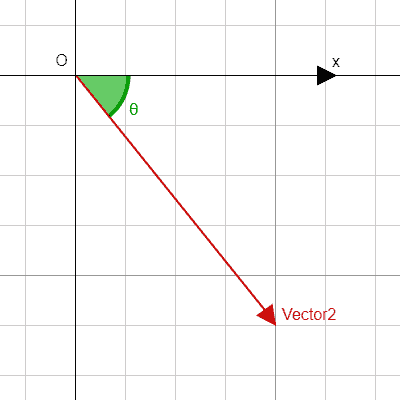
Equivalent to the result of @GlobalScope.atan2 when called with the vector's y and x as parameters: atan2(y, x).
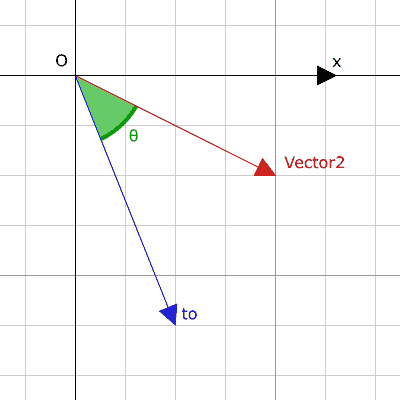
const func angle_to(to: Vector2) -> float#
Returns the signed angle to the given vector, in radians.
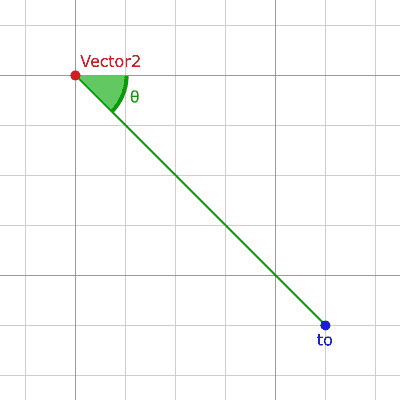
const func angle_to_point(to: Vector2) -> float#
Returns the angle between the line connecting the two points and the X axis, in radians.
a.angle_to_point(b) is equivalent of doing (b - a).angle().
const func bezier_derivative(t: float) -> Vector2#
Returns the derivative at the given t on the Bézier curve defined by this vector and the given control_1, control_2, and end points.
const func bezier_interpolate(t: float) -> Vector2#
Returns the point at the given t on the Bézier curve defined by this vector and the given control_1, control_2, and end points.
const func bounce(n: Vector2) -> Vector2#
Returns the vector "bounced off" from a line defined by the given normal n perpendicular to the line.
Note: bounce performs the operation that most engines and frameworks call [code skip-lint]reflect().
const func ceil() -> Vector2#
Returns a new vector with all components rounded up (towards positive infinity).
const func clamp(max: Vector2) -> Vector2#
Returns a new vector with all components clamped between the components of min and max, by running @GlobalScope.clamp on each component.
const func clampf(max: float) -> Vector2#
Returns a new vector with all components clamped between min and max, by running @GlobalScope.clamp on each component.
const func cross(with: Vector2) -> float#
Returns the 2D analog of the cross product for this vector and with.
This is the signed area of the parallelogram formed by the two vectors. If the second vector is clockwise from the first vector, then the cross product is the positive area. If counter-clockwise, the cross product is the negative area. If the two vectors are parallel this returns zero, making it useful for testing if two vectors are parallel.
Note: Cross product is not defined in 2D mathematically. This method embeds the 2D vectors in the XY plane of 3D space and uses their cross product's Z component as the analog.
const func cubic_interpolate(weight: float) -> Vector2#
Performs a cubic interpolation between this vector and b using pre_a and post_b as handles, and returns the result at position weight. weight is on the range of 0.0 to 1.0, representing the amount of interpolation.
const func cubic_interpolate_in_time(post_b_t: float) -> Vector2#
Performs a cubic interpolation between this vector and b using pre_a and post_b as handles, and returns the result at position weight. weight is on the range of 0.0 to 1.0, representing the amount of interpolation.
It can perform smoother interpolation than cubic_interpolate by the time values.
const func direction_to(to: Vector2) -> Vector2#
Returns the normalized vector pointing from this vector to to. This is equivalent to using (b - a).normalized().
const func distance_squared_to(to: Vector2) -> float#
Returns the squared distance between this vector and to.
This method runs faster than distance_to, so prefer it if you need to compare vectors or need the squared distance for some formula.
const func distance_to(to: Vector2) -> float#
Returns the distance between this vector and to.
const func dot(with: Vector2) -> float#
Returns the dot product of this vector and with. This can be used to compare the angle between two vectors. For example, this can be used to determine whether an enemy is facing the player.
The dot product will be 0 for a right angle (90 degrees), greater than 0 for angles narrower than 90 degrees and lower than 0 for angles wider than 90 degrees.
When using unit (normalized) vectors, the result will always be between -1.0 (180 degree angle) when the vectors are facing opposite directions, and 1.0 (0 degree angle) when the vectors are aligned.
Note: a.dot(b) is equivalent to b.dot(a).
const func floor() -> Vector2#
Returns a new vector with all components rounded down (towards negative infinity).
static func from_angle(angle: float) -> Vector2#
Creates a unit Vector2 rotated to the given angle in radians. This is equivalent to doing Vector2(cos(angle), sin(angle)) or Vector2.RIGHT.rotated(angle).
print(Vector2.from_angle(0)) # Prints (1.0, 0.0)
print(Vector2(1, 0).angle()) # Prints 0.0, which is the angle used above.
print(Vector2.from_angle(PI / 2)) # Prints (0.0, 1.0)
const func is_equal_approx(to: Vector2) -> bool#
Returns true if this vector and to are approximately equal, by running @GlobalScope.is_equal_approx on each component.
const func is_finite() -> bool#
Returns true if this vector is finite, by calling @GlobalScope.is_finite on each component.
const func is_normalized() -> bool#
Returns true if the vector is normalized, i.e. its length is approximately equal to 1.
const func is_zero_approx() -> bool#
Returns true if this vector's values are approximately zero, by running @GlobalScope.is_zero_approx on each component.
This method is faster than using is_equal_approx with one value as a zero vector.
const func length() -> float#
Returns the length (magnitude) of this vector.
const func length_squared() -> float#
Returns the squared length (squared magnitude) of this vector.
This method runs faster than length, so prefer it if you need to compare vectors or need the squared distance for some formula.
const func lerp(weight: float) -> Vector2#
Returns the result of the linear interpolation between this vector and to by amount weight. weight is on the range of 0.0 to 1.0, representing the amount of interpolation.
const func limit_length(length: float = 1.0) -> Vector2#
Returns the vector with a maximum length by limiting its length to length. If the vector is non-finite, the result is undefined.
const func max(with: Vector2) -> Vector2#
Returns the component-wise maximum of this and with, equivalent to Vector2(maxf(x, with.x), maxf(y, with.y)).
const func max_axis_index() -> int#
Returns the axis of the vector's highest value. See AXIS_* constants. If all components are equal, this method returns AXIS_X.
const func maxf(with: float) -> Vector2#
Returns the component-wise maximum of this and with, equivalent to Vector2(maxf(x, with), maxf(y, with)).
const func min(with: Vector2) -> Vector2#
Returns the component-wise minimum of this and with, equivalent to Vector2(minf(x, with.x), minf(y, with.y)).
const func min_axis_index() -> int#
Returns the axis of the vector's lowest value. See AXIS_* constants. If all components are equal, this method returns AXIS_Y.
const func minf(with: float) -> Vector2#
Returns the component-wise minimum of this and with, equivalent to Vector2(minf(x, with), minf(y, with)).
const func move_toward(delta: float) -> Vector2#
Returns a new vector moved toward to by the fixed delta amount. Will not go past the final value.
const func normalized() -> Vector2#
Returns the result of scaling the vector to unit length. Equivalent to v / v.length(). Returns (0, 0) if v.length() == 0. See also is_normalized.
Note: This function may return incorrect values if the input vector length is near zero.
const func orthogonal() -> Vector2#
Returns a perpendicular vector rotated 90 degrees counter-clockwise compared to the original, with the same length.
const func posmod(mod: float) -> Vector2#
Returns a vector composed of the @GlobalScope.fposmod of this vector's components and mod.
const func posmodv(modv: Vector2) -> Vector2#
Returns a vector composed of the @GlobalScope.fposmod of this vector's components and modv's components.
const func project(b: Vector2) -> Vector2#
Returns a new vector resulting from projecting this vector onto the given vector b. The resulting new vector is parallel to b. See also slide.
Note: If the vector b is a zero vector, the components of the resulting new vector will be @GDScript.NAN.
const func reflect(line: Vector2) -> Vector2#
Returns the result of reflecting the vector from a line defined by the given direction vector line.
Note: reflect differs from what other engines and frameworks call [code skip-lint]reflect(). In other engines, [code skip-lint]reflect() takes a normal direction which is a direction perpendicular to the line. In Godot, you specify the direction of the line directly. See also bounce which does what most engines call [code skip-lint]reflect().
const func rotated(angle: float) -> Vector2#
Returns the result of rotating this vector by angle (in radians). See also @GlobalScope.deg_to_rad.
const func round() -> Vector2#
Returns a new vector with all components rounded to the nearest integer, with halfway cases rounded away from zero.
const func sign() -> Vector2#
Returns a new vector with each component set to 1.0 if it's positive, -1.0 if it's negative, and 0.0 if it's zero. The result is identical to calling @GlobalScope.sign on each component.
const func slerp(weight: float) -> Vector2#
Returns the result of spherical linear interpolation between this vector and to, by amount weight. weight is on the range of 0.0 to 1.0, representing the amount of interpolation.
This method also handles interpolating the lengths if the input vectors have different lengths. For the special case of one or both input vectors having zero length, this method behaves like lerp.
const func slide(n: Vector2) -> Vector2#
Returns a new vector resulting from sliding this vector along a line with normal n. The resulting new vector is perpendicular to n, and is equivalent to this vector minus its projection on n. See also project.
Note: The vector n must be normalized. See also normalized.
const func snapped(step: Vector2) -> Vector2#
Returns a new vector with each component snapped to the nearest multiple of the corresponding component in step. This can also be used to round the components to an arbitrary number of decimals.
const func snappedf(step: float) -> Vector2#
Returns a new vector with each component snapped to the nearest multiple of step. This can also be used to round the components to an arbitrary number of decimals.
Annotations #
Constants #
const AXIS_X = 0 enum Axis#
Enumerated value for the X axis. Returned by max_axis_index and min_axis_index.
const AXIS_Y = 1 enum Axis#
Enumerated value for the Y axis. Returned by max_axis_index and min_axis_index.
const ZERO = Vector2(0, 0)#
Zero vector, a vector with all components set to 0.
const ONE = Vector2(1, 1)#
One vector, a vector with all components set to 1.
const INF = Vector2(inf, inf)#
Infinity vector, a vector with all components set to @GDScript.INF.
const LEFT = Vector2(-1, 0)#
Left unit vector. Represents the direction of left.
const RIGHT = Vector2(1, 0)#
Right unit vector. Represents the direction of right.
const UP = Vector2(0, -1)#
Up unit vector. Y is down in 2D, so this vector points -Y.
const DOWN = Vector2(0, 1)#
Down unit vector. Y is down in 2D, so this vector points +Y.
Constructors #
Vector2() -> Vector2 #
Constructs a default-initialized Vector2 with all components set to 0.
Vector2(from: Vector2) -> Vector2 #
Constructs a Vector2 as a copy of the given Vector2.
Vector2(from: Vector2i) -> Vector2 #
Constructs a new Vector2 from Vector2i.
Vector2(y: float) -> Vector2 #
Constructs a new Vector2 from the given x and y.
Enums #
Axis#
enum Axis {
	AXIS_X = 0,
	AXIS_Y = 1,
} Notifications#
enum {
	ZERO = Vector2(0, 0),
	ONE = Vector2(1, 1),
	INF = Vector2(inf, inf),
	LEFT = Vector2(-1, 0),
	RIGHT = Vector2(1, 0),
	UP = Vector2(0, -1),
	DOWN = Vector2(0, 1),
}
Operators #
Vector2 != Vector2 -> bool#
Returns true if the vectors are not equal.
Note: Due to floating-point precision errors, consider using is_equal_approx instead, which is more reliable.
Note: Vectors with @GDScript.NAN elements don't behave the same as other vectors. Therefore, the results from this operator may not be accurate if NaNs are included.
Vector2 * Transform2D -> Vector2#
Inversely transforms (multiplies) the Vector2 by the given Transform2D transformation matrix, under the assumption that the transformation basis is orthonormal (i.e. rotation/reflection is fine, scaling/skew is not).
vector * transform is equivalent to transform.inverse() * vector. See Transform2D.inverse.
For transforming by inverse of an affine transformation (e.g. with scaling) transform.affine_inverse() * vector can be used instead. See Transform2D.affine_inverse.
Vector2 * Vector2 -> Vector2#
Multiplies each component of the Vector2 by the components of the given Vector2.
print(Vector2(10, 20) * Vector2(3, 4)) # Prints (30.0, 80.0)Vector2 * float -> Vector2#
Multiplies each component of the Vector2 by the given float.
Vector2 * int -> Vector2#
Multiplies each component of the Vector2 by the given int.
Vector2 + Vector2 -> Vector2#
Adds each component of the Vector2 by the components of the given Vector2.
print(Vector2(10, 20) + Vector2(3, 4)) # Prints (13.0, 24.0)Vector2 - Vector2 -> Vector2#
Subtracts each component of the Vector2 by the components of the given Vector2.
print(Vector2(10, 20) - Vector2(3, 4)) # Prints (7.0, 16.0)Vector2 / Vector2 -> Vector2#
Divides each component of the Vector2 by the components of the given Vector2.
print(Vector2(10, 20) / Vector2(2, 5)) # Prints (5.0, 4.0)Vector2 / float -> Vector2#
Divides each component of the Vector2 by the given float.
Vector2 / int -> Vector2#
Divides each component of the Vector2 by the given int.
Vector2 < Vector2 -> bool#
Compares two Vector2 vectors by first checking if the X value of the left vector is less than the X value of the right vector. If the X values are exactly equal, then it repeats this check with the Y values of the two vectors. This operator is useful for sorting vectors.
Note: Vectors with @GDScript.NAN elements don't behave the same as other vectors. Therefore, the results from this operator may not be accurate if NaNs are included.
Vector2 <= Vector2 -> bool#
Compares two Vector2 vectors by first checking if the X value of the left vector is less than or equal to the X value of the right vector. If the X values are exactly equal, then it repeats this check with the Y values of the two vectors. This operator is useful for sorting vectors.
Note: Vectors with @GDScript.NAN elements don't behave the same as other vectors. Therefore, the results from this operator may not be accurate if NaNs are included.
Vector2 == Vector2 -> bool#
Returns true if the vectors are exactly equal.
Note: Due to floating-point precision errors, consider using is_equal_approx instead, which is more reliable.
Note: Vectors with @GDScript.NAN elements don't behave the same as other vectors. Therefore, the results from this operator may not be accurate if NaNs are included.
Vector2 > Vector2 -> bool#
Compares two Vector2 vectors by first checking if the X value of the left vector is greater than the X value of the right vector. If the X values are exactly equal, then it repeats this check with the Y values of the two vectors. This operator is useful for sorting vectors.
Note: Vectors with @GDScript.NAN elements don't behave the same as other vectors. Therefore, the results from this operator may not be accurate if NaNs are included.
Vector2 >= Vector2 -> bool#
Compares two Vector2 vectors by first checking if the X value of the left vector is greater than or equal to the X value of the right vector. If the X values are exactly equal, then it repeats this check with the Y values of the two vectors. This operator is useful for sorting vectors.
Note: Vectors with @GDScript.NAN elements don't behave the same as other vectors. Therefore, the results from this operator may not be accurate if NaNs are included.
Vector2[int] -> float#
Access vector components using their index. v0 is equivalent to v.x, and v1 is equivalent to v.y.
+Vector2 -> Vector2#
Returns the same value as if the + was not there. Unary + does nothing, but sometimes it can make your code more readable.
-Vector2 -> Vector2#
Returns the negative value of the Vector2. This is the same as writing Vector2(-v.x, -v.y). This operation flips the direction of the vector while keeping the same magnitude. With floats, the number zero can be either positive or negative.